

Product guide
Free expert advisor for MetaTrader 5: generate, backtest and download your own
 Tommy J.Founder, RoboticEA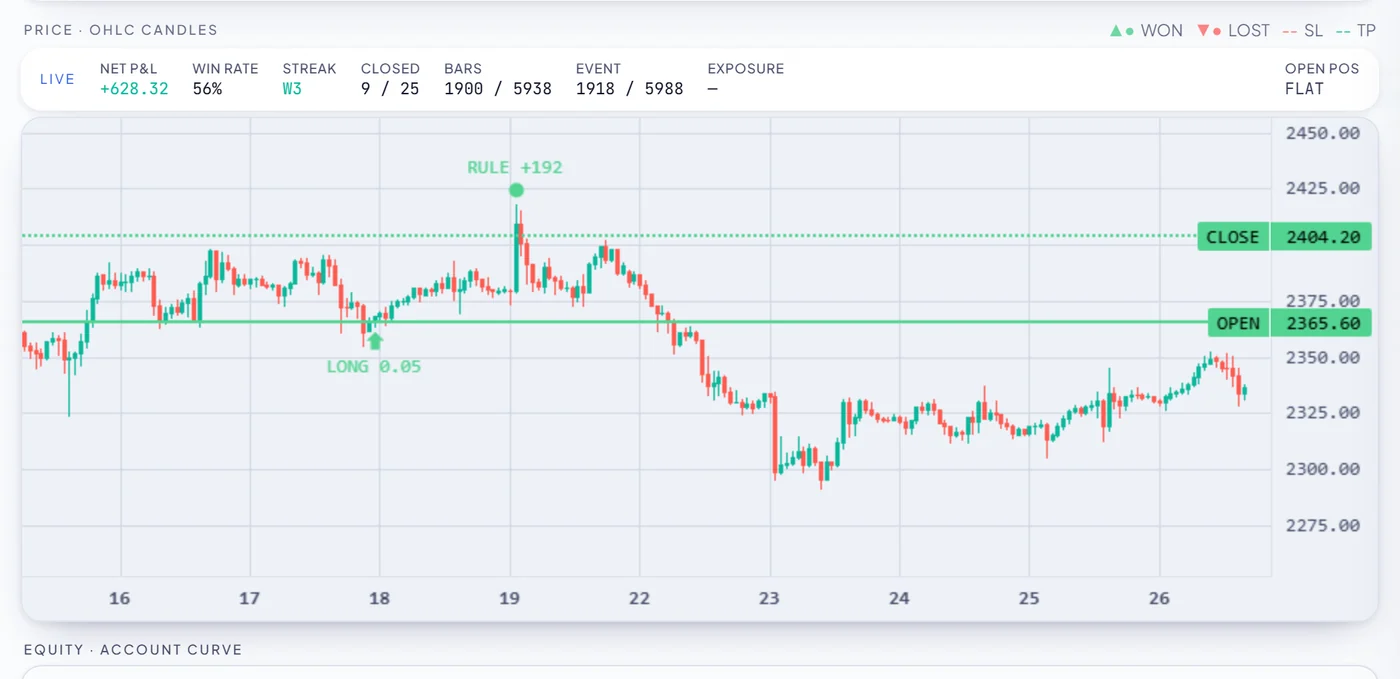
Search for a free expert advisor and the results are almost all the same page: a smooth equity curve, a broker link, and a compiled file with no way to check any of it. This is the other version. RoboticEA gives every new account a one-time grant of 250 tokens with no card required, and MetaTrader 5 export is included on the free tier — so you generate the strategy, backtest it on real market data, validate it year by year, read the MQL5 source, and download the .mq5 yourself. No coding required at any step.
The short answer
.mq5 text you can open and read before it goes near an account. What no free EA can give you — and no paid one either — is a guarantee it makes money: of 4,129 gold strategies we backtested across 8 full years, zero were profitable in every year. So the question worth asking is not where to download a free EA. It is what evidence arrives with it.The offer, stated plainly
What a free RoboticEA account actually gives you
Work in RoboticEA is metered in tokens — one unit of engine compute. A new account is granted 250 of them once, and that grant is the whole free tier: there is no card, no trial clock and no separate export fee.
250
tokens on signing up, one time, no card
One token per new backtest and one per validation-year. That is 250 backtests, or 5 full batches of 50 strategies, or 31 complete 8-year validations — and MetaTrader 5 export costs nothing on any plan. The grant is one-time and does not refresh.
| Action | Tokens | What the 250 covers |
|---|---|---|
| One new backtesta single strategy over a single window | 1 | 250 runs |
| A Compose batch of 5050 fresh strategies, each backtested | 50 | 5 batches |
| Per-year validation, 8 yearsone independent backtest per year | 8 | 31 validations |
| Re-running or replaying a result you already havehistory, replay, opening an old run | 0 | always free |
| Exporting to MetaTrader 5generate, gate and download the .mq5 | 0 | always free |
The last row is the one that matters for this page. Export is not a paid upgrade and it is not metered: once a run exists, the expert advisor it produces is yours as many times as you want it. That is a deliberate choice about where the product should charge — for engine compute, not for the file at the end of it.
The path
From nothing to an .mq5 file
Five steps, and none of them involves writing code. The order matters more than it looks: the validation step is deliberately before the export step, because an expert advisor you have not seen fail is an expert advisor you know nothing about.
- Create the account. An email address and a password — no card, no billing details. Confirm the email and the 250-token grant is there.
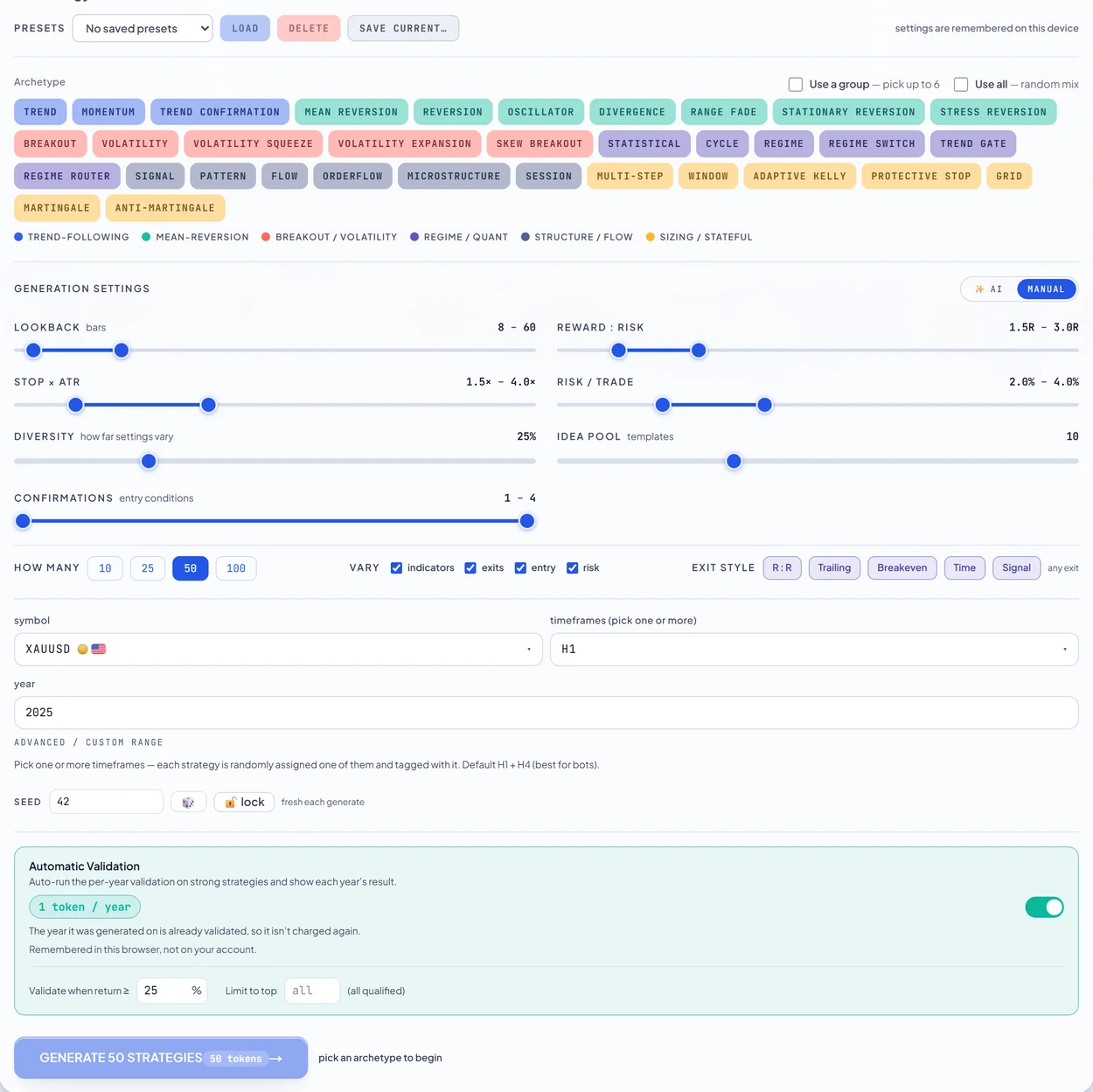
- Compose a batch. Pick a direction from 34 strategy archetypes, choose an instrument and timeframe, and set a few ranges — lookback, reward-to-risk, stop distance in ATR, risk per trade. One click invents a batch of distinct strategies, backtests every one on real market data as they land, and ranks them as they finish. You are configuring a generator, not writing anything.
- Validate the survivors year by year. Each year is re-run as its own independent backtest, and the result is a grid of returns and drawdowns with the losing years left in. One good window is not evidence; our gold study exists mostly to show how much a chosen window can flatter a strategy.
- Read the source, then download it. Preview source & install guide shows the complete generated MQL5 with the compile-gate badge before anything reaches your disk.
- Install it in MetaTrader 5 and test it there too. The
.mq5goes into the terminal’sMQL5/Expertsfolder, compiles once in MetaEditor, and then belongs to you — attach it to a chart or run it in MetaTrader 5’s own Strategy Tester on your broker’s data. The install is screenshotted step by step here.
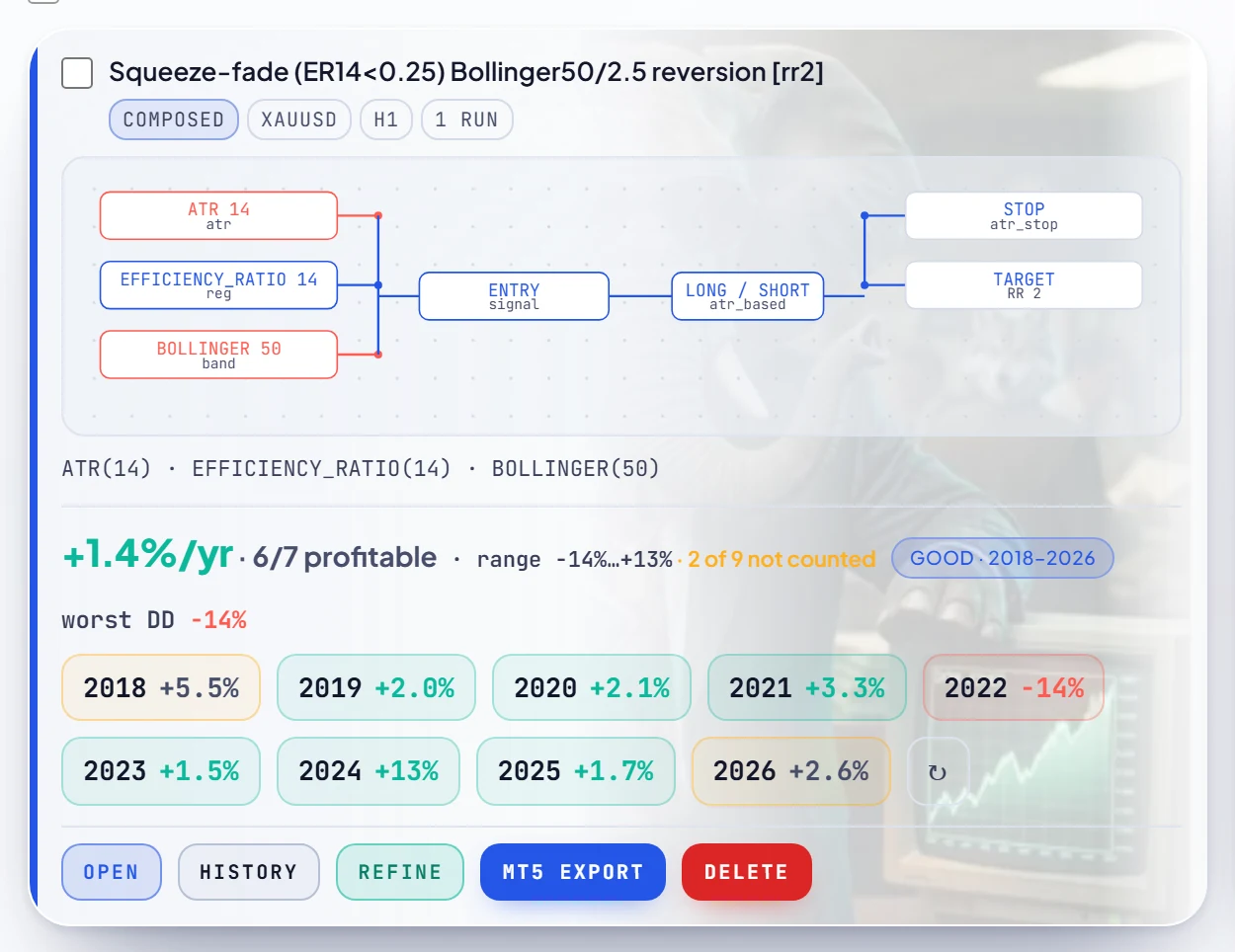
Step three is the one worth slowing down for, because it is what the rest of this post is arguing for. Every strategy you keep carries its own year-by-year record on the card — the mean per year, how many years were profitable, the range, the worst drawdown, and a coloured chip per year with the losses in red:
Watch it trade before you trust it
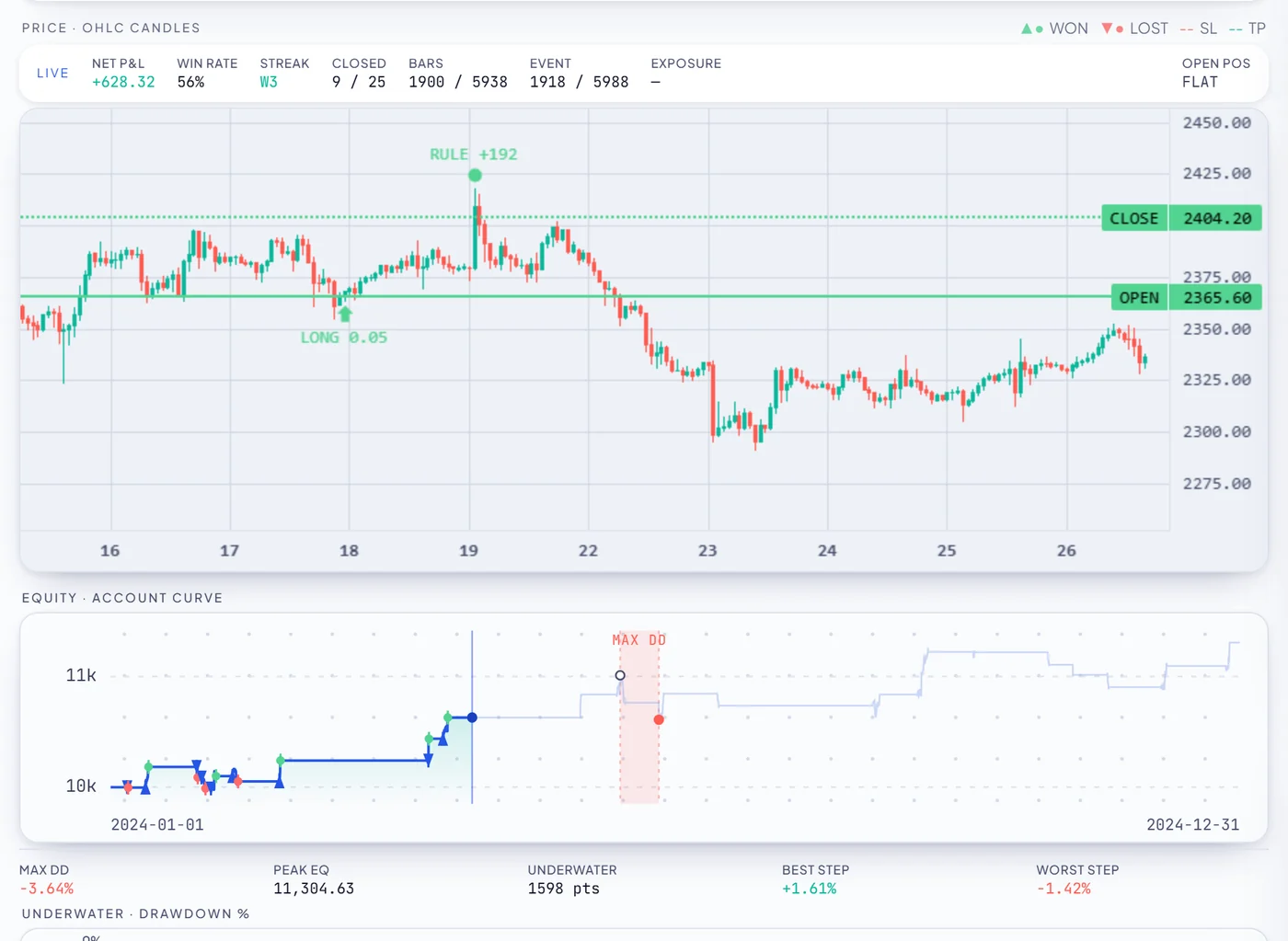
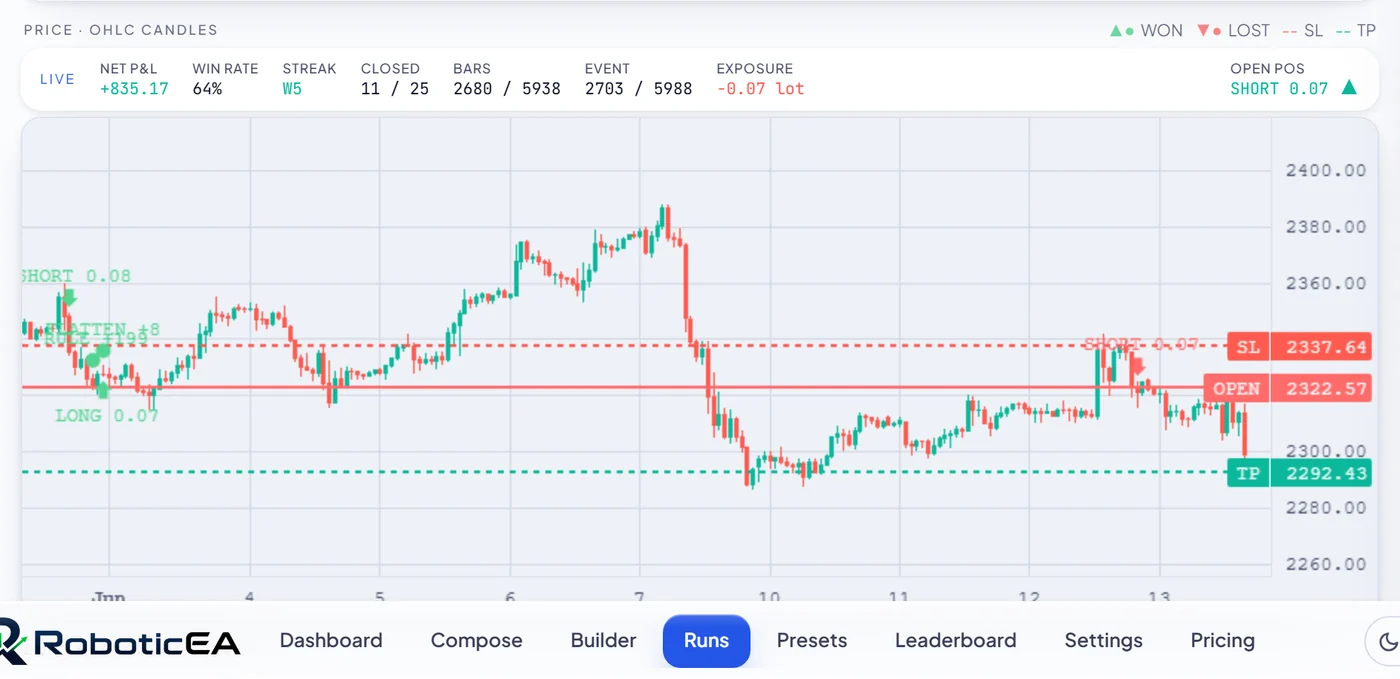
A grid of yearly numbers still does not tell you how a strategy behaves. Trade replay runs the actual backtest back at you bar by bar on real candles: entries and exits marked, stop and target lines drawn, the equity curve building underneath, and live read-outs for net P&L, win rate, streak and open position that update as it goes.
Step five is not a formality. Our own engine and MetaTrader 5’s tester agree closely on real tick data — that is the entire subject of the parity study — but your broker’s feed, spread, commission and swap are not the ones the backtest used, so the numbers will differ. Running it in MetaTrader 5 first is how you find out by how much, on your own account, before any money is involved.
The file
What is actually in the file
This is where a free EA is usually opaque, so here is ours in full. What downloads is a single .mq5 — MQL5 source text, not a compiled .ex5, and not a zip of things you have to assemble. There are no third-party includes to chase: the only include is MetaTrader’s own standard trade library, and every indicator the strategy uses is implemented inside the file, which is why it behaves the same on any terminal.
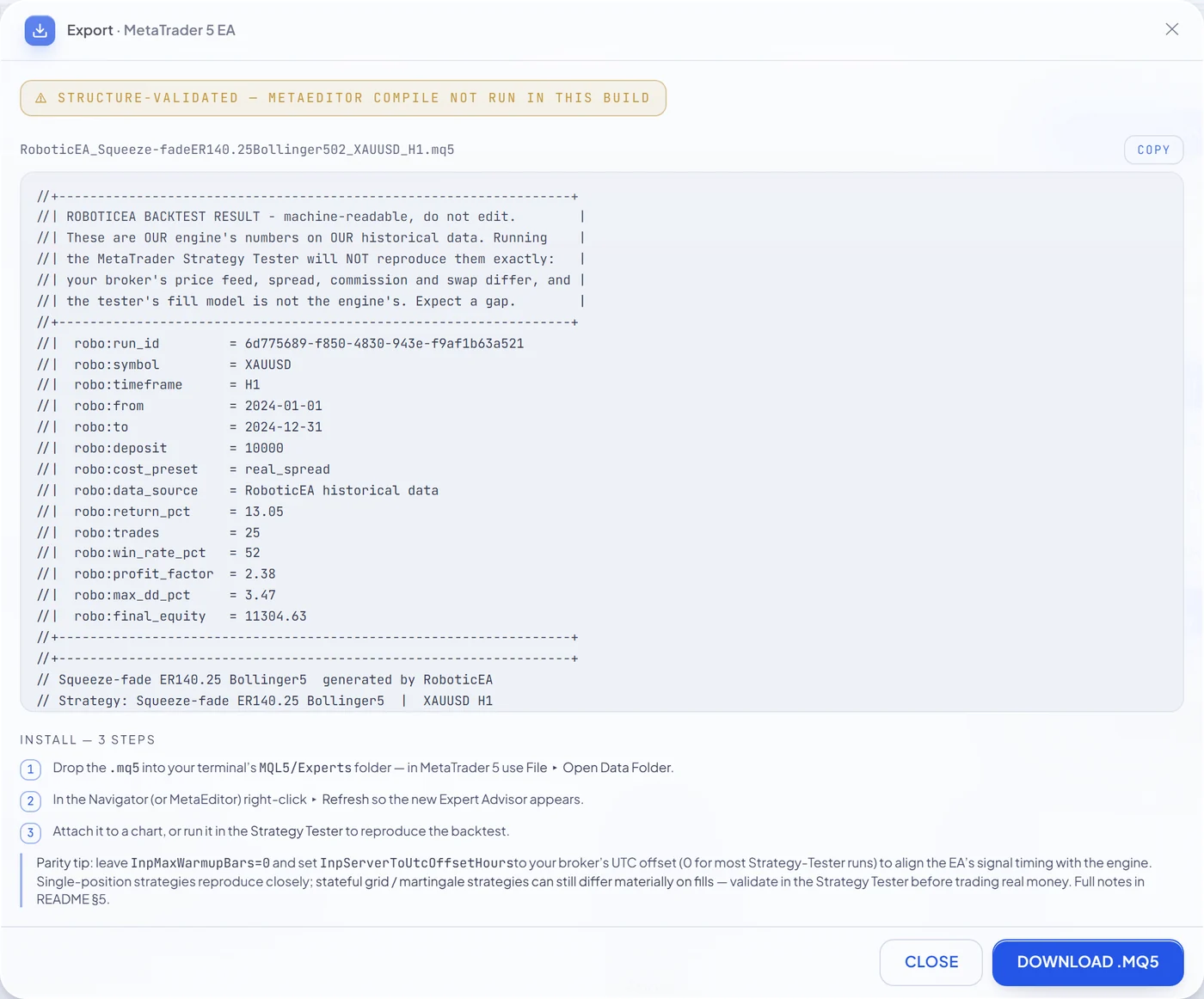
The file opens with a provenance header rather than a sales pitch. It records the run id, the symbol, the timeframe, the exact window, the starting deposit, the cost preset the backtest charged, and the result the engine produced — and then states outright that MetaTrader 5’s Strategy Tester will not reproduce those figures exactly, because your feed and fills are not ours. A number you can trace to the run that produced it is worth more than a number in a screenshot.
Named inputs, not magic constants
Every parameter is an MQL5 input carrying a plain-English label, which means it appears on the Inputs tab of MetaTrader 5’s own properties dialog and can be changed there without touching a line of logic: risk per trade, the ATR stop multiple, the reward-to-risk target, the maximum spread it will enter through, the rollover blackout, and the flatten-before-weekend rule the backtest also applied.
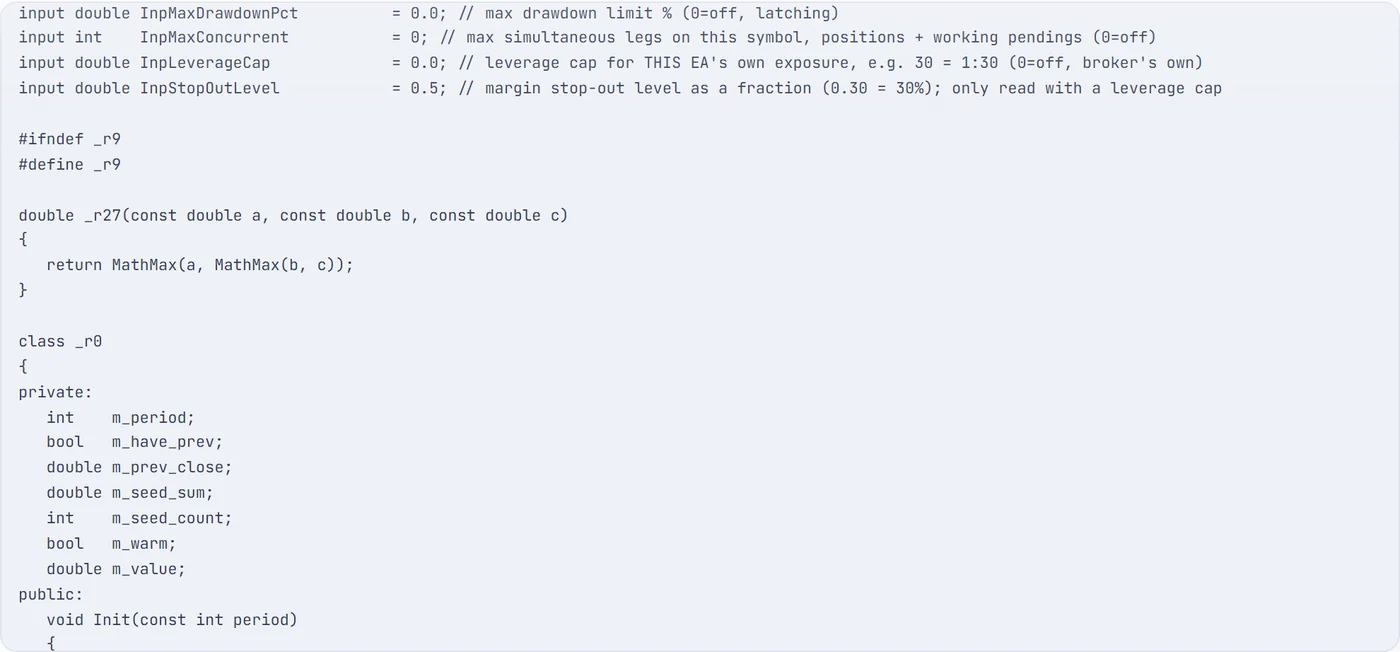
And the part a marketing page would leave out, visible in that same screenshot: the internal machinery is deliberately renamed. Our framework’s classes and helpers are emitted as _r0, _r11 and so on, and comments inside the body are stripped — the inputs and their labels are the exception, because those are what MetaEditor shows you. What you get is real, formatted, indented MQL5 you can read, audit, change and compile. What you do not get is a hand-commented tutorial or a promise that our internals are legible. Anyone claiming otherwise about a generated EA is describing something else.
The account-level protections travel with it. If flatten before weekend and avoid daily rollover were on for the backtest, they are exported as InpFlattenBeforeWeekend and InpAvoidRollover — because an EA that ignores a rule the backtest applied is not the thing you tested.
The compile gate, described honestly
Generated code that does not compile is worse than no code, so nothing is handed over untested. The gate is layered, and the badge in the preview names which layer decided:
- A structural validator always runs. It checks that braces and brackets balance, that the three MQL5 lifecycle handlers are present, that every
Inp*identifier used is actually declared as an input, that the required order layer is included, and that the EA calls none of MetaTrader’s built-in indicator functions — the maths is bundled in the file so the EA computes what our engine computed, rather than something similar. - A real headless MetaEditor compile runs where the deployment has MetaEditor available, and any compiler error rejects the file outright.
- Today, on our web tier, it is the validator that decides. The MetaEditor toolchain is not installed there, so the badge reads structure-validated — MetaEditor compile not run in this build in amber rather than claiming a green tick it has not earned. That is why the screenshot above is amber. The validator catches the defects code generation can plausibly produce; only the compiler proves a file compiles, and the badge is careful about which of the two you are looking at.
Either way the rule is the same: a generated EA that fails its gate is never returned — the request fails instead of handing you a broken file. Compiling it yourself is one keypress in MetaEditor and takes a second, and it is step two of the install guide for exactly this reason.
One more thing happens before your first download on a device: a risk notice you have to read and accept. It is a deliberate ten-second pause on the one action that can put generated code in front of real money.
Generate your own expert advisor now
250 tokens on signing up, no card. MetaTrader 5 export included, readable .mq5 source, previewable before download.
The limits
What the free tier does not include
A free-EA page that only lists what you get is doing the thing this post is complaining about. So, precisely: the grant is one-time. It does not refresh monthly, because a free account has no billing cycle to refresh against. When it is spent, generating more work needs a plan.
250
tokens, once
100
saved strategies
50
strategies per batch
$0
and no card
Four things are genuinely not on the free tier, and it is better to know now than to find out:
- Editing a strategy’s logic. On free you run what the generator invented, as it was invented, and you can read its schematic and every metric — but changing its indicators, thresholds, symbol, year, cost model or risk is paid. Export is not affected: you can export a free-tier strategy exactly as it was tested.
- AI generation and AI tuning. Having a model read a sentence and set every dial for you is paid. Free accounts move the same dials by hand, feeding the same generator.
- The variation refiner. Breeding perturbed copies of a strategy and battery-testing all of them against a robustness invariant is paid.
- Running the preset library. Free accounts can browse the roughly 20,000 named presets and inspect what is inside each one, but running them is paid; free strategies come from Compose.
Generating, backtesting, per-year validation, automatic validation, trade replay and MetaTrader 5 export are all included, out of the one pool of tokens. If you outgrow the grant, the entry plan is starter — $49 / mo, with 20,000 tokens that do refresh each month. Full pricing is here.
The honest part
“Free and profitable” is the claim to distrust
Being free is not the problem with most free expert advisors. Being unverifiable is. And the reason the distinction matters is that automated strategies fail far more often than the download pages suggest — which is measurable, so we measured it.
We generated 4,129 strategies and backtested each one on gold, independently on every one of the 8 full years from 2018 to 2025, charging gold’s real recorded per-bar spread inside the simulation. That is 33,032 yearly backtests on one engine build.
0
profitable in all 8 years
-42.0%
median year
14.1%
of years positive
-56.8%
median max drawdown
Not one of 4,129 cleared every year. The median year lost -42.0% with a worst-case drawdown of -56.8%, and only 14.1% of all yearly results were positive. Those are general-purpose strategies pointed at gold rather than strategies tuned on it — which is exactly what happens when you attach a downloaded EA to XAUUSD.
65 → 0
strategies with a perfect 8-year record, with the spread off and then on
Re-run the identical 33,032 backtests with no trading costs and 65 strategies appear with a flawless 8-year record. Charge the real recorded spread on the same runs and there are none. Nothing about the strategies changed — only what the simulation charged them.
That is the mechanism behind most impressive free-EA curves, and it does not require anybody to lie. Understating the spread as a flat pip made 2,784 of our backtests (8.4%) profitable that were not profitable with real costs. Removing friction altogether flipped 7,920 (24.0%). The window helps too: in 2018 only 6.5% of these strategies made money, against 30.6% in 2025. Same strategies, same engine, different years chosen.
None of that says automated trading cannot work, and it is not an argument for paying for an EA instead — a paid EA with no year-by-year record is worth exactly as little. It says a result you cannot inspect carries no information, at any price. Which is the whole reason our per-year validation is on by default and shows the red years in red.
It also says the two choices a download page never lets you make are the two that move the result most. Which timeframe the EA runs on decides how often it pays the spread, and which instrument you point it at decides how much that spread is — we have measured both: the timeframe study and the pair study. When you generate the strategy yourself, both are settings rather than someone else’s assumption.
Practical
Six questions to ask about any free EA
You do not need our software for this. Six questions, in the order that eliminates fastest — and note that a free EA answering all six is more trustworthy than a paid one answering none:
- Is it source, or a binary? A compiled
.ex5you cannot read means you are trusting the author’s backtest and nothing else. Ask for the.mq5. If the answer is no, that is the answer. - What costs were charged, in numbers? Spread in pips, commission, swap. On our data this single variable moved 24.0% of results across the profit line without changing a strategy.
- Show me every year separately. Not a compounded curve — one row per year with the losers visible. A vendor who picks the window can show you almost anything.
- How many trades per year? Under about 20 and the record is noise, however pretty the curve. Some of the most “consistent” strategies in our study were consistent only because they barely traded.
- What is the maximum drawdown, next to the return? A return quoted without the loss you would have had to sit through is not a result.
- What is being sold instead of the EA? Free usually has a price somewhere: a specific broker you must open through, a signals subscription, a “VPS licence”, or your deposit itself. Find it before you install anything.
If you would rather answer those questions about your own strategy than ask them of a stranger’s, that is the whole product — here is what is in it.
FAQ
Free EA questions, answered
Is there a genuinely free expert advisor for MetaTrader 5?
Yes. RoboticEA gives every new account a one-time grant of 250 tokens with no card required, and MetaTrader 5 export is included on the free tier at no token cost. You generate a strategy, backtest it on real market data, validate it year by year, read the generated MQL5 and download the .mq5 file. What no free EA can offer, and no paid one either, is a guarantee of profit: of 4,961 gold strategies we generated and backtested across the eight full years from 2018 to 2025, the best compounded +175% while still losing money in four of those years and drawing down -57.8%.
Are free expert advisors profitable?
Usually it cannot be shown either way, and that is the real problem. Being free is not the issue; being unverifiable is. Across 33,032 yearly gold backtests at 3% risk with real recorded spread charged, the median year lost 42.0%, only 14.1% of yearly results were positive, and the median maximum drawdown was -56.8%. Before installing any EA, free or paid, ask for a year-by-year record with real trading costs charged and the losing years left in.
Do I need to know how to code to create an expert advisor?
No. In RoboticEA you pick a direction from 34 strategy archetypes, choose an instrument and timeframe, and set ranges for lookback, reward-to-risk, stop distance in ATR and risk per trade. One click invents a batch of distinct strategies and backtests every one on real market data. The MQL5 is written for you and you can read it before you download it. Compiling it is one keypress in MetaEditor.
Do I get the source code or a compiled file?
Source. A single .mq5 text file, never a compiled .ex5, and you can read the whole thing in the app before it downloads, with a copy button. The only include is MetaTrader 5's own standard trade library, and every indicator is implemented inside the file. To be accurate about it: internal framework identifiers are deliberately renamed to short names and comments inside the body are stripped, while the header, the named inputs and their labels remain. It is real MQL5 you can read, audit, edit and compile, not a hand-commented tutorial.
How many tokens does the MetaTrader 5 export cost?
None. Export is not metered and is not a paid upgrade, so once a run exists you can export it as often as you like on any plan, including free. Tokens are charged for engine compute instead: one per new backtest and one per validation-year, so a Compose batch of 50 strategies costs 50 tokens and validating one strategy across eight years costs 8. Re-running or replaying a result you already have costs nothing.
Is the exported EA checked before I download it?
It is gated, and the app tells you which check decided. A structural validator always runs: it verifies that braces balance, that the three MQL5 lifecycle handlers are present, that every input used is declared, that the required order layer is included, and that the EA calls none of MetaTrader's built-in indicator functions so it computes what our engine computed. A real headless MetaEditor compile runs where the deployment has MetaEditor available; on our web tier it does not, so the badge says structure-validated rather than claiming a green tick. A file that fails its gate is never returned.
What can a free RoboticEA account not do?
The 250-token grant is one-time and does not refresh. Editing a generated strategy's logic, symbol, year, cost model or risk is a paid feature: on free you run what the generator invented, as it was tested. AI generation and AI tuning are paid, the variation refiner is paid, and running the roughly 20,000 library presets is paid, though you can browse them. Generating, backtesting, per-year validation, automatic validation, trade replay and MetaTrader 5 export are all included, and free accounts can keep up to 100 saved strategies.
Every study figure above comes from the same artifact as our gold post: 186,637 engine runs, build 0.2.0, seed 20260824, $10,000 per run, on real market bars. Every product figure comes from the constants the server enforces. The workflow that produces the .mq5 is documented end to end — including the MetaTrader 5 install, screenshot by screenshot.
Keep reading
What 9 years of gold EA backtests show
16,400 XAUUSD backtests on real recorded spread, and how many strategies survived every year. None did.
Do forex robots actually work?
The prior question, answered with numbers rather than a disclaimer.
Exporting a strategy to MetaTrader 5
The export step in detail, then the install and the Strategy Tester run, fully screenshotted.
Does our engine agree with MetaTrader 5?
Run for run against MetaTrader 5's own Strategy Tester on real ticks — why the exported EA behaves like the backtest.