

How it works
The complete guide
Every tool in RoboticEA, in the order you meet them, from the Compose generator that invents strategies to the MetaTrader 5 expert advisor you run on your own account. Nothing hidden: every dial, every metric, every setting.
Compose
Build & refine
Backtest & validate
Replay & export
The generator
Compose: invent a batch of strategies
Compose is where a strategy is born. You never write code: you pick a direction, set a few ranges (or let the AI set them), and one click invents a whole batch of fresh strategies, backtests every one on real market data, and ranks the winners as they land.
Choose a direction
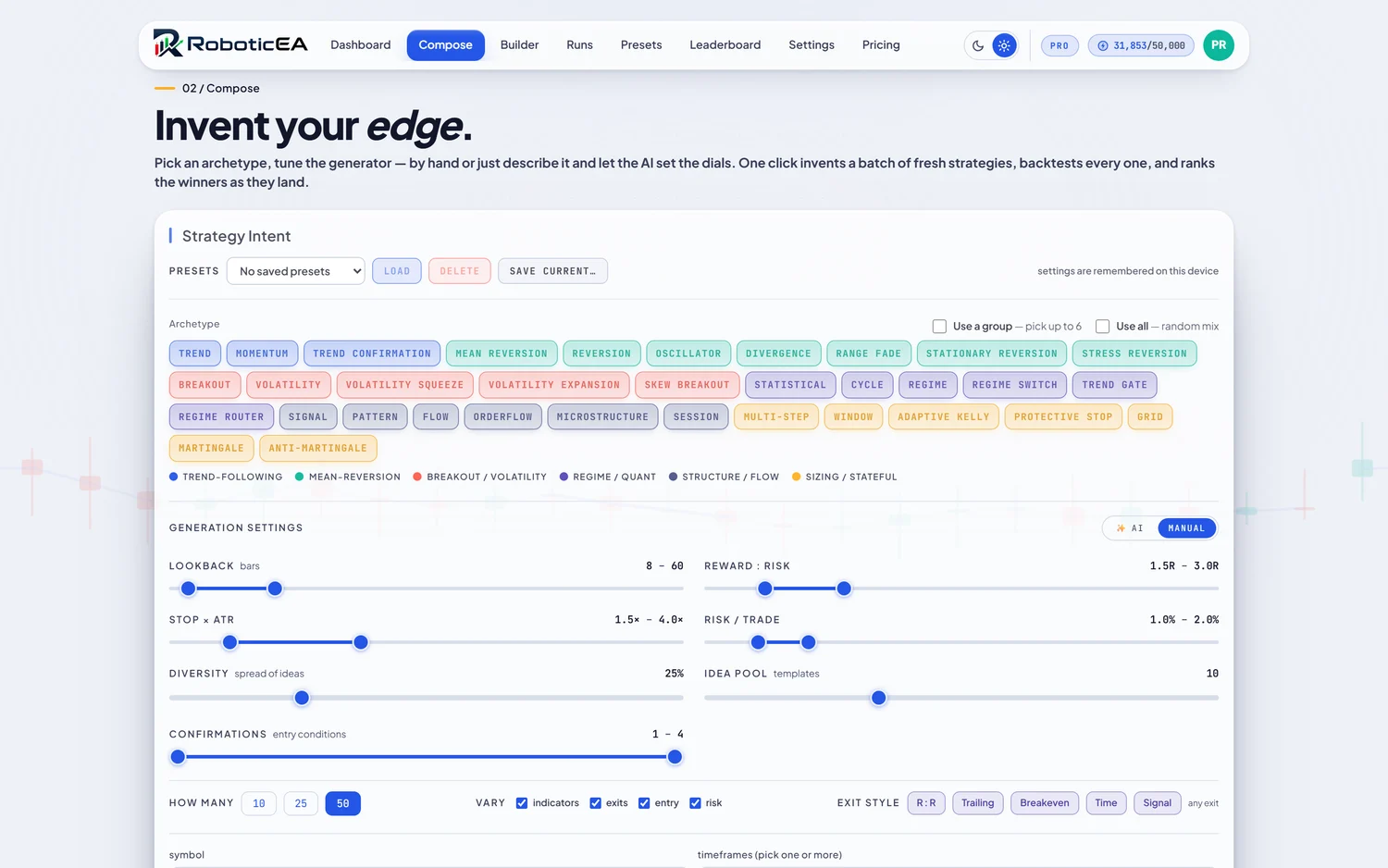
Pick from 34 archetypes across 6 families — Trend-following, Mean-reversion, Breakout / Volatility, Regime / Quant, Structure / Flow, and Sizing / Stateful. Tap a single archetype, tick Use a group to draw from a whole family (up to 6), or Use all for a random mix across everything.

Set the dials, by hand or with AI
The Generation Settings block has an AI / Manual toggle. In Manual you move the sliders yourself. In AI you type what you’re after (e.g. “aggressive scalping with wide targets”) and one LLM call maps your words onto every dial, animating the sliders to its picks. Every dial is a range, not a single value, so the generator samples across it and the batch spans fast and slow ideas rather than fifty clones.
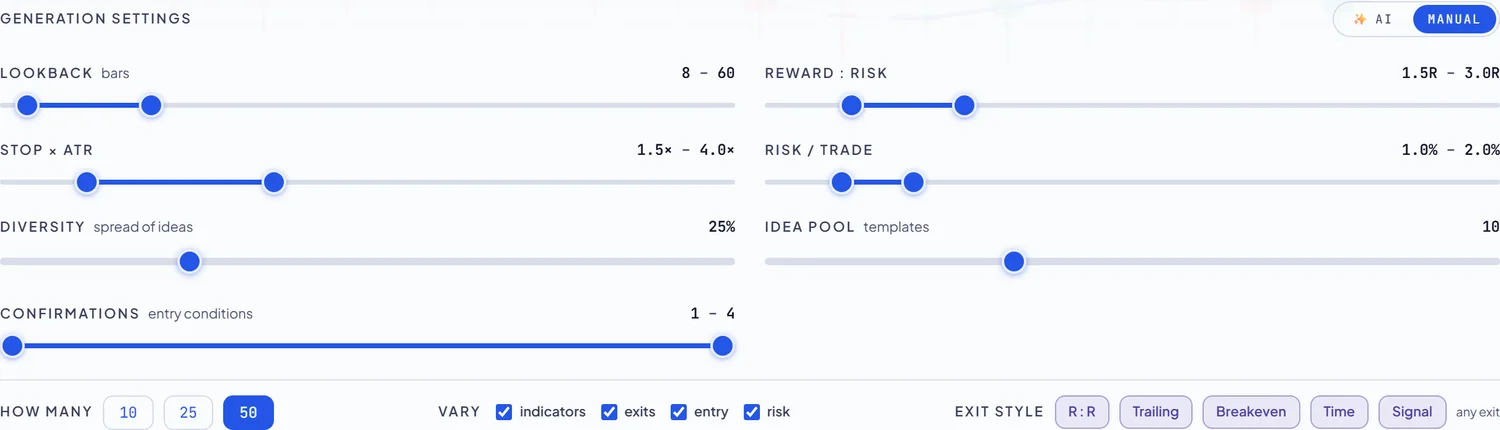
- Lookbackbars · 8–60
- How many bars indicators look back over. Shorter = twitchier and reactive; longer = smoother and slower.
- Reward : RiskR · 1.5–3.0
- Take-profit distance as a multiple of the stop. 2.0R = target twice the stop distance; higher R needs a lower win rate to break even.
- Stop × ATR× · 1.5–4.0
- Stop distance as a multiple of Average True Range, so stops scale with each instrument's volatility instead of a fixed pip count.
- Risk / trade% · 1.0–2.0
- Percentage of the account risked to the stop on each trade ($10,000 unless you change the starting balance in Settings); position size is derived from this and the ATR stop.
- Diversityspread of ideas
- How far the generator wanders from the centre of each range. Low = tightly clustered variants; high = a wide spread of distinct ideas.
- Idea pooltemplates
- How many underlying strategy templates the batch is drawn from before variation: a bigger pool means more structural variety.
- Confirmations1–4
- How many entry conditions must agree before a trade fires. More confirmations = fewer, higher-conviction entries.
Shape and generate the batch
- How many10 / 25 / 50
- Batch size: how many distinct strategies to invent and backtest in this run.
- Varyindicators · exits · entry · risk
- Which parts the generator may change between siblings. Untick a dimension to hold it fixed across the whole batch.
- Exit styleR:R · Trailing · Breakeven · Time · Signal
- The exit mechanics allowed. Leave all off for “any exit”, or restrict to, say, trailing stops only.
- Symbol & timeframes
- The instrument and one or more timeframes, on real 2020–2026 data. 25 instruments, six timeframes. Default H1 + H4 (best for bots).
- Seedre-roll · lock
- A random seed drives the batch. Re-roll for a fresh set, or lock the seed to reproduce the exact same batch every time.
- Presets
- Save the whole Compose configuration under a name to reuse (Save / Load / Delete). Settings are also remembered per device automatically.
The winners land as ranked cards
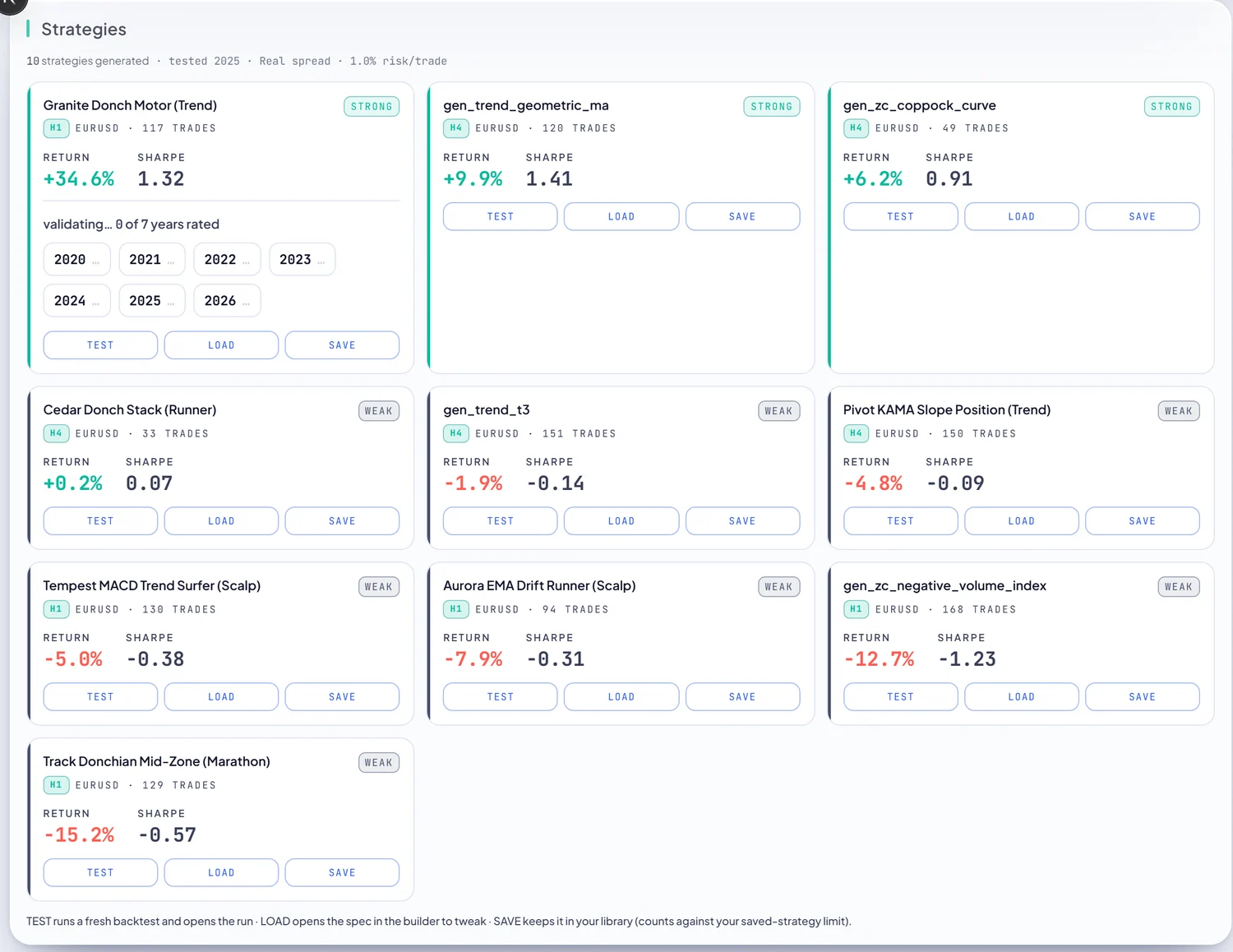
Hit generate and the batch backtests live, filling in as each strategy finishes. Every result is a card (name, symbol, trade count, return and Sharpe) badged STRONG or WEAK so the winners are obvious. From a card you can Test (a fresh backtest), Load it into the Builder, or Save it to your library. With Automatic Validation on, the strong ones start validating across every year on the spot.
Not just one lucky year
Per-year validation: did it survive every year?
Generating is only half of it. One backtest can get lucky, so RoboticEA re-runs each strategy on every year of its instrument as separate, independent, replayable backtests, and shows a year-by-year grid of return and drawdown with a positive/negative tally. With Automatic Validation on, it does this to the batch's winners the moment they land.
Automatic Validation: hands-off proof, right in the batch
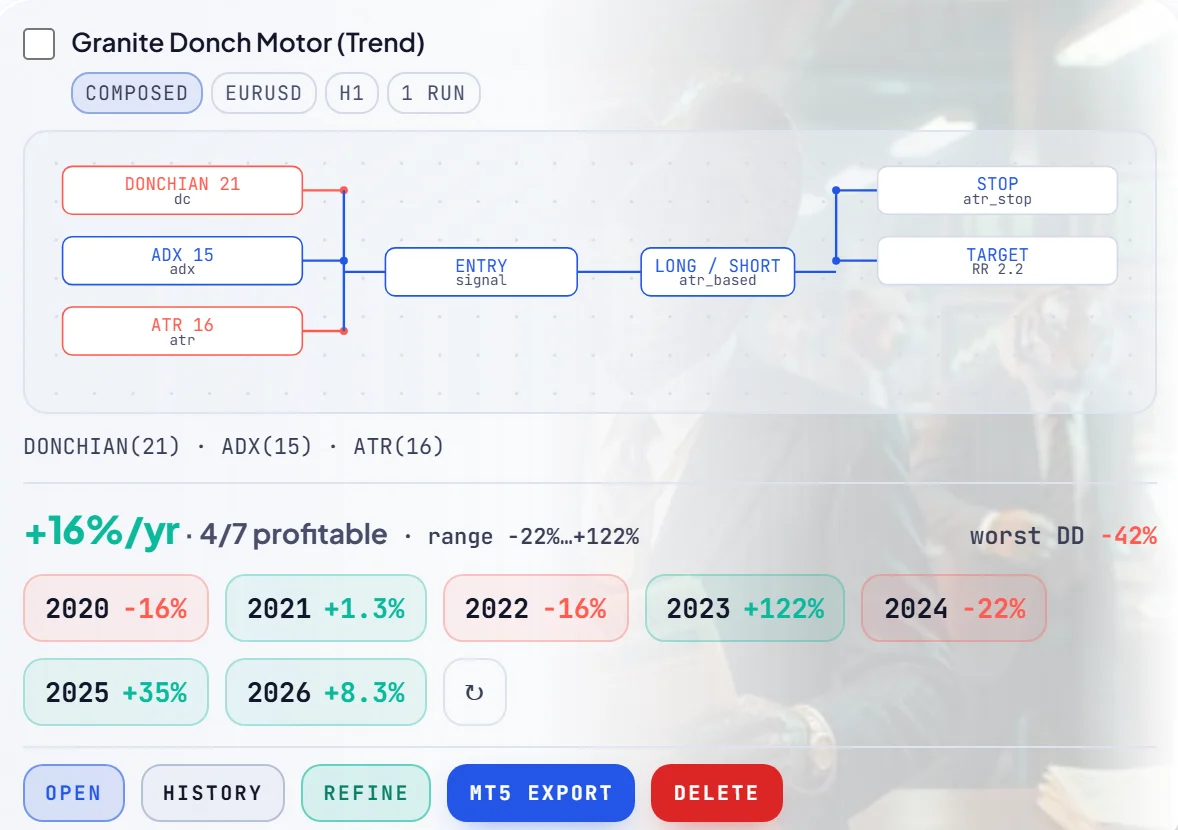
Turn Automatic Validation on in Compose, set the return threshold a strategy must clear to qualify (and, optionally, a limit to top N winners so only the best few validate), and every qualifying strategy in a batch is validated across every year the moment it lands. No extra clicks. When it finishes, the year-by-year grid appears right on the result card:

The full validated grid
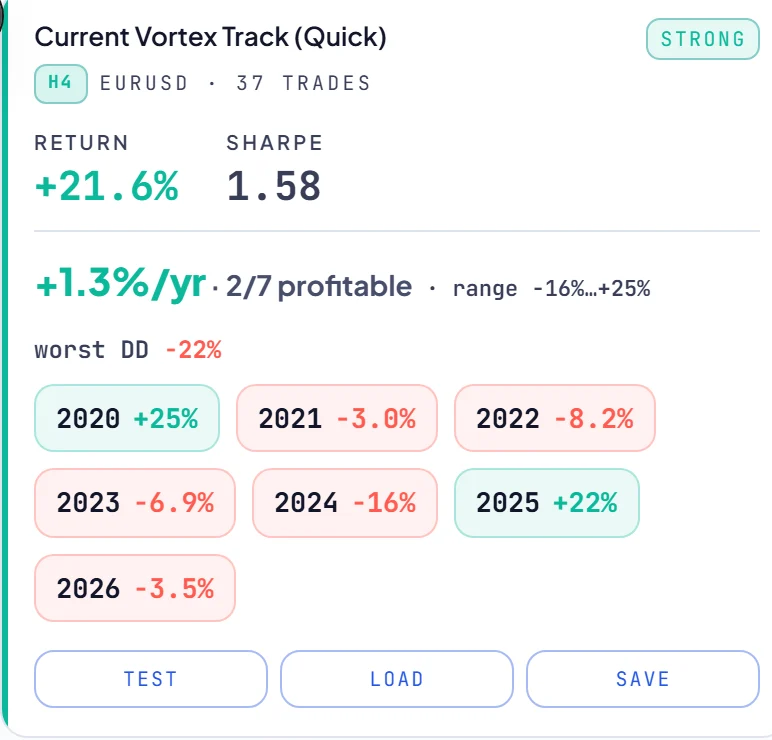
Whether it ran automatically or you fired it by hand, the result is the same year-by-year grid: the mean %/yr, a “N of 7 profitable” tally, the range and worst drawdown, and a green/red chip per year. Click any year to replay it.
- Validate
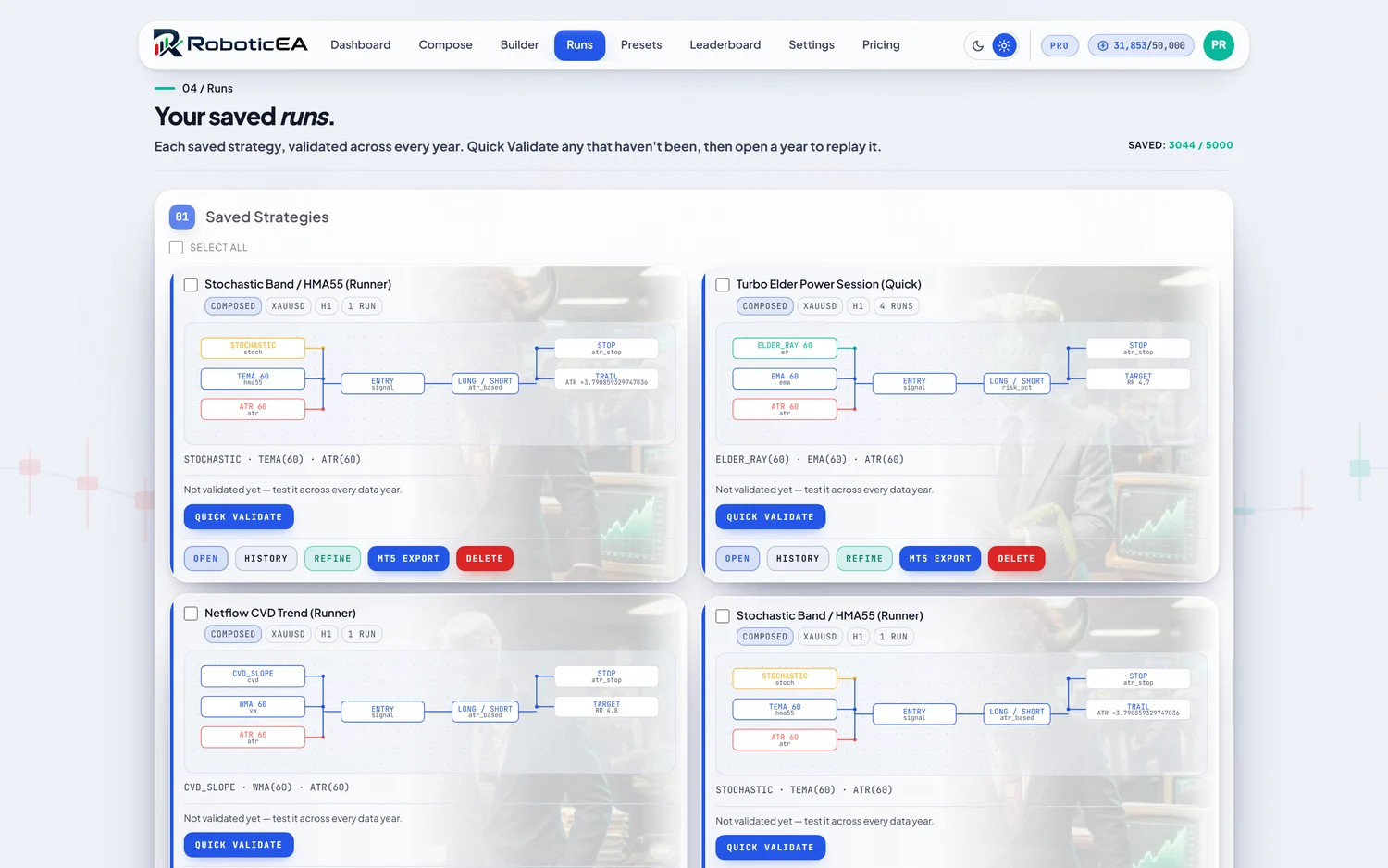
- Runs the strategy on every data year of its instrument and shows how each year performed. Click any year to watch that year's replay.
- Quick Validate
- On the saved-runs page, validate a strategy across all years in one tap without opening it.
- Automatic Validationdefault off · threshold 25%
- Turn it on in Compose and any strategy that clears your return threshold is validated across every year automatically, so survivors arrive already proven.
Read & edit
The Builder: open any strategy and change anything
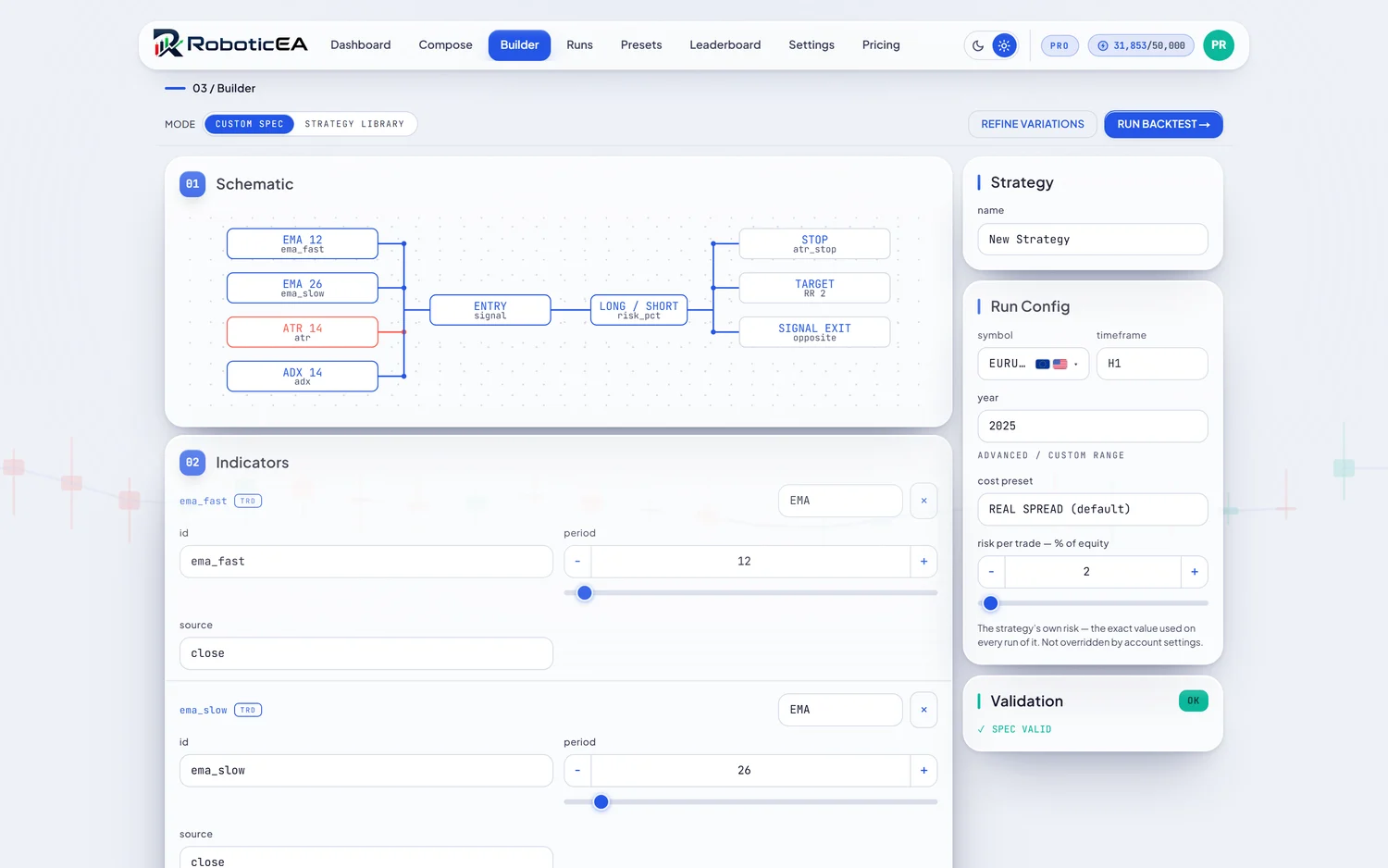
Every strategy, whether the AI invented it or you pulled it from the library, is a readable schematic, not a black box. The Builder shows the indicators, the entry, the stop, the target and the sizing as blocks you can edit by hand, and it's where you set exactly how a backtest runs.
The strategy as blocks
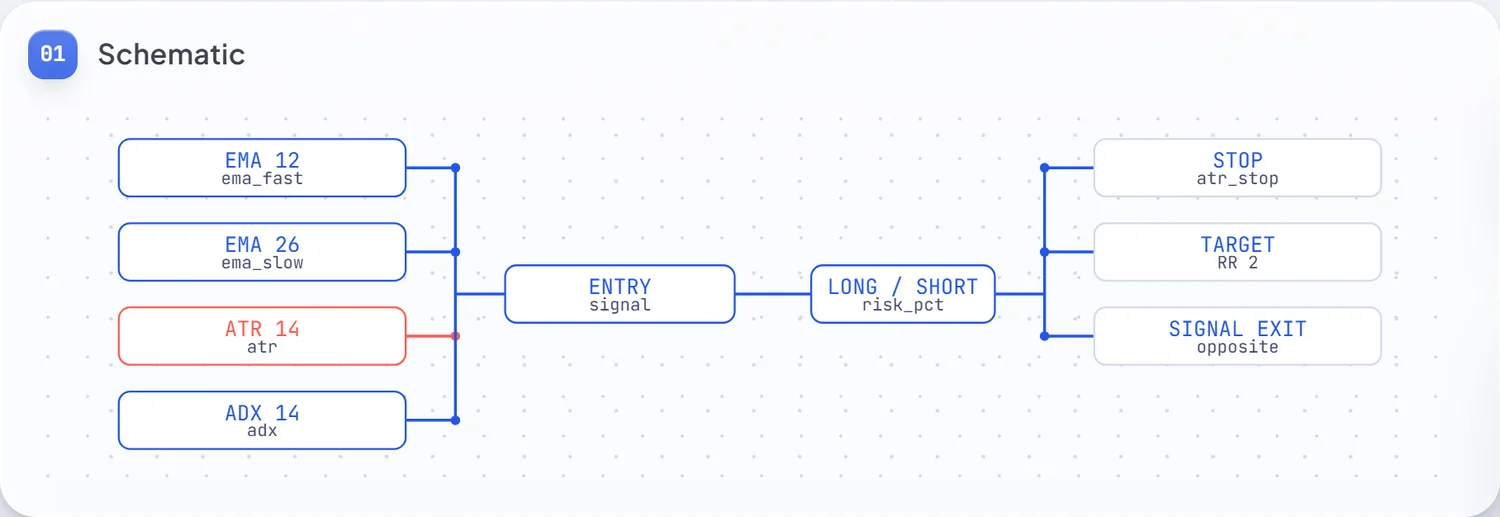
The schematic draws the whole strategy as connected blocks — indicators feed the entry, which opens a long or short, governed by a stop, a target and an optional signal-exit. It’s a live map of what the strategy actually does.
- ModeCustom spec · Strategy library
- Edit a fully custom spec, or drop in one of the ready-made library strategies as a starting point.
- Indicatorsid · type · period · source
- Each indicator is an editable block: rename its id, change its type (EMA, ATR, ADX, …), drag its period, and choose its price source.
- Symbol / timeframe / year
- What the backtest runs on. Year picks a single calendar year; Advanced / Custom Range opens an arbitrary date window.
- Cost presetReal Spread (default)
- The friction model applied to the run (see §8). Real Spread is the honest default.
- Risk per trade% of equity
- The strategy's own risk, used on every run of it. Stored on the strategy, never silently overridden by account settings.
- Validation status
- A live check that the spec is valid before you run it: a green SPEC VALID badge means it will backtest and export cleanly.
From here, Run Backtest executes the strategy, or Refine Variations opens the refiner (§6) to breed and battery-test dozens of variants.
Prove it
The backtest: every number the engine owns
A purpose-built C++ engine runs each strategy from a $10,000 account by default — change it in Settings — over real market data and reports the full metric set. Nothing is estimated after the fact — spread, commission and swap are charged inside the simulation, so the headline return is already net of friction.
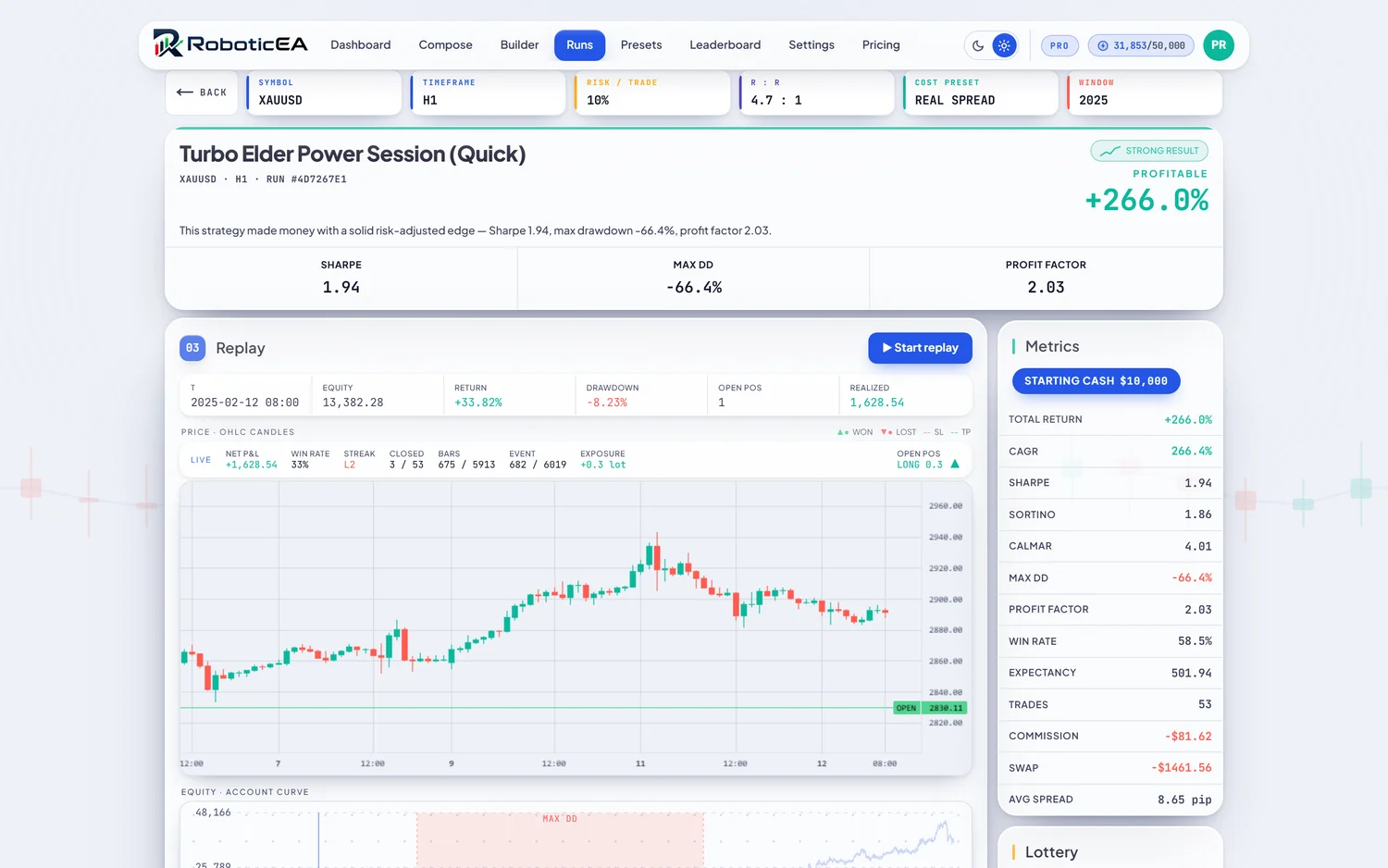
The Metrics panel reports the complete picture, all anchored to the same starting balance ($10,000 by default):

- Total Return / CAGR
- The net percentage gain over the window, and its compound annual growth rate.
- Sharpe / Sortino / Calmar
- Risk-adjusted return versus total volatility (Sharpe), downside-only volatility (Sortino), and worst drawdown (Calmar).
- Max Drawdown
- The deepest peak-to-trough equity fall: the loss you'd have had to sit through. Shown next to the return, always.
- Profit Factor
- Gross profit ÷ gross loss. Above 1.0 is profitable; the further above, the more cushion.
- Win Rate / Expectancy / Trades
- The share of winning trades, the average dollar outcome per trade, and how many round-trips: context for whether the numbers are meaningful.
- Commission / Swap / Avg Spread
- The friction actually charged: broker commission, overnight swap, and the mean spread paid per trade. Real costs, itemised.
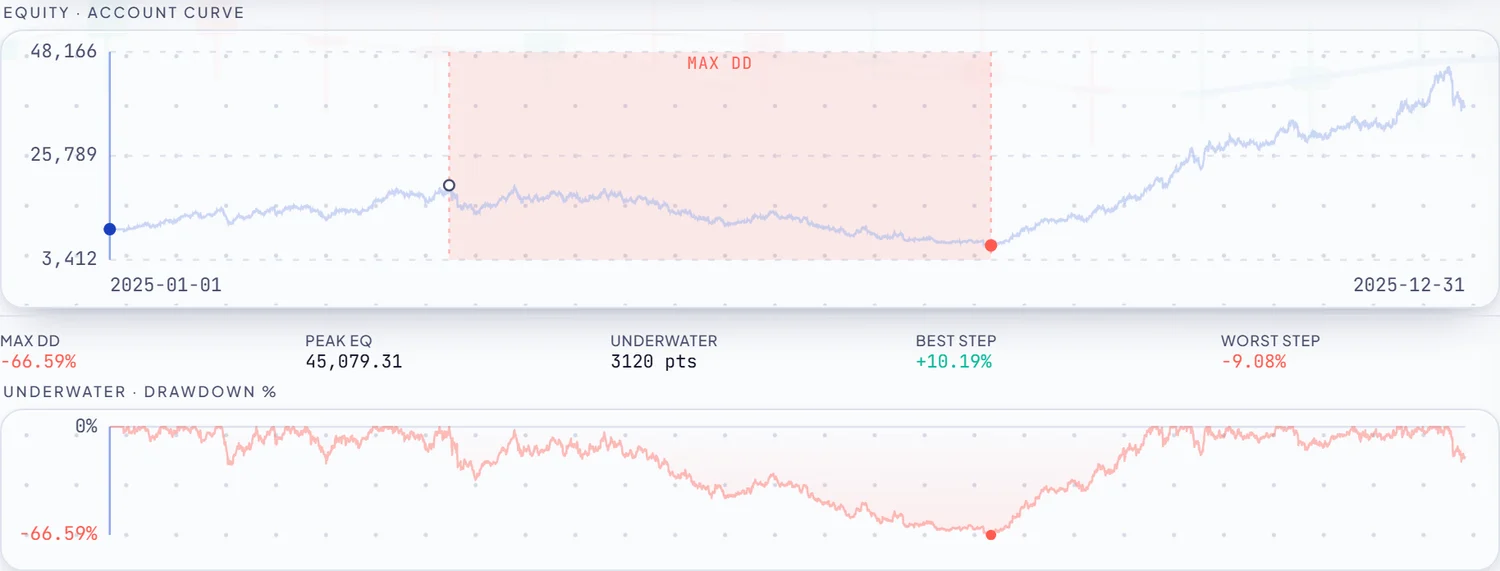
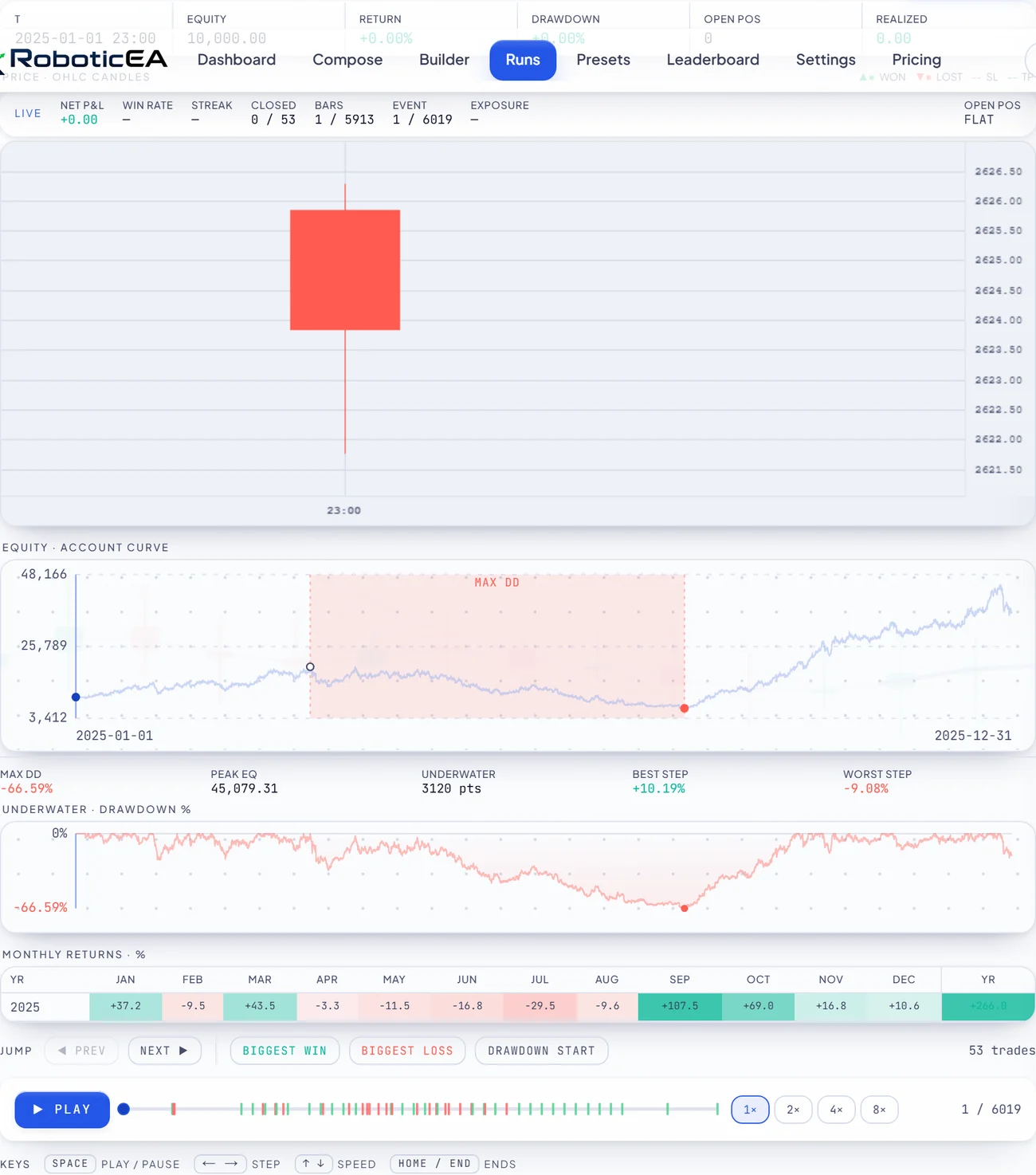
The curve and the calendar
Watch it trade
Trade replay: bar by bar, on the real chart
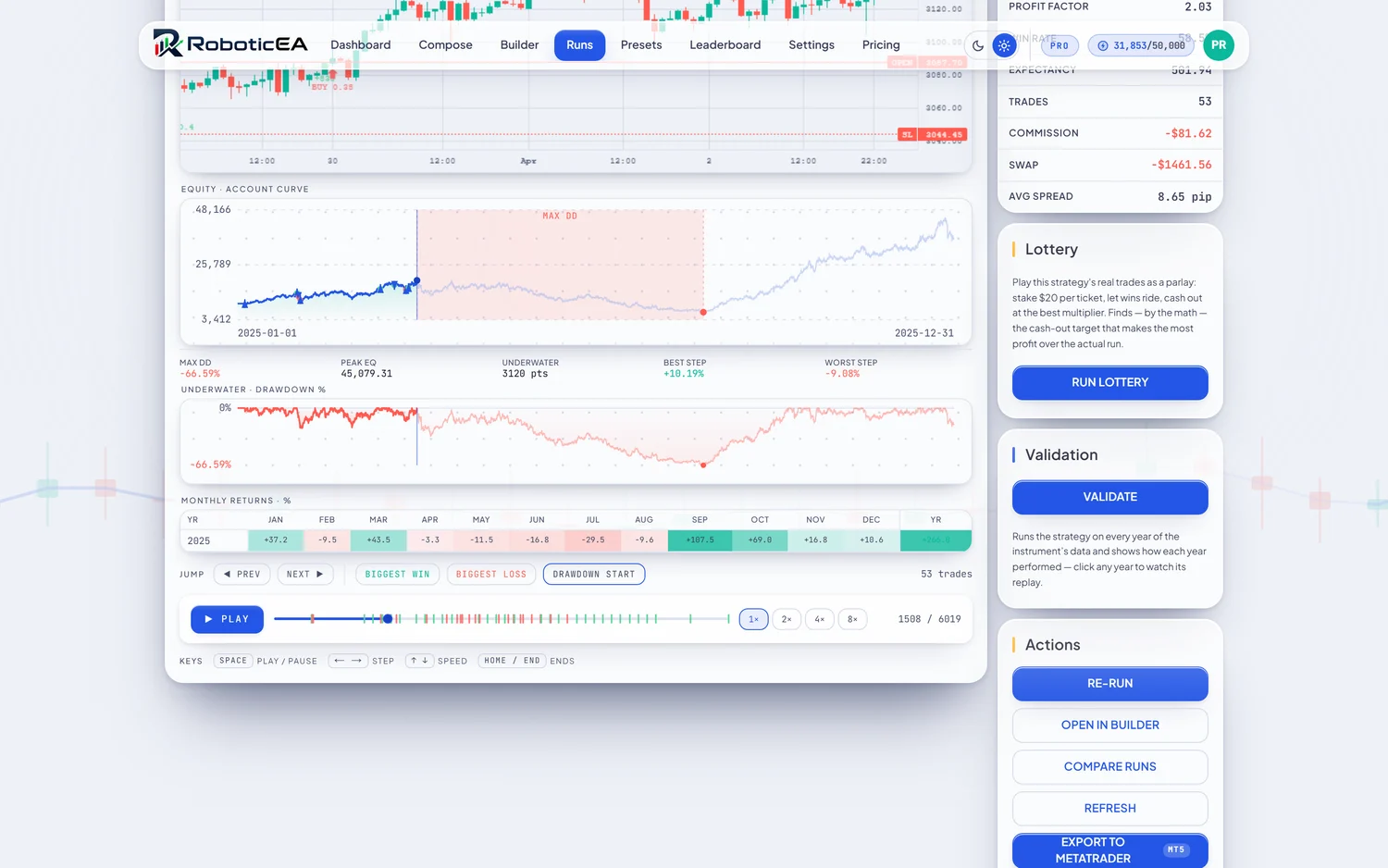
A strategy-tester-style replay of the actual run: real OHLC candles with entry and exit markers and SL/TP lines, a synced equity curve building trade by trade, and live stats that update as you scrub.
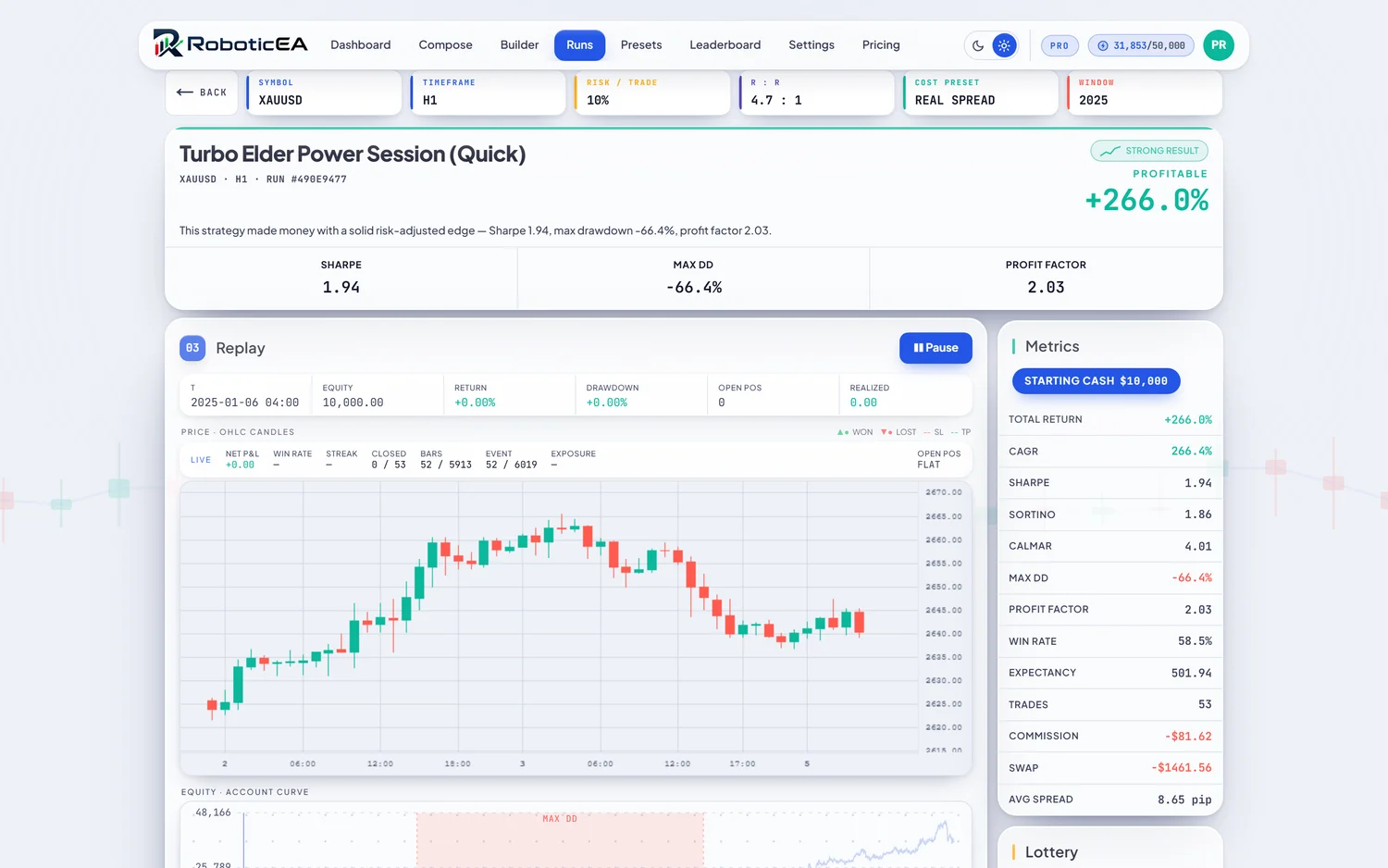

- Playback1× · 2× · 4× · 8×
- Play / pause, speed control, and single-bar stepping. Fully keyboard-driven (Space, arrows, Home / End).
- Jump-tobiggest win · biggest loss · drawdown start
- Skip straight to the moments that matter — the best and worst trades, or exactly where the worst drawdown began.
- Live read-outs
- Time, equity, return, drawdown, open position and realised P&L update as the replay runs: the behaviour, not just the summary.
Improve without breaking
The variation refiner: breed and battery-test
Take a proven strategy and spin up perturbed copies of it, then backtest every one against the same battery as the baseline. A variation is promoted only if it beats your objective AND keeps a robustness invariant — a “bigger headline” that breaks the invariant is flagged FRAGILE, not promoted.
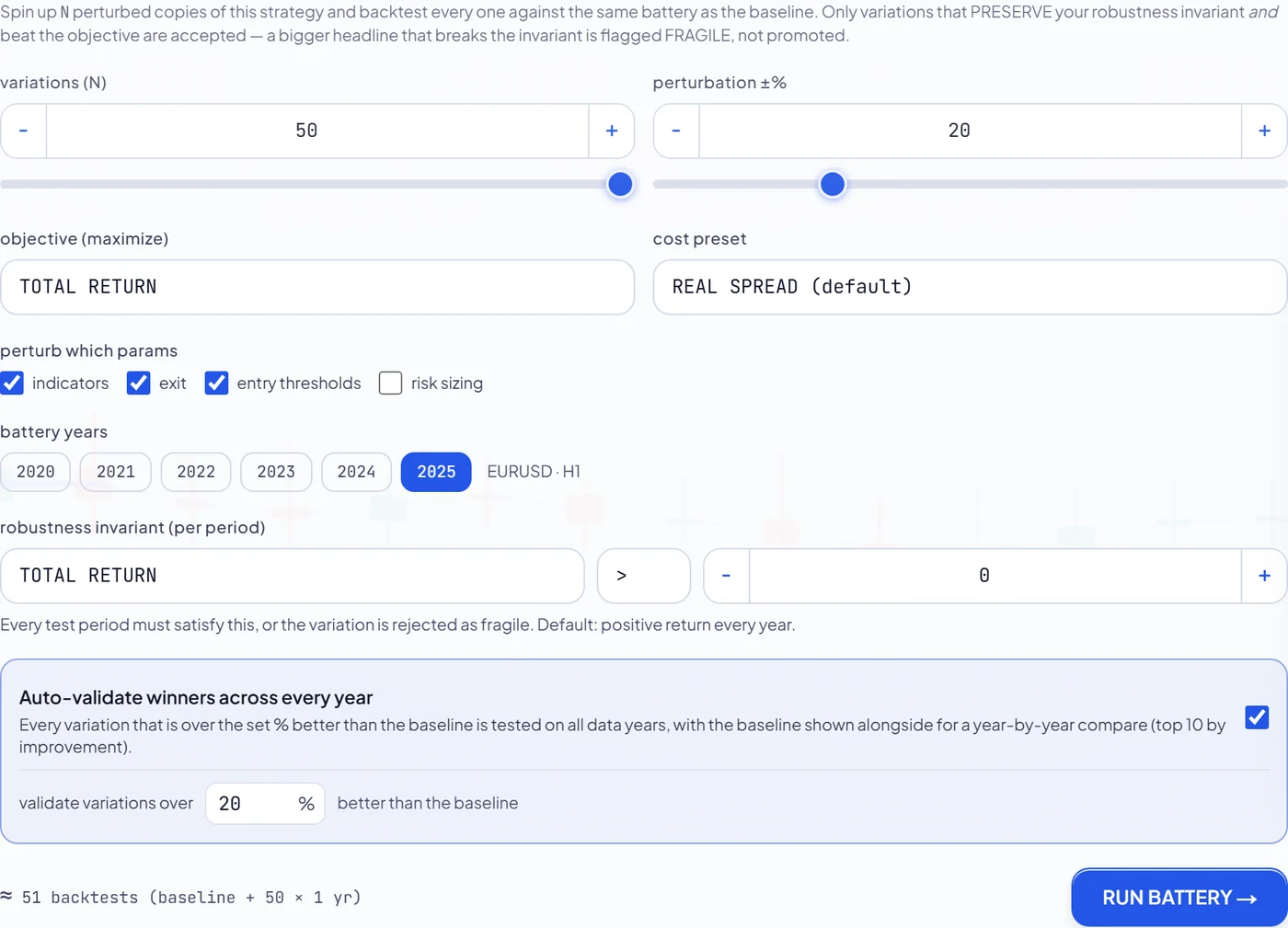
- Variations (N)1–50
- How many perturbed copies of the baseline to breed and test.
- Perturbation ±%5–60%
- How hard to nudge each chosen parameter away from the baseline value.
- Objectivemaximize
- The metric a variation must beat to be considered: Total Return, Sharpe, Calmar or Max Drawdown.
- Perturb which paramsindicators · exit · entry thresholds · risk sizing
- Which parts are allowed to change. Untick a part to hold it fixed (risk sizing is off by default).
- Battery years
- The set of years every variation is tested over, so nothing is judged on a single window.
- Robustness invariant
- A per-period rule every test window must satisfy. The default is a positive return every year. Break it and the variant is rejected as fragile.
- Auto-validate winners
- Optionally validate every variation that clears your threshold across all years, with the baseline shown alongside for a year-by-year compare.
Start from proven ground
Preset library, saved strategies & leaderboard
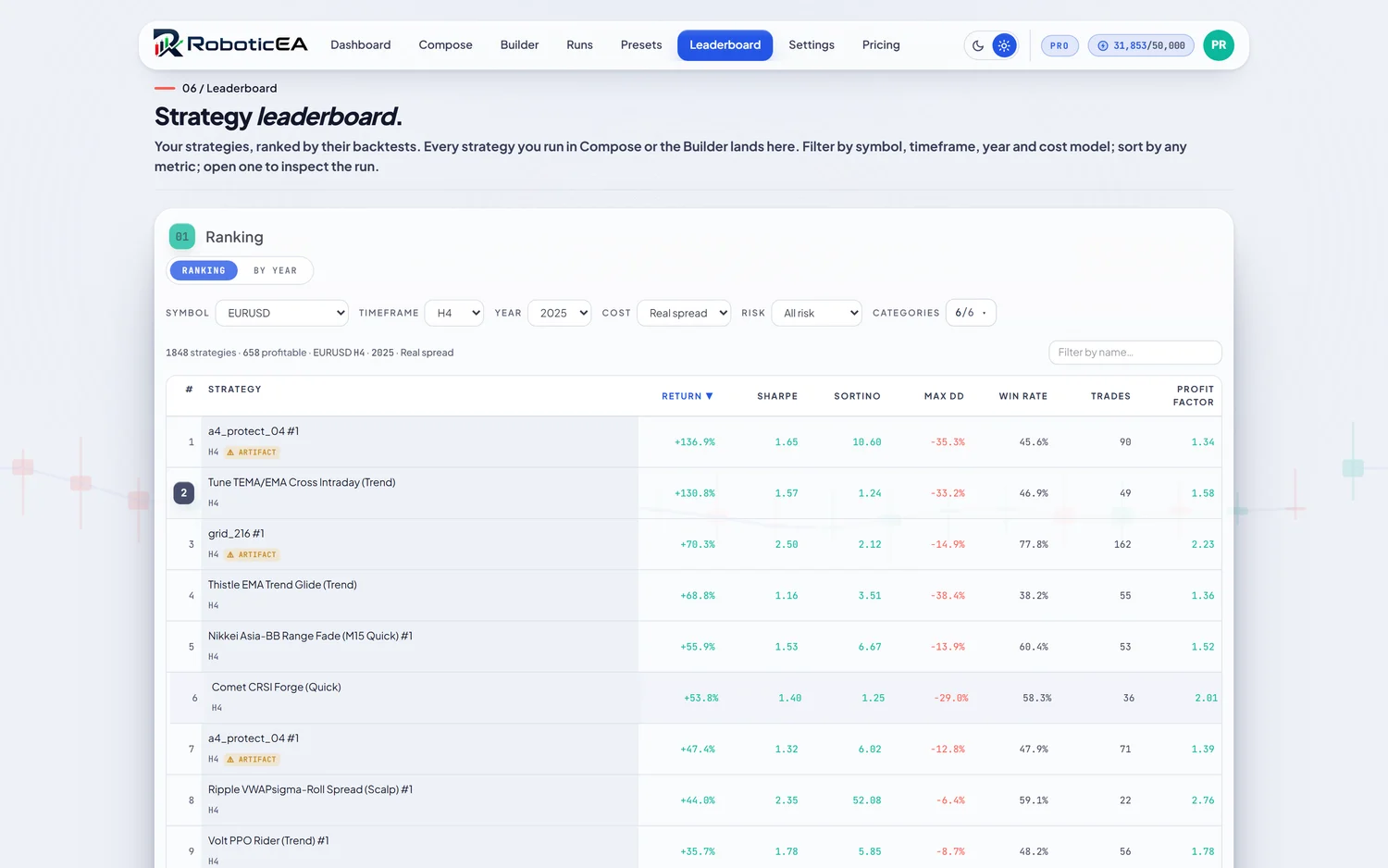
You don't have to start from a blank prompt. Browse a large library of ready-made named presets plus tunable native strategy types, each with a “what's inside” schematic; everything you keep lands in your saved strategies, and every run you make lands on a personal leaderboard.
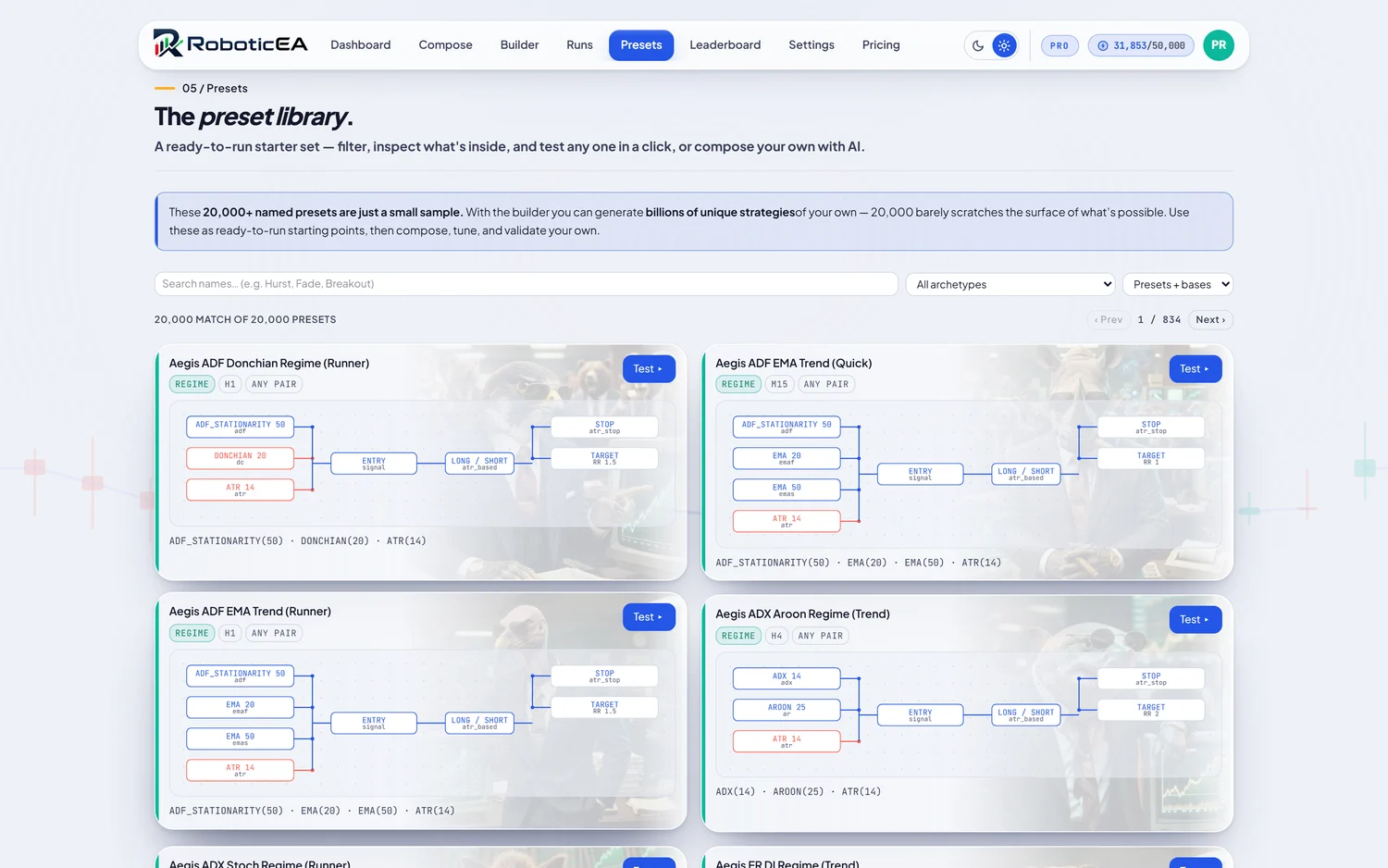
- Preset library
- Ready-made presets and native strategy types, each showing the indicators and structure inside before you run it.
- Saved strategies
- Everything you keep: each card carries its schematic, run count and validation state, with Open / History / Refine / MT5 Export / Delete and bulk select.
- Leaderboard
- Your own results, sortable and filterable, in a ranking view or a year-by-year matrix.
Honest by default
Realism, costs & trading defaults
The engine defaults to the honest case, and the knobs that change it are explicit. By default strategies trade with their natural behaviour and every run charges real friction. You opt in to idealised or bounded variants, never by accident.
Cost model
Every run carries a cost preset that decides the friction the engine charges. Real Spread is the default; the others exist for raw-account testing or frictionless debugging.
- Real Spreaddefault
- Recorded per-bar spread from real market data plus broker commission, with overnight swap always modelled. Friction lives inside the engine, not a bolted-on estimate. Required for gold & indices.
- Flat 1 pipretail
- A flat one-pip spread and no commission, a simple realistic-retail approximation.
- Raw SpreadECN
- A raw ~0.2-pip spread plus a per-lot commission, modelling a raw / ECN account.
- Zerodebug
- Frictionless: no spread, no commission. For sanity-checking a strategy's structure only, never for a realistic result.
Backtest realism
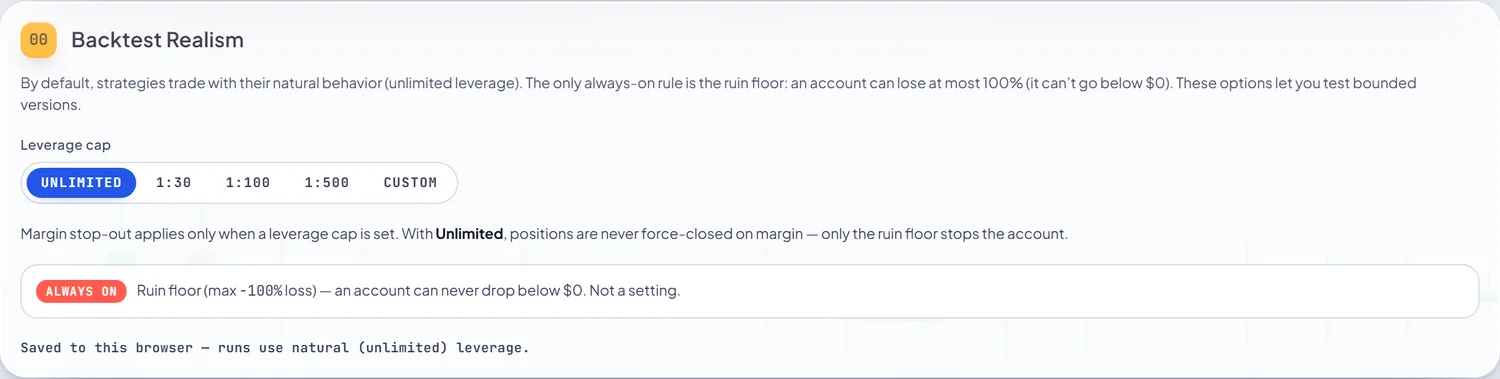
- Leverage capUnlimited · 1:30 · 1:100 · 1:500 · Custom
- By default positions size to their natural behaviour (unlimited leverage). Set a cap to test a margin-bounded version. A margin model then applies.
- Margin stop-outwhen a cap is set
- The equity level at which the broker force-closes positions once a leverage cap is active (default 5%).
- Ruin flooralways on
- The one rule you can't turn off: an account can lose at most 100% — it can never drop below $0. A guardrail, not a setting.
Trading defaults
Two account-level protections applied to every strategy: both at backtest time and, crucially, exported into the MetaTrader 5 EA as inputs so live behaviour matches.
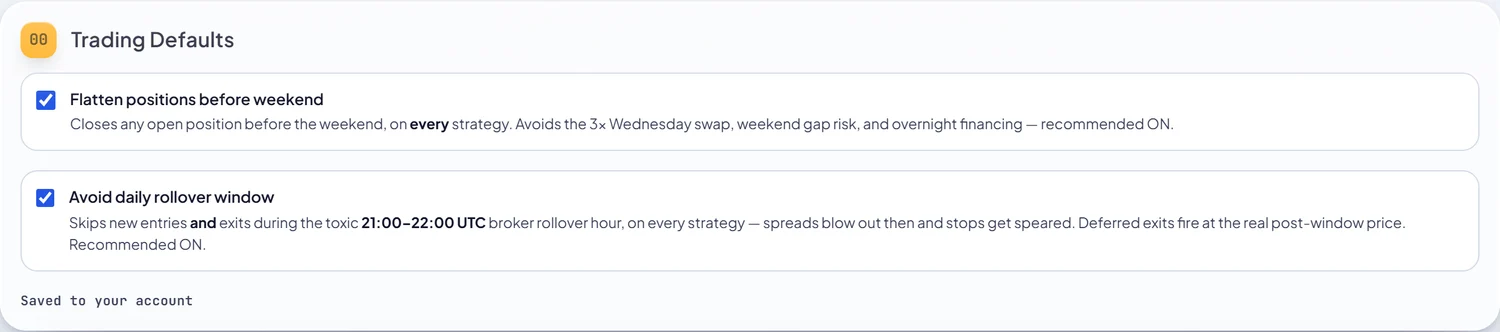
- Flatten before weekenddefault on
- Closes any open position before the weekend. Avoids the 3× Wednesday swap, weekend gap risk and overnight financing. Exported as InpFlattenBeforeWeekend.
- Avoid daily rolloverdefault on · 21:00–22:00 UTC
- Skips new entries and exits during the toxic broker rollover hour where spreads blow out and stops get speared; deferred exits fire at the real post-window price. Exported as InpAvoidRollover.
- Risk per trade
- Deliberately NOT an account setting: risk is owned by the strategy (§3), so the exact value that produced a result is the value that runs and exports.
Ship it
Export to MetaTrader 5
When a strategy has earned it, one click writes a complete MetaTrader 5 expert advisor — the real .mq5 source, with a preview of the full code and an install guide. Drop it into your Experts folder, compile it once in MetaEditor, and it trades your exact strategy on your own broker and account.
Export & download. Click Export to MetaTrader on any completed run. RoboticEA generates the
.mq5source, runs it through a server-side validation gate (a file that fails is never handed to you) and downloads a named file such as RoboticEA_…_XAUUSD_H1.mq5.Read it before you run it. Preview source & install guide shows the full generated code with the gate’s verdict, so nothing reaches a live account unread. The file is plain MQL5 text — no binary, no obfuscation.
Install it in MetaTrader. The
.mq5goes in the terminal’s Experts folder and is compiled once. Two routes, both fully screenshotted, in §10 below.Test it, then run it. Load the compiled EA into MetaTrader’s own Strategy Tester to backtest it on your broker’s data — §11.
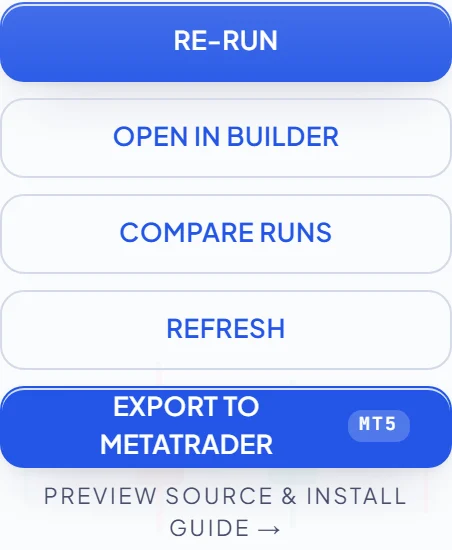
Before it downloads, Preview source & install guide shows the full generated code with the gate’s verdict, so you can read exactly what you’re about to run before it ever touches a live account. The file downloads under a descriptive name, e.g. RoboticEA_TurboElderPowerSessionQuick_XAUUSD_H1.mq5.
The full walkthrough
MetaTrader 5: from download to a running EA
The downloaded file is real MQL5 source, so MetaTrader compiles it itself — once. There are two complete routes from the file in your Downloads folder to an expert advisor live on a chart. They end in exactly the same place, so pick one and follow it to the end; you don't need the other.
Whichever route you take: the Algo Trading switch
One toolbar button is the master switch for every Expert Advisor in the terminal. A red square means algorithmic trading is off and nothing will place an order — not in the tester, not on a chart. Click it once; it turns into a green ▶.
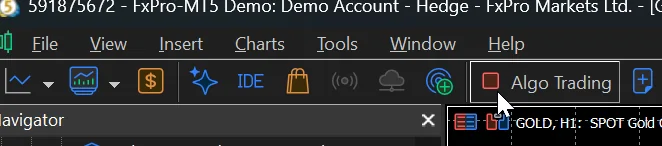

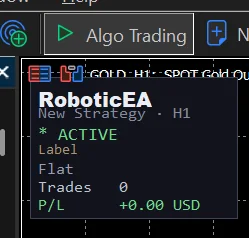
Every EA RoboticEA exports draws its own status panel in the chart corner, so you can see at a glance that it’s alive: strategy name, timeframe, state, current position, trade count and running P&L. That panel is what you’re working towards.
Now pick a route
Route A never leaves MetaTrader and is much faster — it’s the one to use once you’ve done this before. Route B walks the folders in Windows Explorer, which is worth doing once because it shows you exactly where MetaTrader keeps its files. Each route below is complete on its own, from the switch above to a running EA.
Route A — the quick pathNever leaves MetaTrader · 13 steps · about two minutes
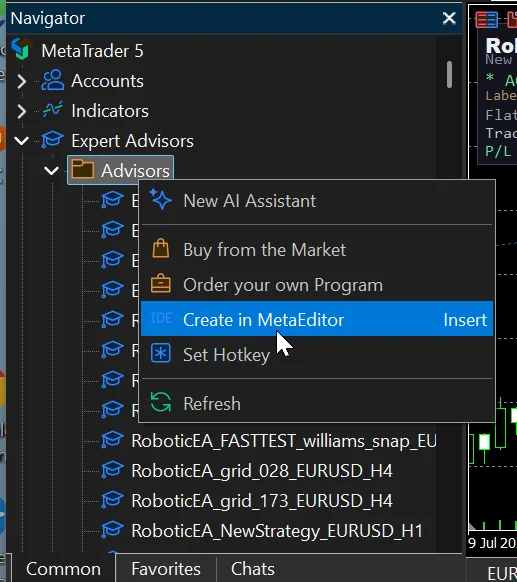
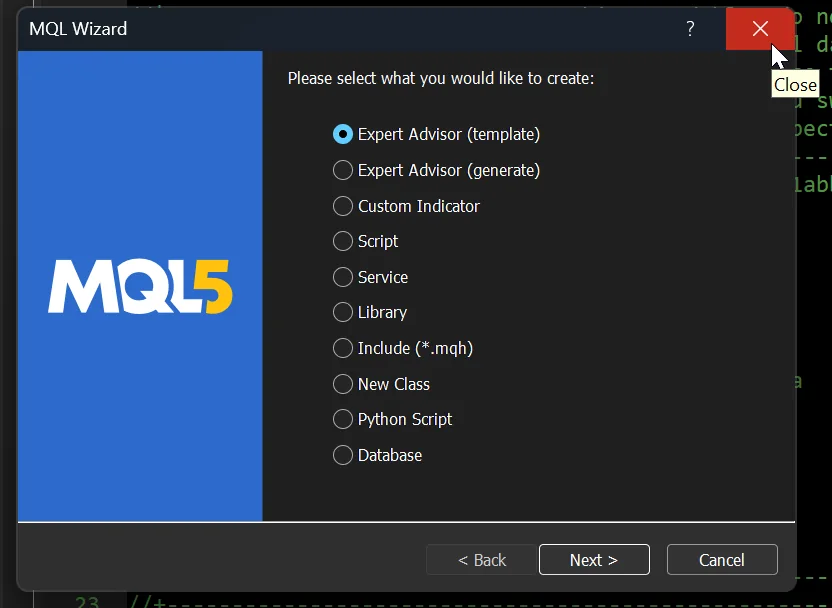
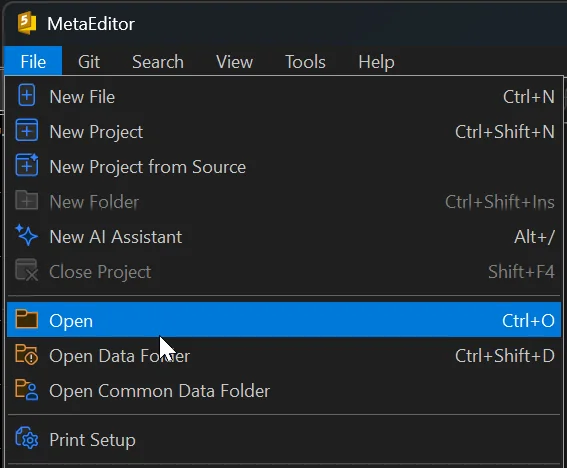
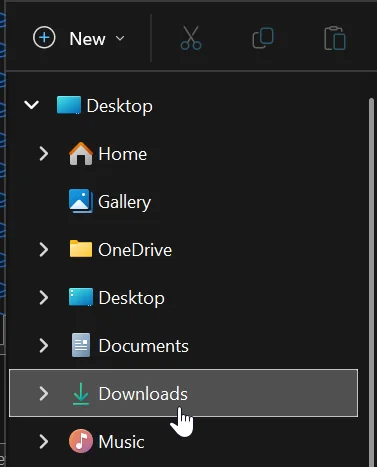
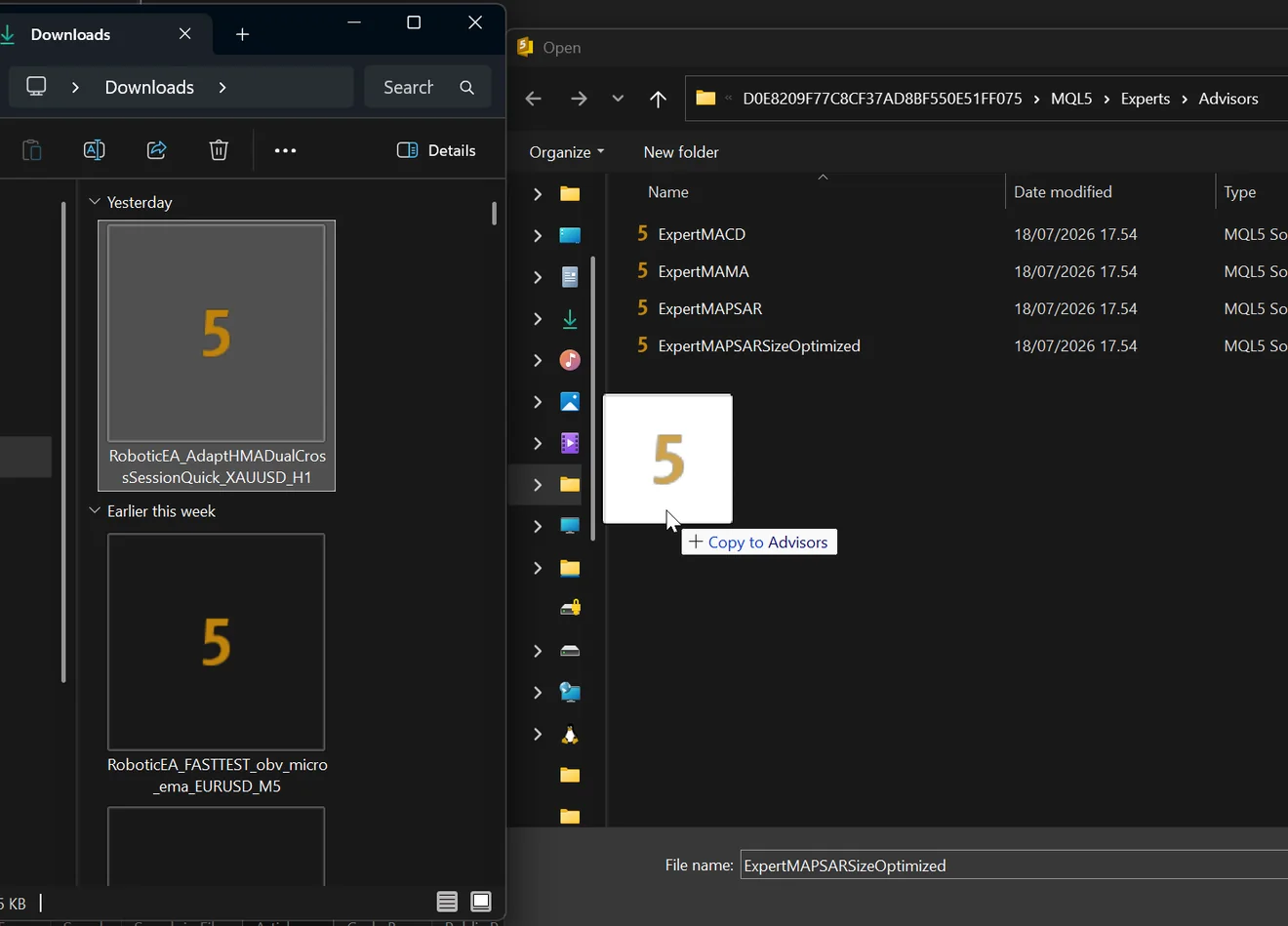
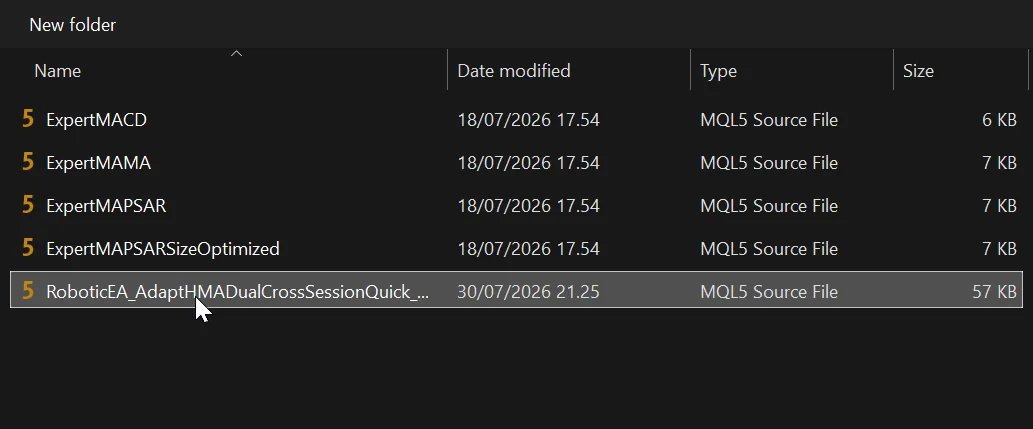

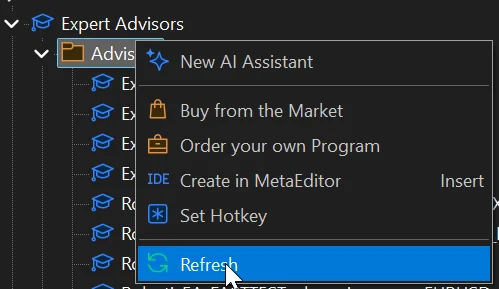
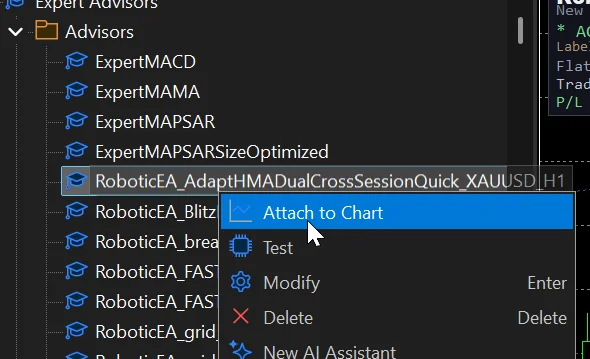
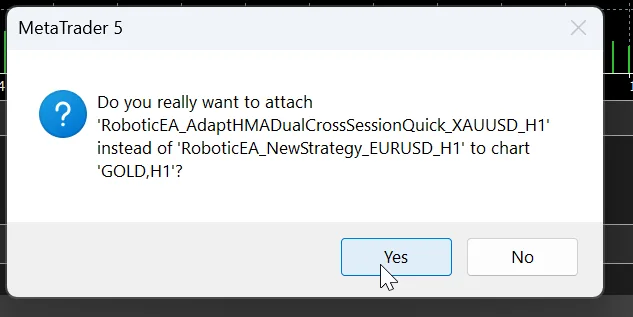
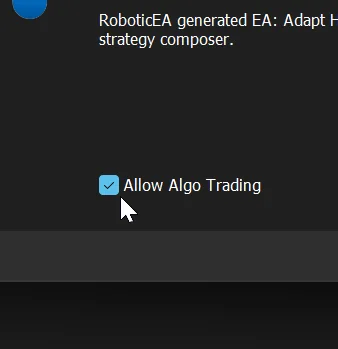
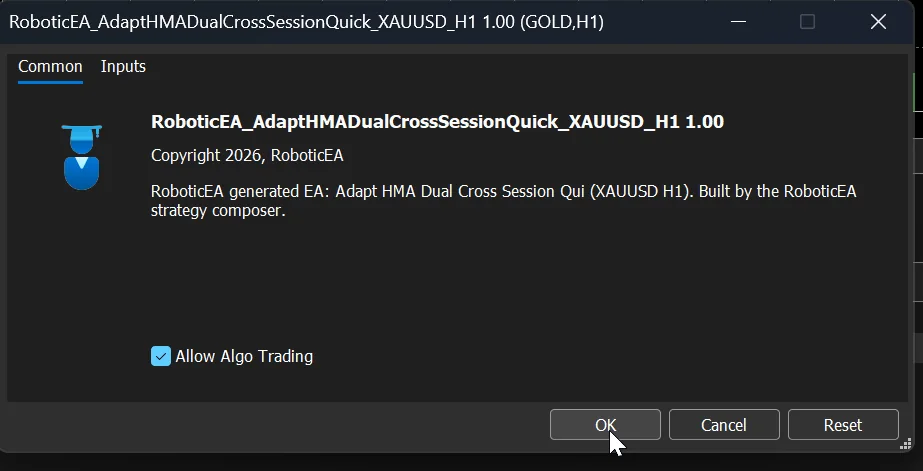
What's on the Inputs tab
InpFlattenBeforeWeekend and InpAvoidRollover — so live behaviour matches what you backtested rather than quietly dropping the safeguards.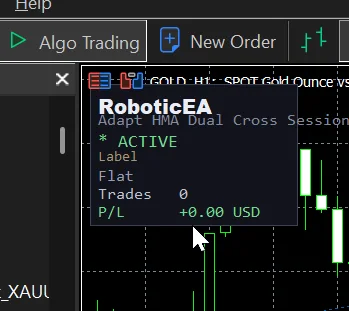
Route B — the classic pathThrough Windows Explorer · shows you exactly where MetaTrader keeps its files
The destination is the terminal’s data folder:
C:\Users\<you>\AppData\Roaming\MetaQuotes\Terminal\<ID>\MQL5\Experts\Advisors
<ID> is a long hexadecimal folder name unique to your installation — you can’t type it from memory, you just click through it. Start at This PC ▸ Local Disk (C:) ▸ Users ▸ your username.
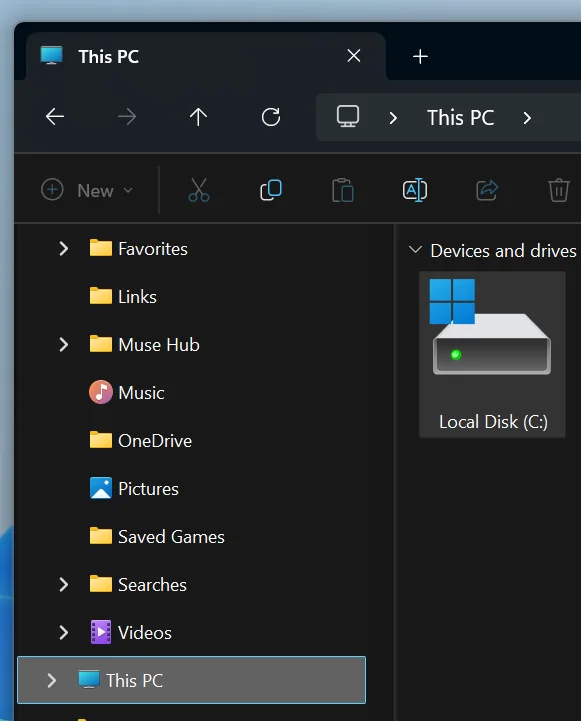

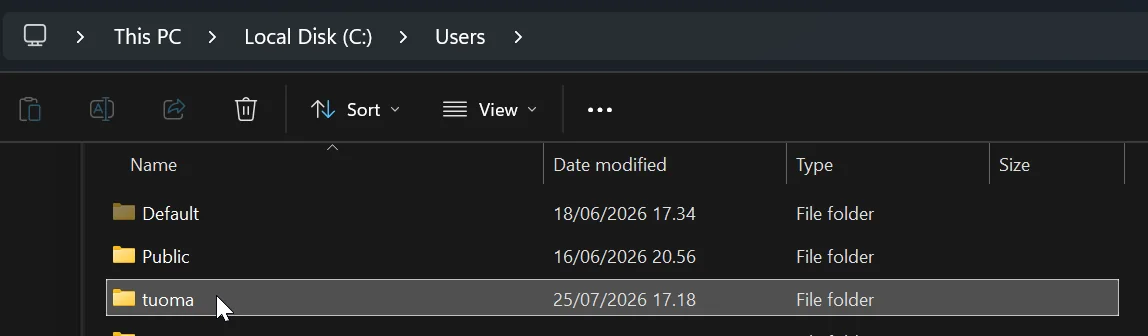
AppData is hidden by default
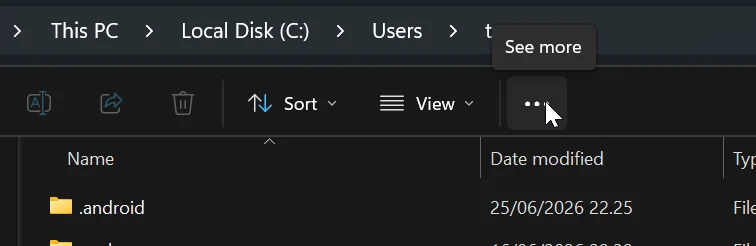
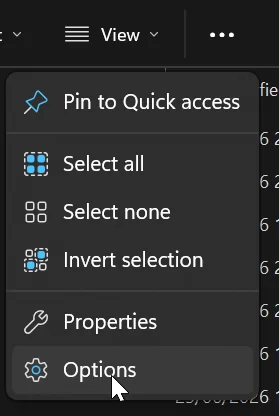
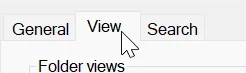
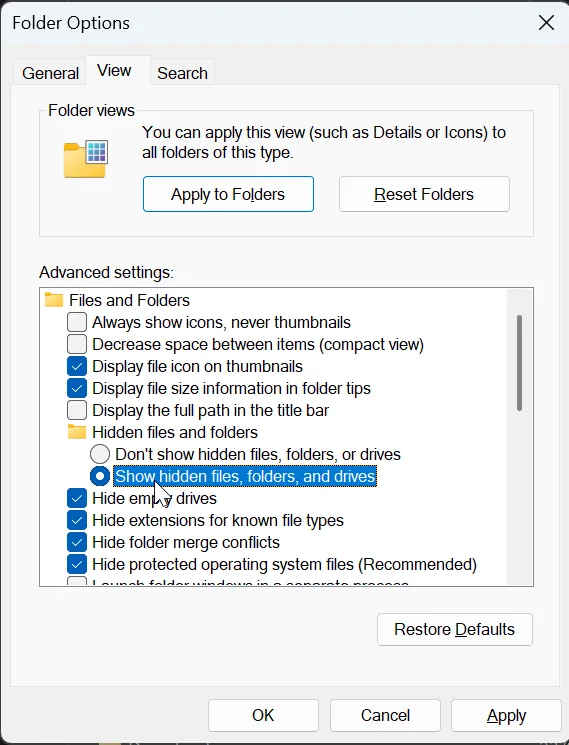

Steps 9–16 are just eight double-clicks, in this order:








You’ve arrived. The folder already holds MetaTrader’s own sample EAs, and they show you the pattern to expect: every advisor exists twice, as a MQL5 Source File (the .mq5 you can read) and as an MQL5 Program (the compiled .ex5 the terminal actually runs).
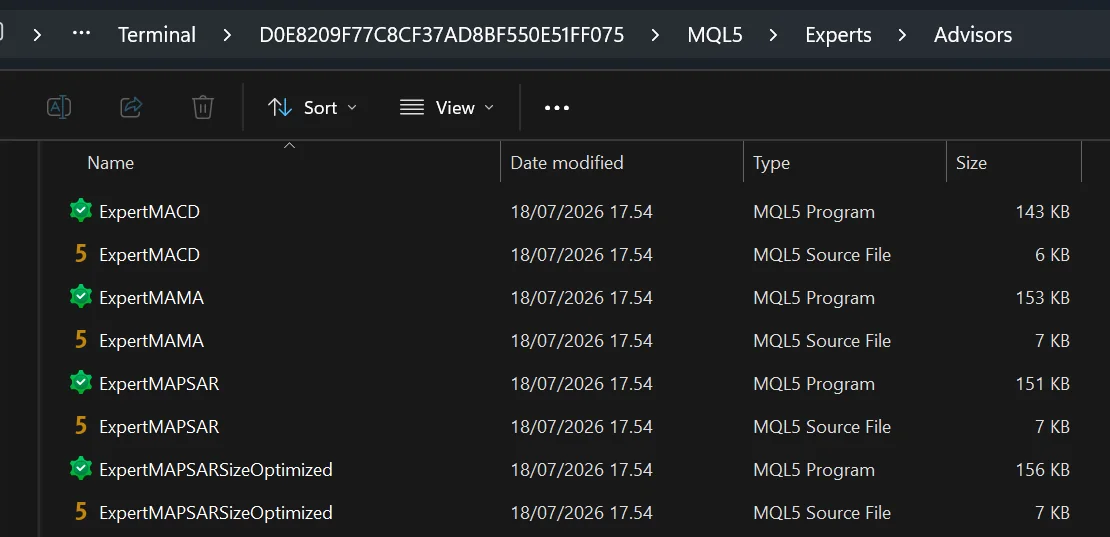

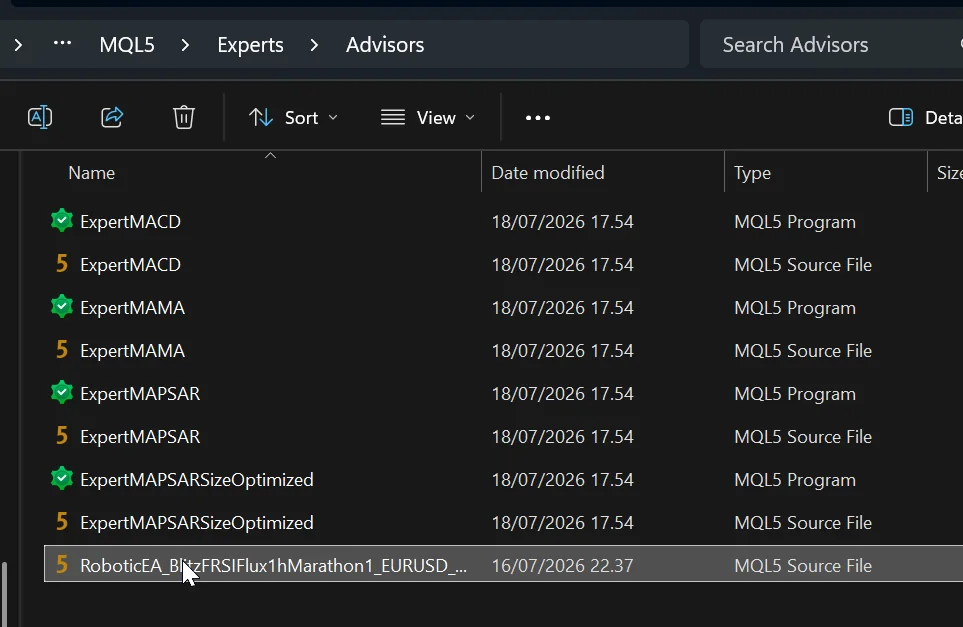
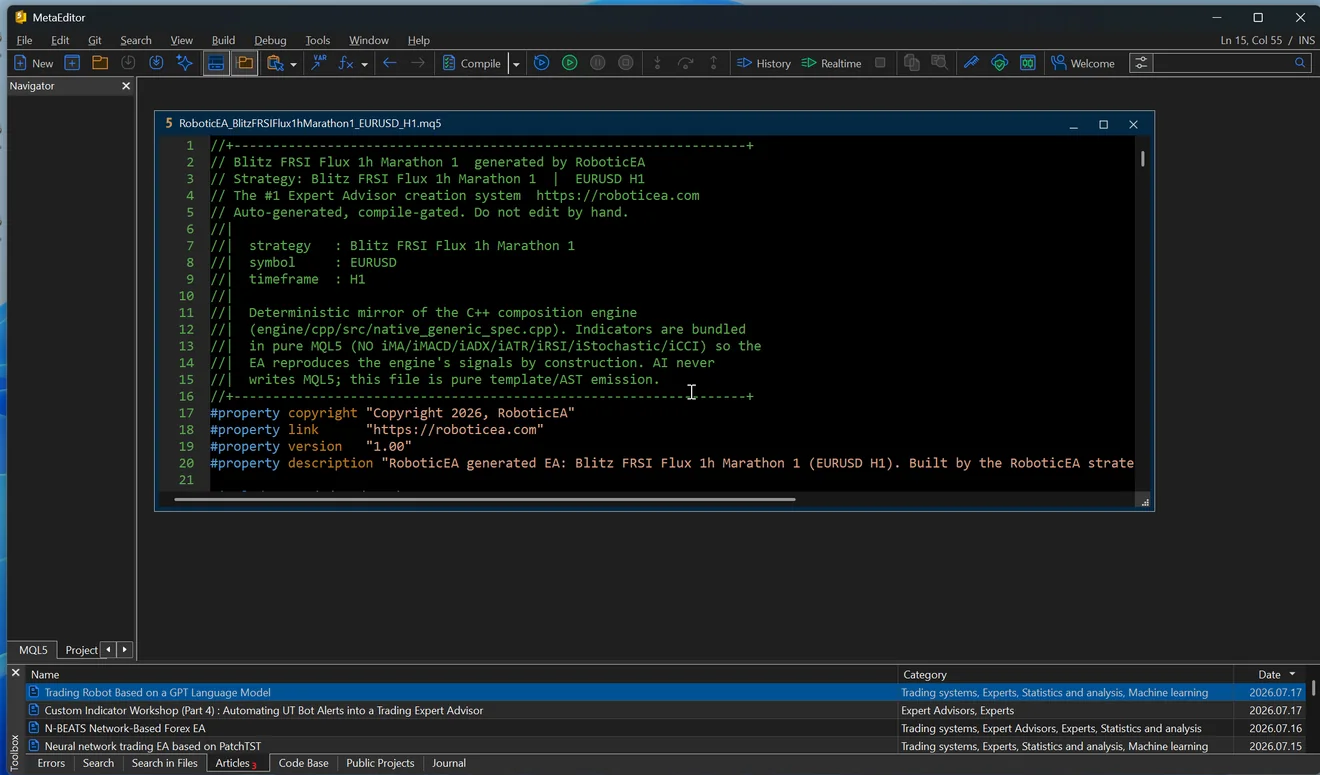
MetaTrader will not run source it hasn’t compiled, and it won’t compile a freshly-dropped file on its own. Open the file in MetaEditor — from MetaTrader that’s Tools ▸ MetaQuotes Language Editor or F4.


If the compile fails
.txt, or a MetaTrader build old enough to predate some MQL5 syntax. Re-download and update the terminal.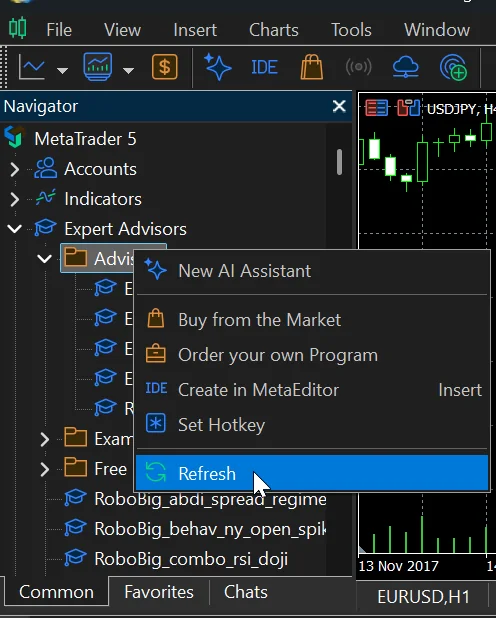
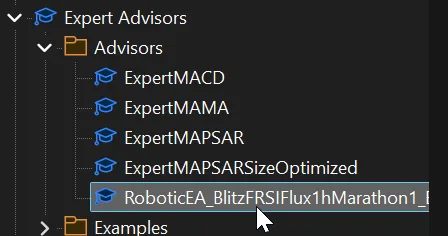
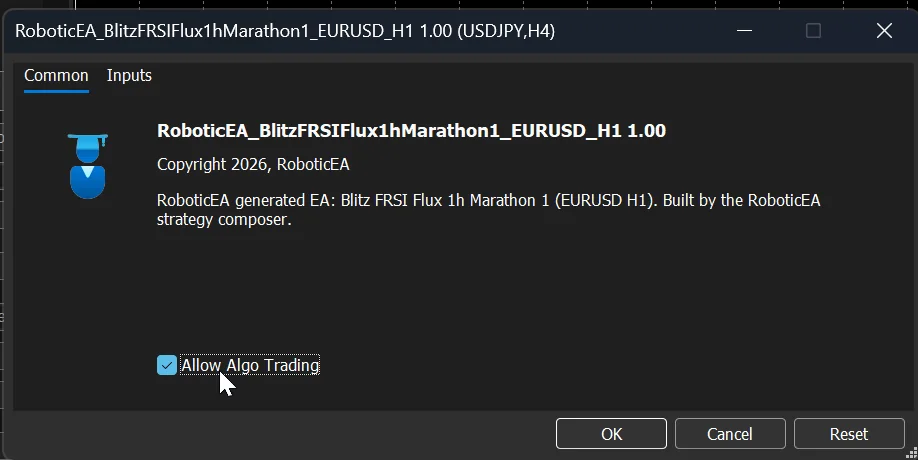
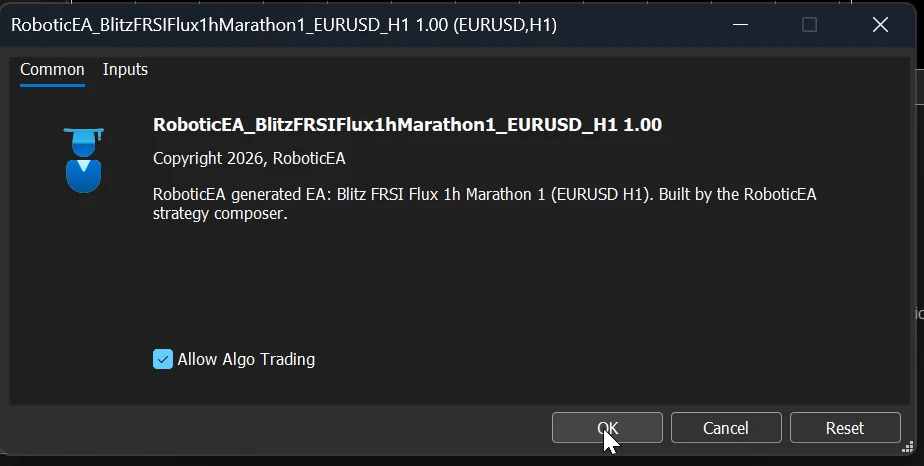
Check the title bar names the right chart
A second opinion
Backtest it in MetaTrader's Strategy Tester
Once the EA is compiled and visible in the Navigator — by either route — MetaTrader can backtest it itself, on your broker's data, with your spread, commission and swap. This is the check that matters before a live account, because it's the same feed the EA will actually trade on.
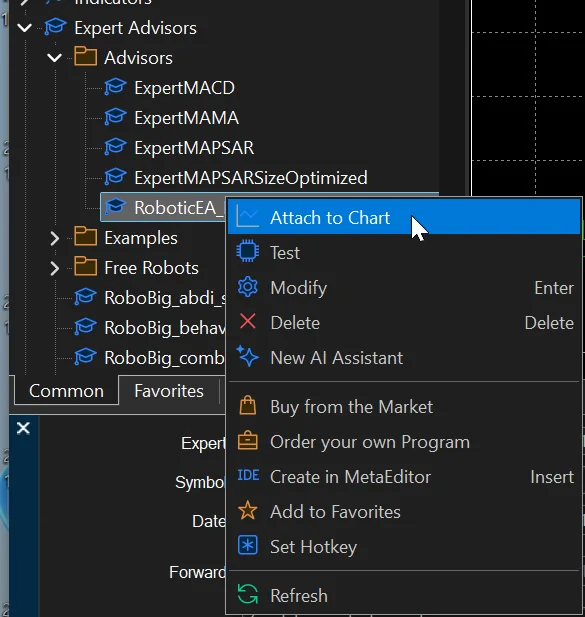
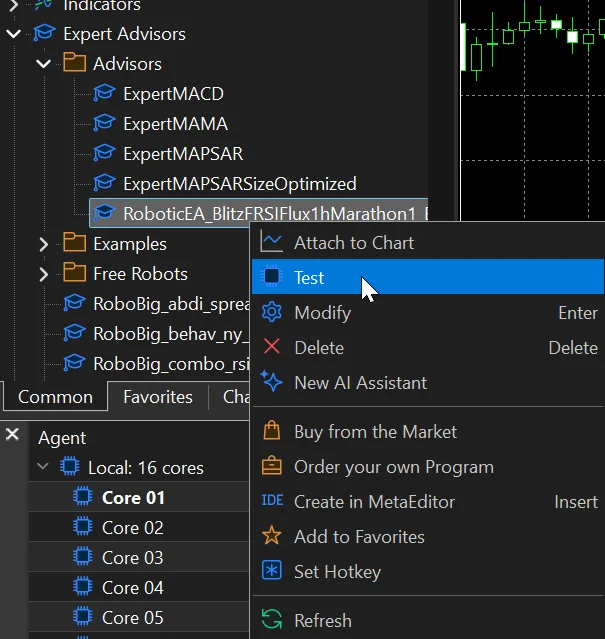
Right-click the EA in the Navigator and choose Test: the Strategy Tester opens with it already loaded. The same menu carries Attach to Chart, Modify to open the source, and Delete.
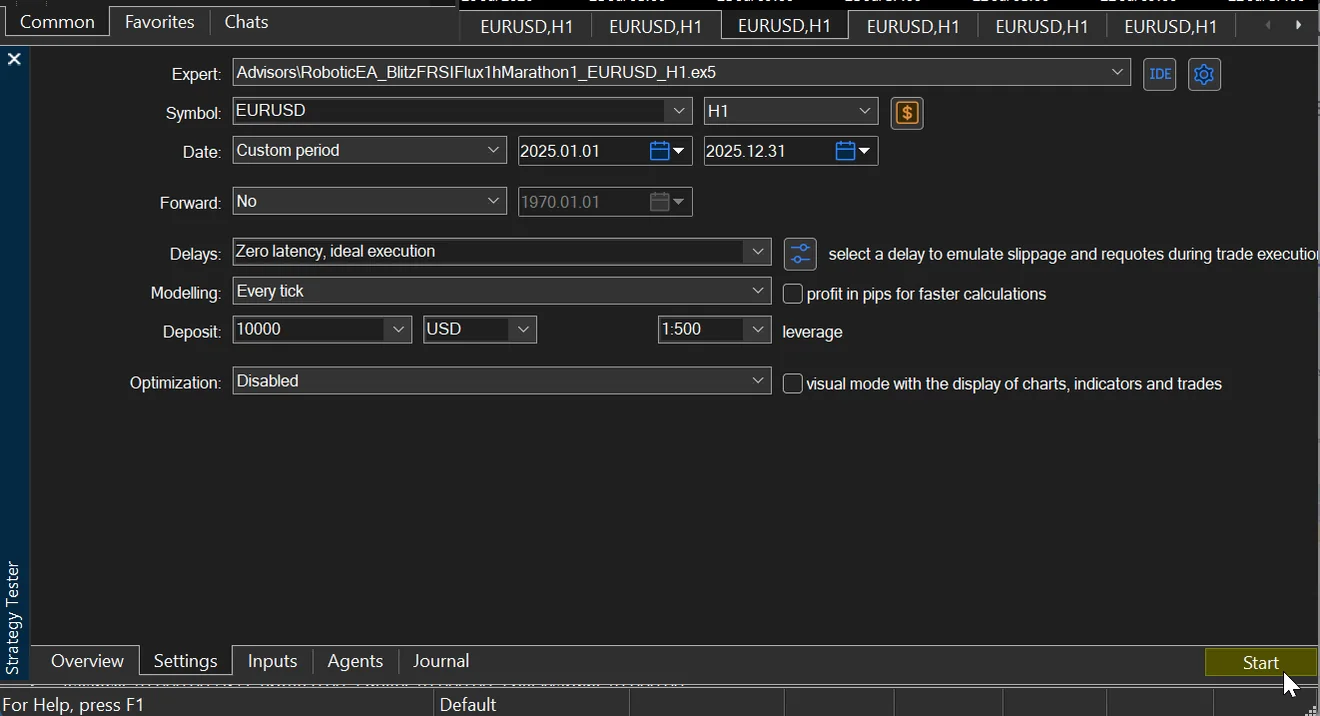
- Expert…\RoboticEA_….ex5
- The compiled EA. If the dropdown can't see yours, the compile or the Navigator refresh hasn't happened yet.
- Symbol & period
- Set both to what the strategy was built for — the export's filename ends in the symbol and timeframe, e.g. …_EURUSD_H1. Testing an H1 strategy on H4 tests something else entirely.
- DateCustom period
- The window to test. Pick the same years you ran in RoboticEA if you want the two results to be comparable.
- ForwardNo / ½ / ⅓ / custom
- Optionally splits the window, optimising on the first part and testing on the rest, for a quick out-of-sample check.
- Delayszero latency = optimistic
- Emulated execution latency. “Zero latency, ideal execution” is the friendliest possible assumption; pick a real delay to model slippage and requotes.
- ModellingEvery tick
- How prices are simulated between bars. “Every tick” is the most detailed mode from bar data; “every tick based on real ticks” is better still where your broker supplies them.
- Deposit & leverage10 000 · 1:100
- Starting balance and account leverage. RoboticEA's engine starts from $10,000 and models 1:100 with a 30% margin stop-out, so use those to compare like for like — a higher tester leverage lets trades survive that the backtest liquidated. If you set a leverage cap under Settings ▸ Backtest realism, match the tester to that number instead.
- OptimizationDisabled
- Leave off for a single run. Turned on, MetaTrader sweeps input combinations instead — a different job.
- Visual mode
- Draws the chart, indicators and trades as the test runs, so you can watch the strategy work. Slower, but the fastest way to sanity-check behaviour.
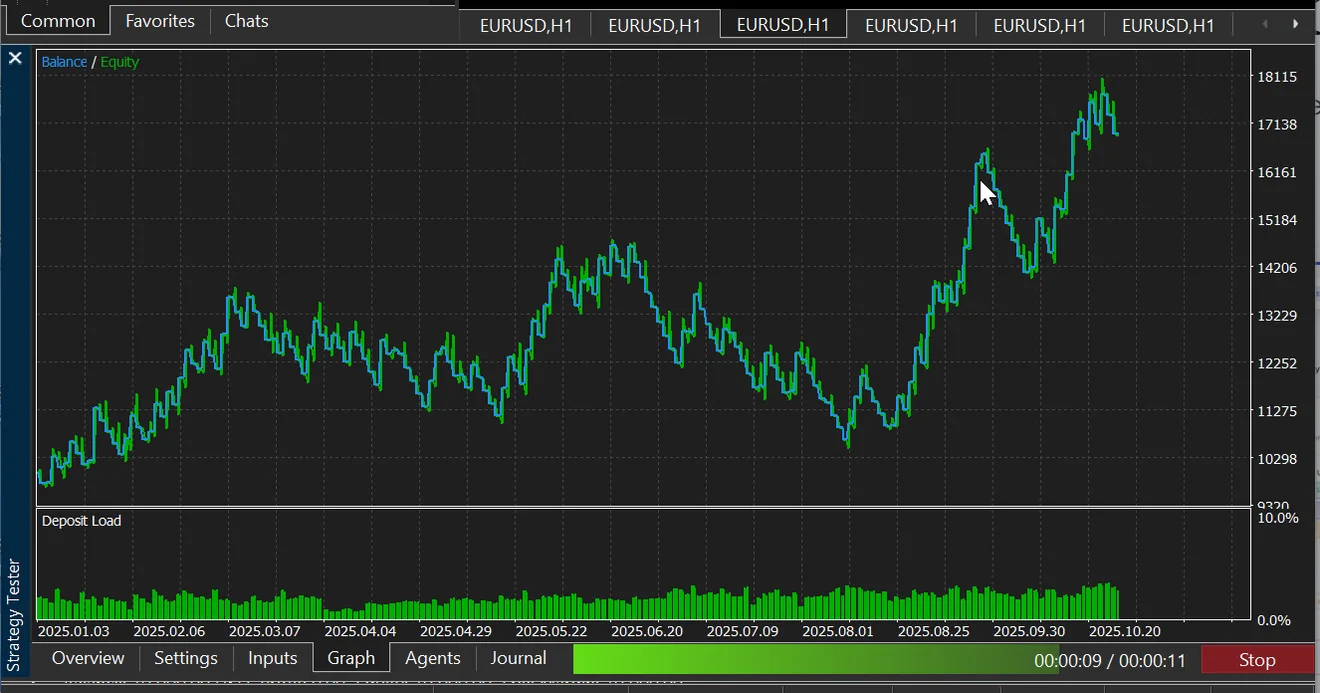
Press Start. The Graph tab draws balance and equity as it goes; a year of H1 data takes a few seconds.
When it finishes, the Backtest tab holds the full report.
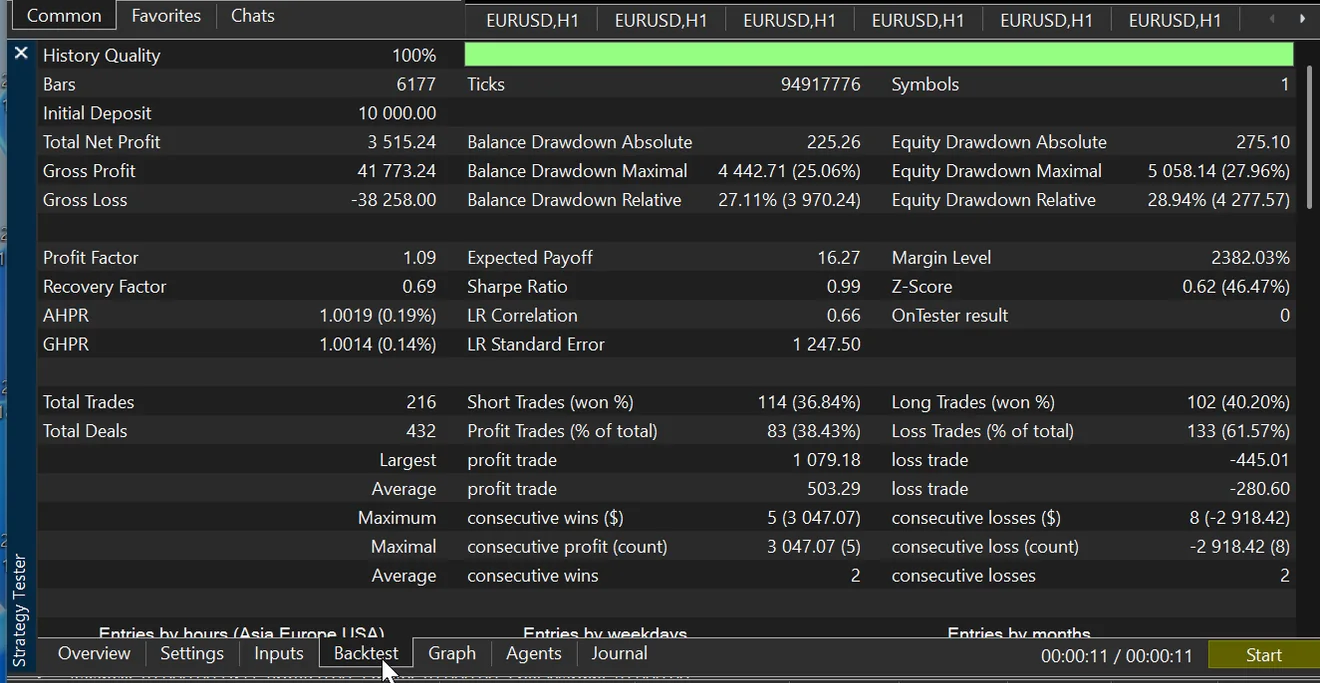
- History Qualityread this first
- The share of the window your broker actually supplied data for. Anything below 100% means gaps, and every number below it was computed on incomplete data.
- Bars / Ticks
- How much data really ran. A bar count far short of the window you asked for means the test ended early — often because the account was wiped — even when the summary above it looks ordinary.
- Total Net Profit
- Gross profit minus gross loss over the deposit, after your broker's real spread, commission and swap.
- Balance / Equity Drawdownabsolute · maximal · relative
- The worst falls, by closed balance and by floating equity. Equity drawdown is the honest one: it includes losses that were still open.
- Profit Factor / Expected Payoff
- Gross profit ÷ gross loss, and the average currency outcome per trade. Above 1.0 is profitable.
- Sharpe Ratio / Recovery Factor
- Return per unit of volatility, and net profit relative to the maximum drawdown — how well it climbs back out.
- Total Trades vs Total Deals
- MetaTrader records a deal for the open and another for the close, so deals run about double the trades. Compare trade counts, never deals.
- Short / Long trades (won %)
- The split by direction, with each side's hit rate. A strategy that only works in one direction shows up here immediately.
Why these numbers won't equal RoboticEA's
They shouldn’t, and a mismatch isn’t a fault in either tool. Your broker’s price feed, spread, commission, swap and fill model all differ from the reference data RoboticEA backtests on, and MetaTrader simulates ticks its own way.
Expect MetaTrader to look better first. RoboticEA’s default Real Spread preset charges recorded spread and broker commission inside the simulation. MetaTrader charges whatever your own broker’s symbol settings say, and plenty of accounts carry no commission at all — so the same strategy often shows a higher return here. That is a difference in what is being charged, not a better strategy. It runs the other way too: wider spreads, a non-zero Delays setting, different swap rates and weekend gaps can all make it worse.
Single-position strategies track closely; stateful designs that stack many orders can diverge much more. Use the export to run the strategy, and the tester to see how it behaves on the account you’ll actually trade — not to re-derive the original backtest.
What it costs
Plans & tokens
Every plan unlocks the full engine — all 34 archetypes, 25 instruments, backtesting, per-year validation and MetaTrader 5 export. Work is metered in tokens, so pricing tracks what you actually run: only new backtests cost tokens; rerunning a saved strategy or watching a replay is always free.
- Free tokens250 one-time
- Every new account gets a one-time grant of 250 tokens, no card required, enough to compose, backtest, validate and export your first strategies.
- What costs a token
- One token per new backtest and one per validation-year: a Compose batch of 50 is 50 tokens; a variation battery is one per variation. A backtest that's already been computed (rerun, replay, history) is free.
- STARTER20,000 tokens / month
- A paid tier with a monthly token allotment. Billed monthly or yearly; see Pricing for the current rates.
- PRO50,000 tokens / month
- A paid tier with a monthly token allotment. Billed monthly or yearly; see Pricing for the current rates.
- UNLIMITEDUnlimited tokens / month
- A paid tier with a monthly token allotment. Billed monthly or yearly; see Pricing for the current rates.
Start with a sentence. Ship an EA.
Try it free