

Product guide
EA builder: build an MT5 expert advisor, test it on real data, then export the MQL5
 Tommy J.Founder, RoboticEA
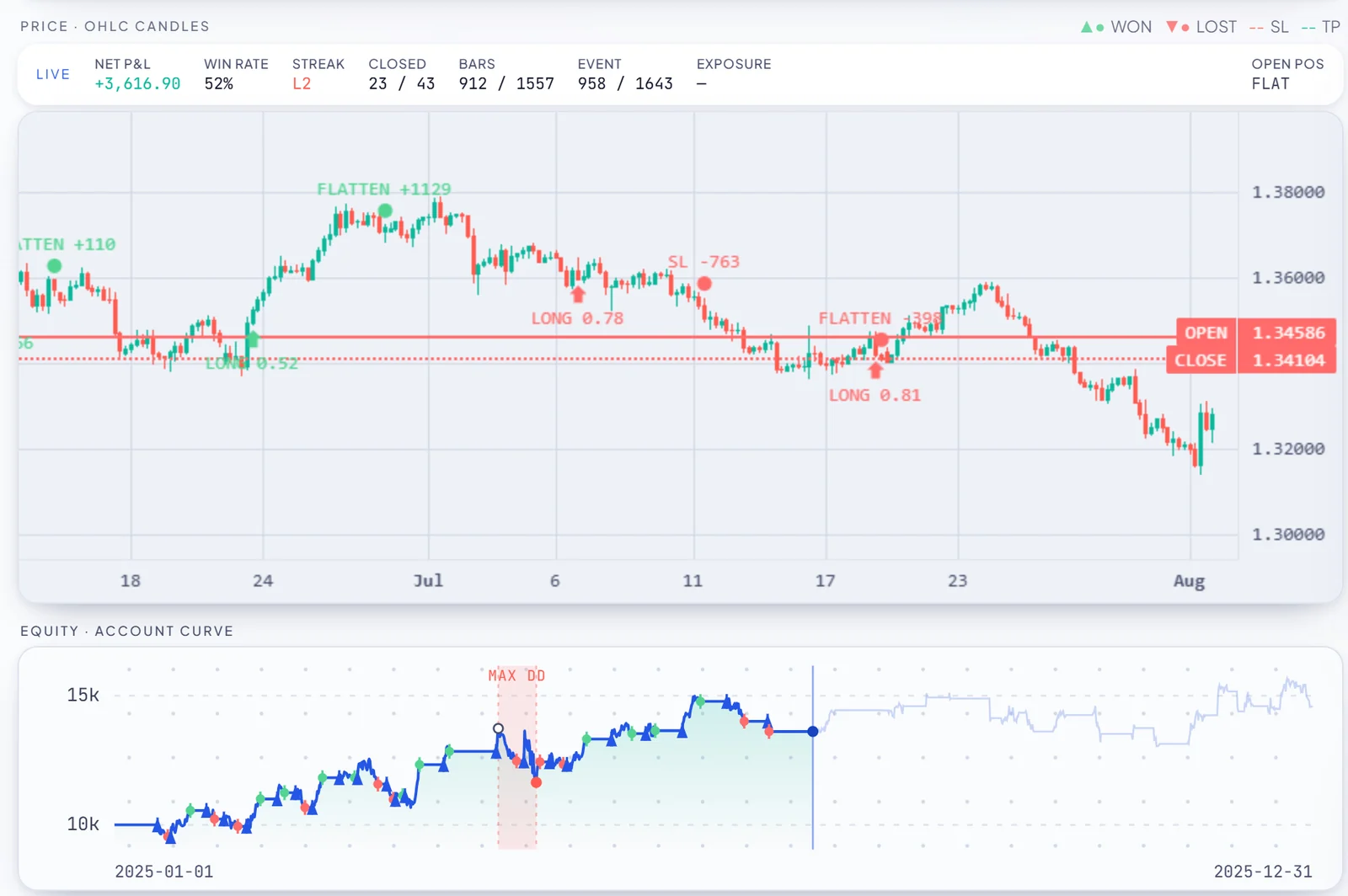
An EA builder is a tool that turns a trading idea into a working MetaTrader 5 expert advisor without you writing the code by hand. RoboticEA is one, and this is a walkthrough of it from the first click to the .mq5 file: describe or dial in what you want, let it compose a batch of strategies, backtest each one on real market data, validate the survivors year by year, watch them trade in replay, and export the MQL5 to MetaTrader 5. With the limits named, because an expert advisor builder that only shows you the good parts is not much of a builder.
The short answer
The output
What an EA builder should actually produce
Most people looking for an EA builder are picturing the last step: a file that loads in MetaTrader 5 and places trades. That file matters, and RoboticEA produces it. But the file is the cheapest thing in the chain. Any builder can emit syntactically valid MQL5 for a moving average cross. What separates a useful one from a code generator is what arrives with the file.
For each strategy, this one produces five things, in this order:
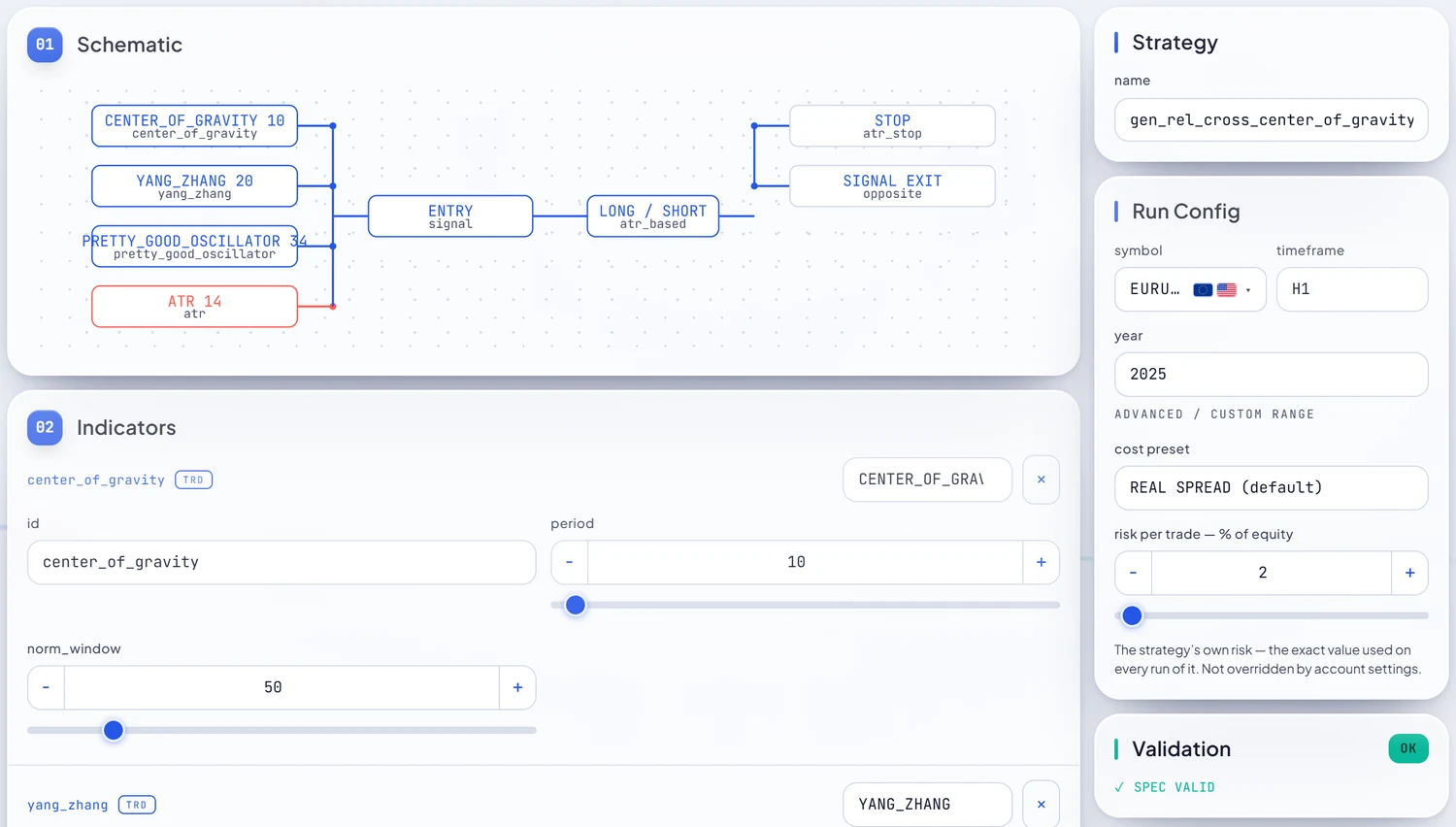
- A readable strategy schematic — indicators feeding an entry, a long or short, a stop, a target and an optional signal exit, drawn as blocks.
- A backtest on real market bars, with the spread that was actually recorded on each bar charged inside the simulation rather than estimated afterwards.
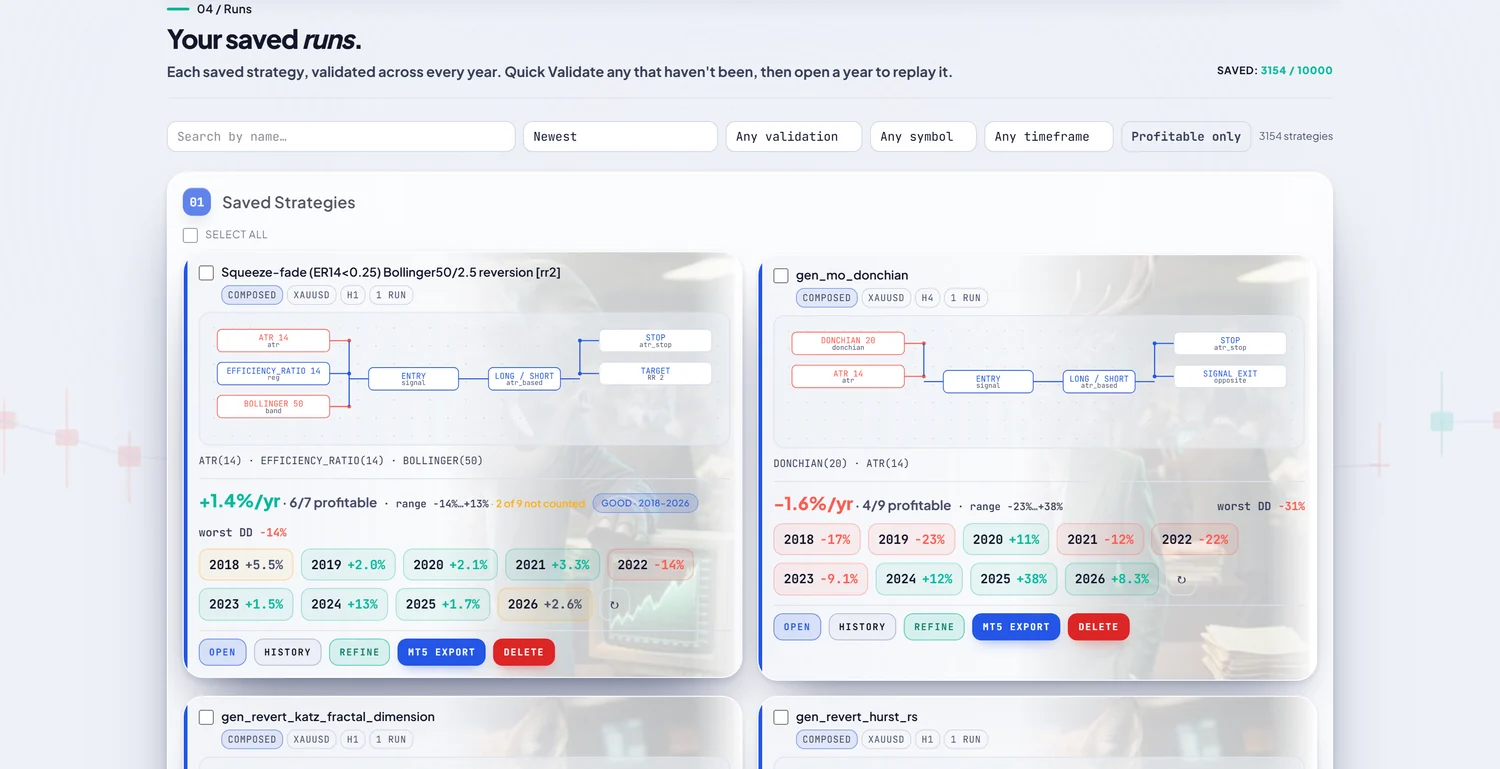
- A year-by-year validation grid — every year re-run as its own independent backtest, losing years in red.
- A trade replay of any year, bar by bar on real candles, with the equity curve and drawdown building underneath.
- An MQL5 source file for MetaTrader 5, previewable before it downloads.
The category
Two kinds of expert advisor builder
EA builders broadly come in two shapes, and it is worth knowing which one you want before you pick a tool.
Block and visual builders: you design, it codes
The established kind gives you a canvas or a form. You assemble conditions — “if the fast average crosses above the slow one and RSI is under 70, buy” — out of blocks or dropdowns, and the tool writes the MQL5 for exactly that rule. This is the right tool when you already know the strategy you want and need it coded faithfully. It gives you precise control and it is a good way to learn how an EA is structured. What it does not do on its own is tell you whether the rule is any good; that part is still yours, usually in MetaTrader 5’s Strategy Tester afterwards.
A generator: you set the intent, it invents and tests
RoboticEA starts from the other end. Instead of drawing one rule, you choose a direction — a strategy archetype such as trend-following or mean reversion — and set ranges on a few dials. The generator then invents a batch of distinct strategies inside those bounds and backtests every one of them as it lands. You are searching a space of ideas rather than coding a single idea, and the testing is part of the build rather than a separate job.
It still has blocks. Every strategy, however it was made, opens in the Builder as an editable schematic: indicators, entry, direction, stop, target, sizing, plus the run configuration — symbol, timeframe, year, cost preset, risk per trade. The difference is that you rarely start from an empty canvas.
The walkthrough
How to build an MT5 EA with RoboticEA, step by step
Six steps. None of them involves writing code, and the token cost of each is shown as you go — tokens are the unit of engine compute, and a new account gets 250 once, with no card.
1. Describe it, or set the dials
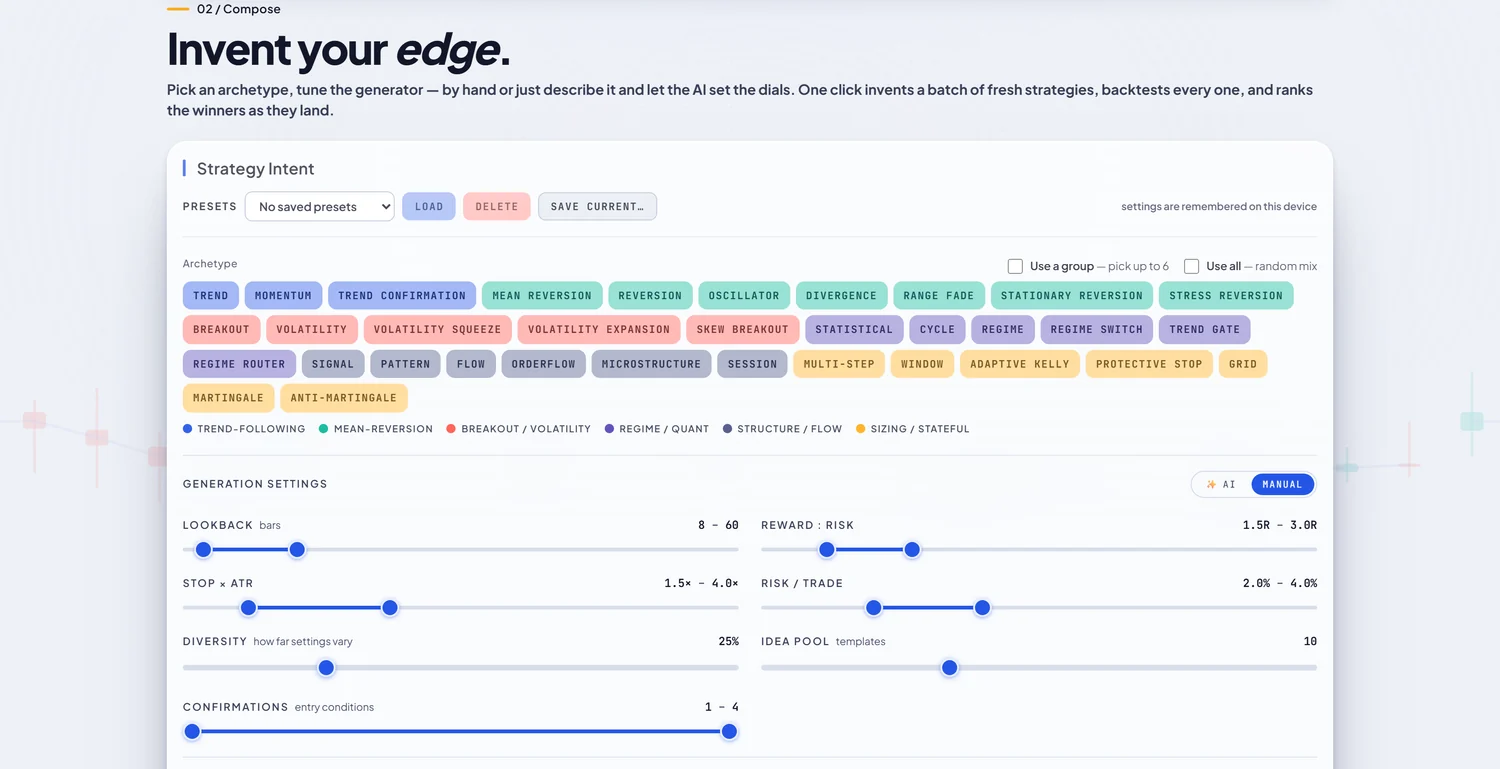
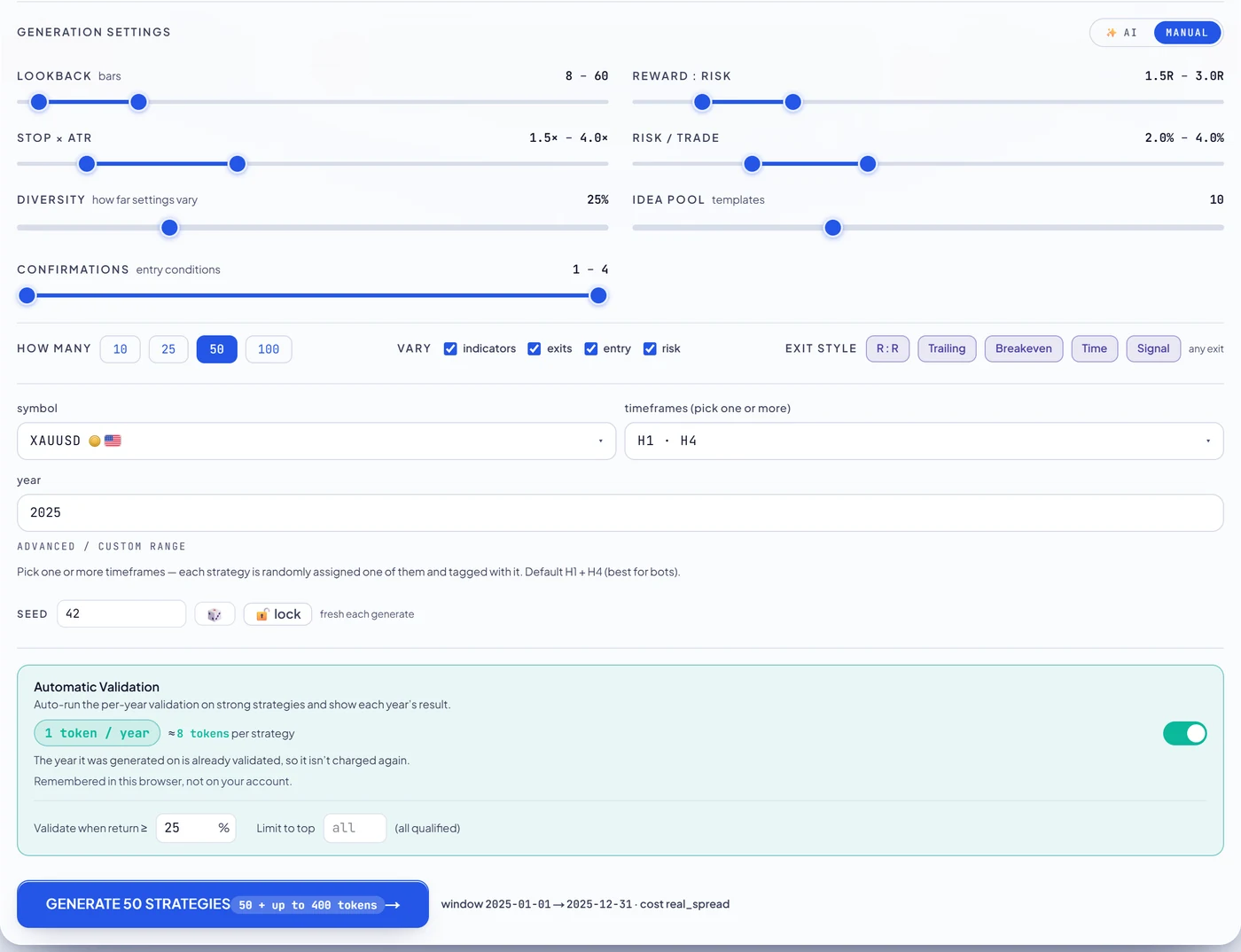
Compose opens on the archetype picker: 34 archetypes in 6 colour-coded families, from trend-following and mean reversion through breakout, regime and order-flow ideas to stateful sizing schemes like grids. Underneath sit the generation dials, each set as a range rather than a single value — lookback in bars, reward-to-risk, stop distance in ATR, risk per trade, how far settings may vary, and how many entry confirmations a strategy may stack.
On a paid plan you can skip the dials and describe what you want in a sentence — “patient trend strategies with wide targets” — and the AI tuner sets them for you. On the free tier you move the same dials by hand, and you compose from 4 of the 34 archetypes (Trend, Momentum, Trend Confirmation, Mean Reversion); the rest are shown but locked.
2. Compose a batch
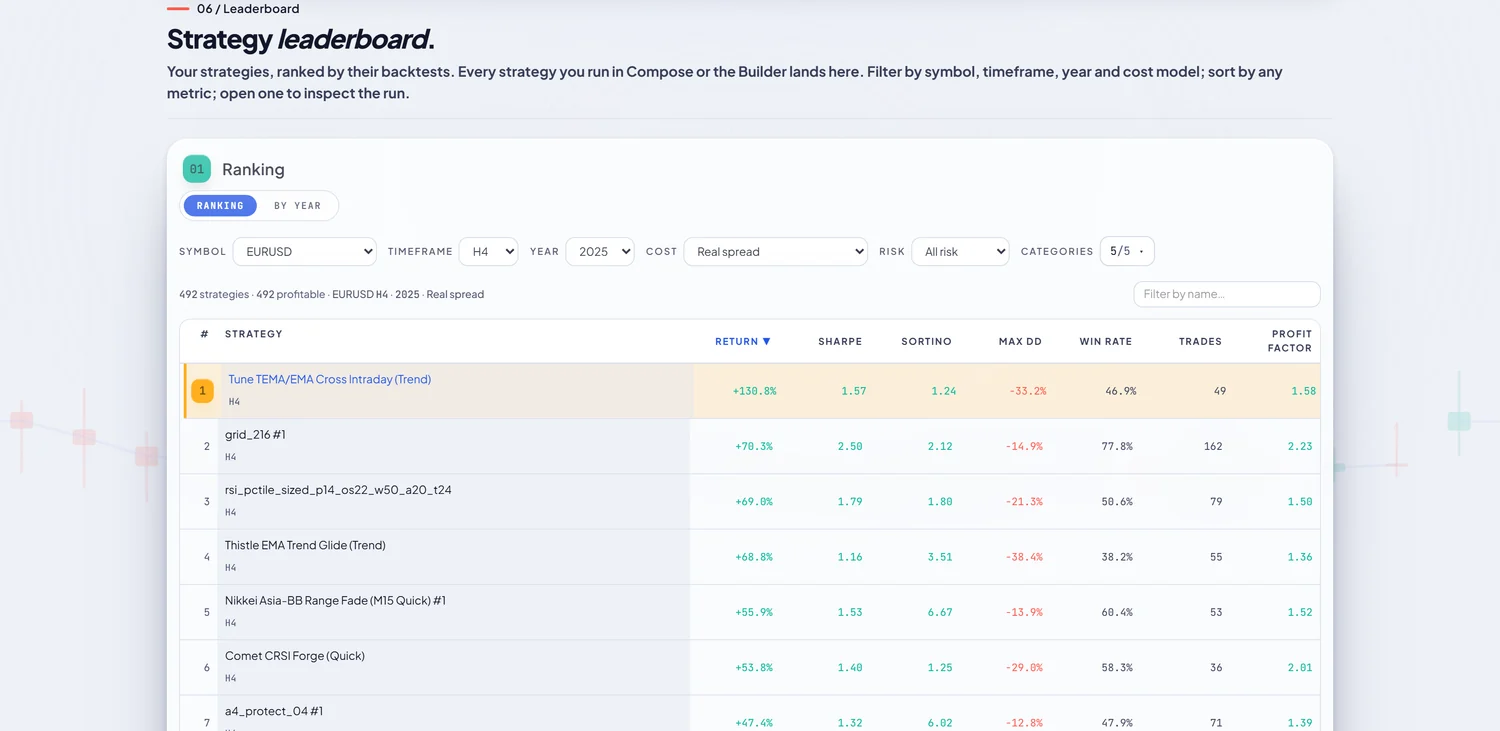
One click generates the batch: up to 50 strategies on the Free and Starter plans, 100 on Pro and Unlimited. Each is a complete, distinct strategy — its own indicators, entry logic, exit and sizing — and each is backtested the moment it is created, so results arrive ranked while the rest are still running. A batch of 50 costs 50 tokens: one per backtest, nothing for the generation itself.
3. Backtest on real data
Every backtest runs on real historical bars, not synthesised ones, and the default cost preset is Real Spread: the spread recorded on each bar is charged on each fill. On every plan except Unlimited, one run covers one calendar year, which is deliberate — the multi-year picture comes from the next step, where each year is judged on its own instead of being blended into one flattering curve. A single new backtest costs 1 token; reopening or re-viewing one you already have costs nothing.
4. Validate across years
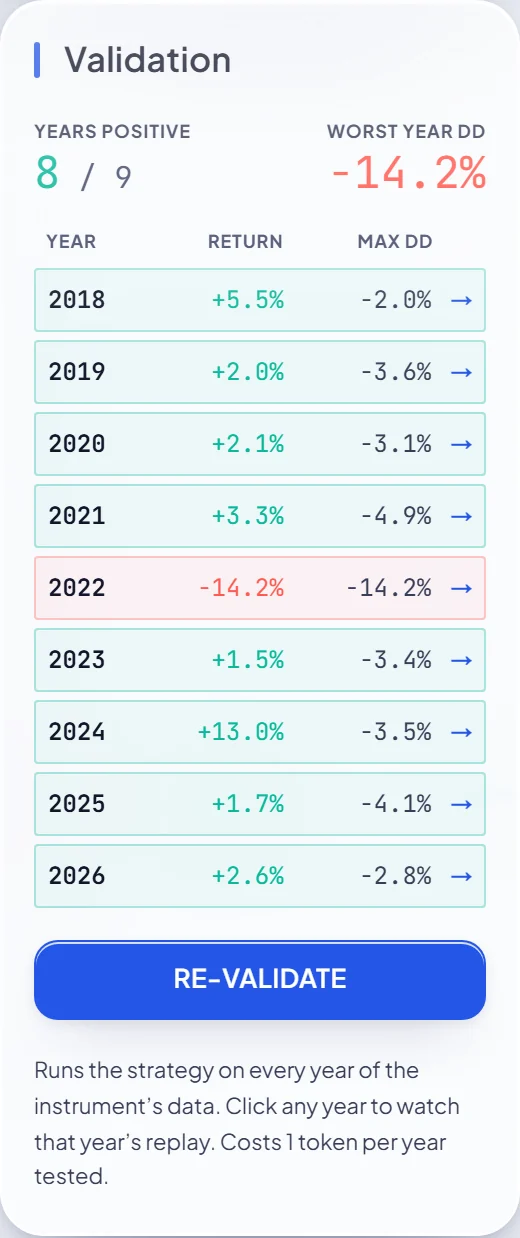
This is the step that makes an expert advisor builder worth using. Validation re-runs the strategy as an independent backtest on every year of the instrument’s data and lays the results out as a grid: return and maximum drawdown per year, the count of positive years, and the worst year’s drawdown at the top. A full 8-year validation costs 8 tokens — one per year tested.
You do not have to remember to do it. Automatic validation is on by default: any strategy in a Compose batch whose backtest returns at least 25% is validated across every year without you asking, and you can change the threshold or switch it off. Years with too few trades to judge are marked as not counted rather than quietly scored as wins.
5. Replay it before you trust it
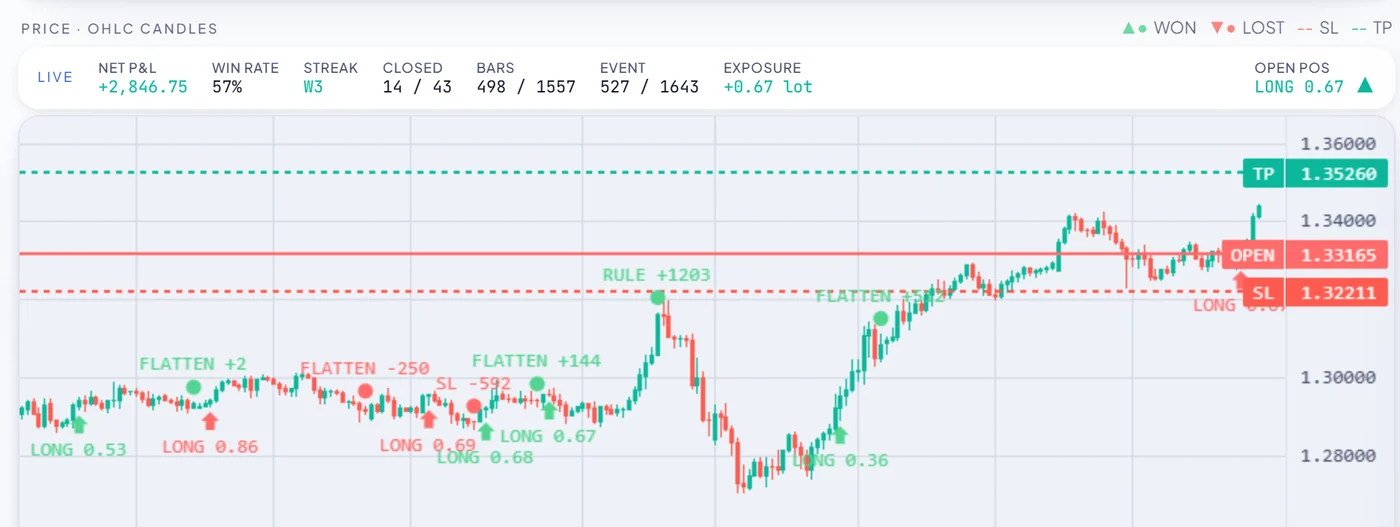
A grid of yearly numbers still does not show how a strategy trades. Replay runs the actual backtest back on real candles: entries and exits marked, stop and target lines drawn, the account curve building trade by trade underneath, and an underwater strip showing drawdown. One button jumps straight to the bar where the worst drawdown began, which is the single most useful thing to look at before you export anything. Replay is unmetered, because the run it plays has already been paid for.
6. Export the MQL5 to MetaTrader 5
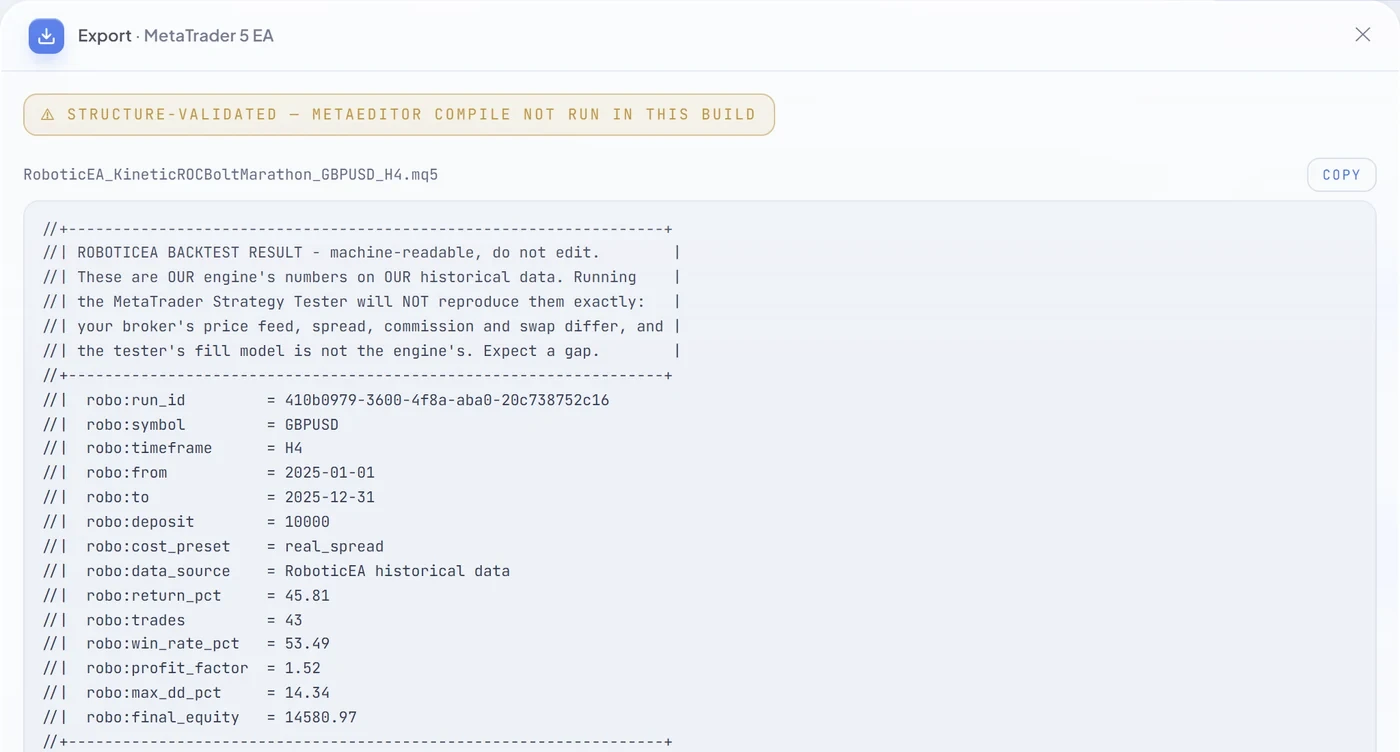
When a strategy has earned it, MT5 export opens a preview of the complete generated file before anything downloads: a single .mq5 source file, not a compiled .ex5. It opens with a provenance header — run id, symbol, timeframe, window, deposit, cost preset and the engine’s result — and states that MetaTrader 5’s tester will not reproduce those numbers exactly, because your broker’s feed, spread and fills are not ours. Every parameter is a named input, so it shows up on the Inputs tab in MetaTrader 5 and can be changed there.
Every indicator the strategy uses is implemented inside the file, and the export is checked before it is returned to make sure the EA calls none of MetaTrader’s built-in indicator functions — so it computes what our engine computed, not something close to it. Export costs no tokens on any plan, including free. From there it is three steps: drop it into MQL5/Experts, compile it once in MetaEditor, and run it in MetaTrader 5’s own Strategy Tester on your broker’s data before it goes anywhere near a live chart.
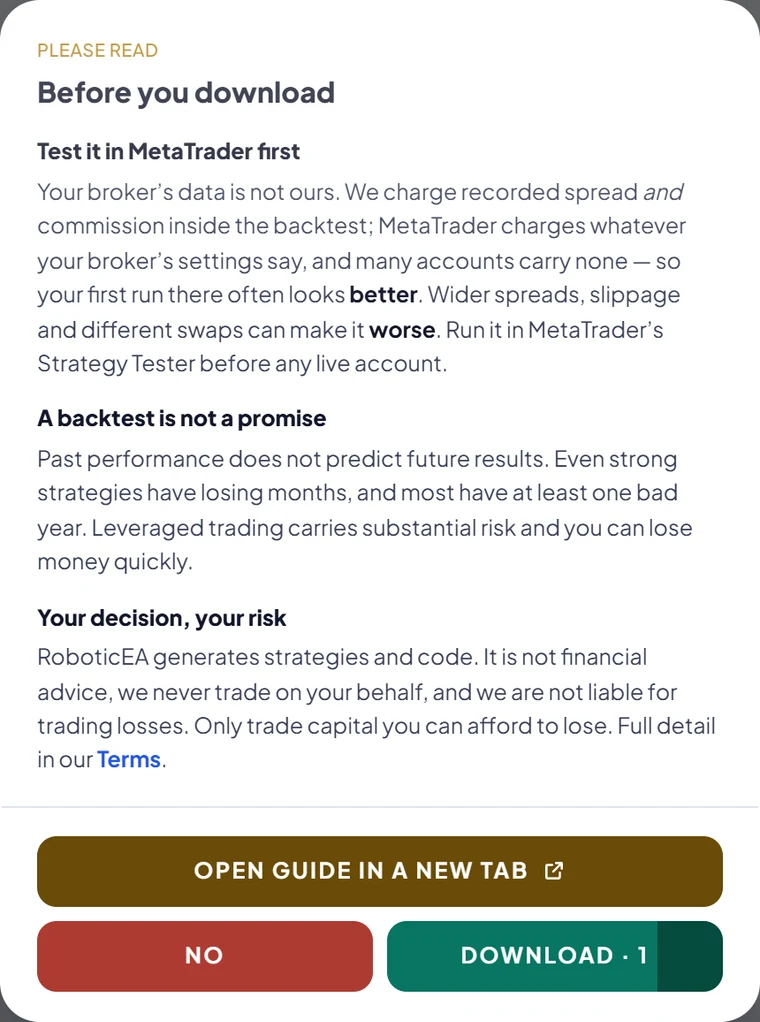
The first download on a device is gated by a short notice you have to read before the button unlocks. It says, in plain words, that your broker’s data is not ours, that a backtest is not a promise, and that the decision and the risk are yours.
How close is the engine to MetaTrader 5 on the same strategy? We ran a hundred strategies through both on real ticks and published the differences, including the bad rows — that write-up is here.
Build your first EA
250 tokens on signing up, no card. Compose, backtest on real spread, validate every year, replay it, and export the .mq5 — all on the free tier.
The evidence
Why the cost model decides whether a forex EA is worth building
Any forex EA generator can make a strategy look good. The fastest way is to be generous about trading costs, and it does not require anyone to lie — only to leave the spread as a flat guess or switch it off. We measured how much that changes the picture, on our own engine, so you know why the builder above charges the recorded spread by default.
On gold, we generated 4,961 strategies and backtested each one independently on every one of the 8 full years from 2018 to 2025, three times: with the real recorded spread, with a flat retail-style spread, and with no costs at all.
65 → 0
gold strategies profitable in all 8 years, costs off → real spread on
The same 33,032 yearly backtests. Nothing about the strategies changed between the two counts — only what each trade was charged.
38.1%
of years positive, no costs
22.5%
flat retail spread
14.1%
real recorded spread
24.0%
of results flipped to profit by removing costs
Removing costs turned 7,920 losing yearly results into winners — 24.0% of all of them. Even a plausible-looking flat spread flipped 2,784 (8.4%). If the EA builder you use lets you pick the cost model, this is the setting to look at first.
It is not a gold quirk. We ran 2,050 library strategies on EURUSD the same way, real spread against zero cost, and split the result by timeframe. With real spread 19.2% of strategy-years were profitable; with costs off, 41.6%. And the faster the timeframe, the more of the result is the cost assumption:
| Timeframe | Median year, real spread | Median year, zero cost | Years positive, real | Years positive, zero |
|---|---|---|---|---|
| M5 | -99.9% | -48.6% | 0.2% | 29.7% |
| M15 | -64.6% | -11.9% | 3.0% | 33.5% |
| M30 | -33.3% | -4.6% | 10.3% | 40.4% |
| H1 | -13.8% | -1.1% | 23.0% | 45.9% |
| H4 | -1.8% | -0.2% | 37.9% | 46.2% |
None of this says an EA you build cannot work. It says the backtest an EA builder shows you is only as honest as the costs it charged, and that a single good year is a weak reason to export anything. Both studies are written up in full: gold and timeframes.
The limits
What this EA builder does not do, and what is paid
A product walkthrough that skips the limits is an advert. These are the ones you would otherwise discover in the first ten minutes:
- The free grant is one-time. 250 tokens, no refresh — a free account has no billing cycle to refresh against. Free accounts keep up to 100 saved strategies. The entry plan is starter, $49 / mo for 20,000 tokens a month.
- Editing is paid. On free you run what the generator invented, exactly as it was tested: you can read the schematic and every metric, but changing its indicators, thresholds, symbol, year, cost model or risk in the Builder needs a plan. You can still export a free strategy as tested.
- Describing it with AI is paid, as are the variation refiner and running the preset library. Free accounts compose from 4 of the 34 archetypes.
- The export is partially obfuscated. The header, the named inputs and their labels are readable; our internal framework classes and helpers are renamed to short identifiers like
_r0and_r11, and comments inside the body are stripped. It is real MQL5 you can read, audit, change and compile — not a hand-commented tutorial. - The export gate is a validation gate, not a compile. A structural validator always runs — balanced braces, the MQL5 lifecycle handlers present, every input declared, the order layer included, no built-in indicator calls — and a file that fails it is never returned. A real MetaEditor compile only runs where the toolchain is installed, and on our web tier it is not. Compiling is your one keypress in MetaEditor.
- It will not match your broker exactly. Your feed, spread, commission and swap differ from the backtest’s. Single-position strategies reproduce closely; grid and martingale-style strategies can differ materially on fills. Test in MetaTrader 5 first.
- No builder can promise profit. Including this one. It can show you what a strategy did on real data, year by year, with the costs charged. That is all a backtest is.
The alternative
EA builder or EA coder: which do you need?
The other way to get an MT5 EA without coding it yourself is to hire someone to code it. Coding an EA by hand — yours or a freelancer’s — is the right call when the strategy is specific and already decided: an unusual order-management rule, a broker-specific quirk, a discretionary system you want automated exactly. A good EA coder will implement precisely what you specify.
What a coder will not usually do is tell you whether the specification is worth implementing, and every revision is another round of work. An EA builder flips that: it is cheap to try a hundred variations and throw ninety-nine away, and expensive (or impossible) to express a truly bespoke rule. The two are not exclusive. Because the export is a readable .mq5 with named inputs, a strategy you found and validated here is a reasonable starting brief for a coder, rather than a paragraph of description.
| EA builder (generator) | Hand-coded EA | |
|---|---|---|
| Best when | You are searching for an idea that survives | The idea is fixed and specific |
| Testing | Built in: every strategy backtested and validated per year | Separate step, usually in MetaTrader 5 |
| Changing it | Re-compose or edit the schematic | Another revision of the code |
| Output | Readable .mq5 with named inputs, partially obfuscated internals | Whatever source you agree on |
FAQ
EA builder questions, answered
What is an EA builder?
An EA builder is a tool that turns a trading idea into a MetaTrader 5 expert advisor without you writing the code by hand. Most are block or visual builders: you assemble the entry and exit conditions and the tool writes the MQL5 for exactly that rule. RoboticEA works the other way round: you pick a strategy archetype and set ranges on a few dials, and it invents a batch of distinct strategies, backtests every one on real market data, validates them year by year and exports the one you choose as a .mq5 file. Every strategy still opens as an editable block schematic.
Do I need to know how to code to build an EA?
No. You pick an archetype and set ranges for lookback, reward-to-risk, stop distance in ATR and risk per trade, or on a paid plan describe what you want in a sentence and let the AI set the dials. The MQL5 is written for you and you can read it in a preview before it downloads. The only step outside RoboticEA is compiling the .mq5 once in MetaEditor, which is one keypress.
Is the RoboticEA EA builder free?
There is a free tier: a one-time grant of 250 tokens with no card, where one token is one backtest and one validation-year. Composing, backtesting, per-year validation, automatic validation, trade replay and MetaTrader 5 export are all included, and export costs no tokens on any plan. Free accounts compose from 4 of the 34 strategy archetypes. Editing a strategy, describing it with AI, the variation refiner and running the preset library are paid; the entry plan is Starter at $49 a month for 20,000 tokens.
Is the exported EA compiled and checked before I download it?
It passes a validation gate, not a compile. A structural validator always runs: it checks that braces balance, that the MQL5 lifecycle handlers are present, that every input is declared, that the order layer is included, and that the EA calls none of MetaTrader's built-in indicator functions, so it computes what our engine computed. A file that fails is never returned. A real MetaEditor compile only runs where the toolchain is installed, and on our web tier it is not, so the badge says so. You compile it yourself in MetaEditor.
Can I read and edit the MQL5 source of the EA?
Yes. You download a single .mq5 source file, not a compiled .ex5. The header, the named inputs and their labels are readable, and every parameter appears on the Inputs tab in MetaTrader 5. To be accurate about it: our internal framework classes and helpers are renamed to short identifiers like _r0, and comments inside the body are stripped. It is real MQL5 you can read, audit, change and compile, but it is partially obfuscated, not a hand-commented tutorial.
Why should an EA builder backtest with real spread?
Because the cost model can decide the result on its own. We backtested 4,961 gold strategies on each of the 8 full years from 2018 to 2025, with and without costs. With trading costs switched off, 65 strategies were profitable in all 8 years; with the real recorded spread charged, none were. Removing costs turned 24.0% of all yearly results from losses into profits. RoboticEA charges the recorded spread by default for that reason.
Should I use an EA builder or hire an EA coder?
Hire a coder when the strategy is already decided and specific, such as an unusual order-management rule you want implemented exactly. Use an EA builder when you are still searching for an idea that survives testing: it is cheap to try many variations and discard most of them, and the testing is built in. The two combine well, because a strategy found and validated in RoboticEA exports as a readable .mq5 with named inputs that a coder can work from.
Every study figure above comes from two run artifacts: the gold study (186,637 engine runs, build 0.2.0, seed 20260824) and the EURUSD timeframe study (33,100 runs, seed 20260817), both on real market bars from $10,000 per run. Every product figure comes from the constants the server enforces. The full product tour, screenshot by screenshot, is on how it works.
Keep reading
Free expert advisor for MetaTrader 5
What the free tier covers in tokens, and what is inside the exported .mq5, line by line.
How accurate is the MT5 Strategy Tester?
Our engine against MetaTrader 5 on real ticks, a hundred strategies, the bad rows included.
Do forex robots actually work?
The prior question for anyone building an EA, answered with 700,000 backtests.
Exporting a strategy to MetaTrader 5
The export, the install and the Strategy Tester run, fully screenshotted.