

Comparison
fxDreema alternative: four EA builders compared, and when to switch
 Tommy J.Founder, RoboticEA
If you are looking for an fxDreema alternative, it helps to be clear about what fxDreema already does well, because the right replacement depends on which part of the job you want done differently. fxDreema is a visual EA builder: you connect blocks and it writes the MetaTrader expert advisor. This guide covers what it offers as of November 2026, who it suits, where a research-first tool like RoboticEA takes a different route, and three other builders worth comparing.
The short answer
Start with the original
What fxDreema is, and what it does well
fxDreema describes itself as an expert advisor builder for creating trading robots and scripts for MetaTrader 4 and 5 “without using your keyboard”, with “no programming skills required, only logic thinking” (fxdreema.com). A strategy is assembled from graphical blocks, each with its own input parameters, and the blocks are wired together into the EA’s logic. According to its feature documentation, it runs as a web application and is also available as a Windows program that works offline, and its output is an .mq4, .ex4, .mq5 or .ex5 file. Exported source can also be imported back in as a new project.
That gives it several real strengths:
- Both MetaTrader platforms. MT4 and MT5 are both supported. That still matters, because many brokers and many existing EAs are on MT4.
- Fine-grained control over logic. Because you wire the blocks yourself, you can express trade management a generator would not invent for you. Its homepage lists martingale, trailing stops and custom indicators among the features.
- A usable free plan and a no-signup demo. The site says it is “free for simple projects” and offers a demo without registration.
- No subscription trap. Paid time is bought in fixed periods, and when it ends the account drops back to free with its projects kept.
- A large community. Support runs through email and a public forum, which the site prefers because answers stay searchable for the next person.
| fxDreema plan limit | Free | Full |
|---|---|---|
| Connections between blocks (to export a file) | 10 | 10,000 |
| Blocks in a project | 100 | 3,000 |
| Projects | 30 | 10,000 |
The limit that matters on the free plan is the first one. Ten connections is enough for a simple entry and exit with a filter or two. Larger projects need the Full plan before they can be exported.
Fit
Who fxDreema suits
fxDreema is a strong choice if you already know the strategy you want and need it turned into a working EA without writing code. That covers a rule from a book, a manual system you have traded for years, or a trade-management routine with precise rules about partial closes and trailing. It also suits anyone who needs MT4 output, and anyone who wants to own every branch of the logic rather than accept what a generator proposes.
What it is not built to do is tell you whether the idea works. fxDreema’s testing documentation covers testing on history inside MetaTrader’s own tester, along with that tester’s limits. That is a perfectly sound division of labour, because MetaTrader’s Strategy Tester is a capable tool. It does mean the research loop sits outside the builder: build, export, compile, configure a test, run it, read the report, go back and change a block, and then repeat for every year and every variation you want to check.
The gap
Why traders look for an fxDreema alternative
The common reason is not the builder. It is everything after the build. Turning an idea into an EA is the easy half. Finding out whether it survives real trading costs across many years is the hard half, and it is the half that decides whether the EA is worth running.
Two variables move a backtest more than most people expect: the cost model and the window. We measured both on gold. We generated strategies and backtested each one on XAUUSD separately for every one of the 8 full years from 2018 to 2025, which is 33,032 yearly backtests at 3% risk per trade. We then ran the identical set again with trading costs switched off.
65 → 0
gold strategies profitable in all 8 years, with costs off and then with the real recorded spread
Same 4,129 strategies, same engine. Only what the simulation charged changed. With costs off, 38.1% of strategy-years were profitable; with real spread charged, 14.1%, and the median year went from -4.8% to -42.0%.
No strategy builder causes that, and no builder prevents it. It is a property of the test. But it explains why a growing share of traders want the testing inside the tool that makes the EA, with the real spread charged by default and every year shown separately. A single good window, tested on a flattering cost assumption, looks exactly like an edge. The full methodology is in our gold study.
A different approach
RoboticEA as an fxDreema alternative: test first, then export
RoboticEA comes at the problem from the other end. Instead of starting with a blank canvas of blocks, you start with a generator, and every strategy it produces is backtested before you see it. The EA is the last step, not the first. It runs in the browser and nothing needs installing until the .mq5 reaches MetaTrader 5.
1. Compose: describe a direction, get a tested batch
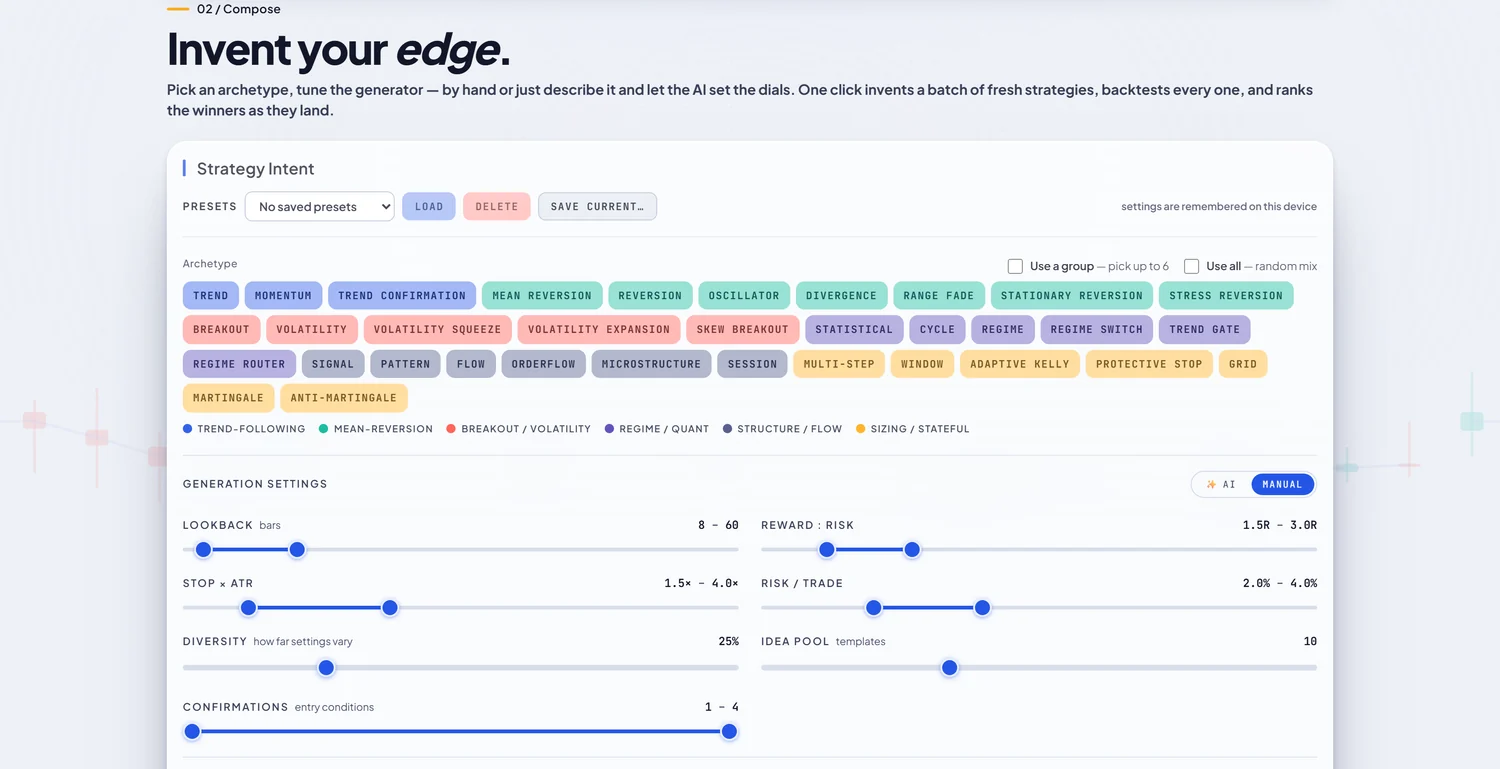
You pick from 34 strategy archetypes in 6 families (trend-following, mean-reversion, breakout and volatility, regime, structure, and sizing), choose an instrument and timeframe, and set ranges for lookback, reward-to-risk, stop distance and risk per trade. One click generates a batch of distinct strategies and backtests every one. On paid plans you can also describe the idea in plain English and let the AI set the generator’s dials for you. Free accounts compose from 4 of the 34 archetypes and set the dials by hand.
2. A visual builder, if you want to edit the logic
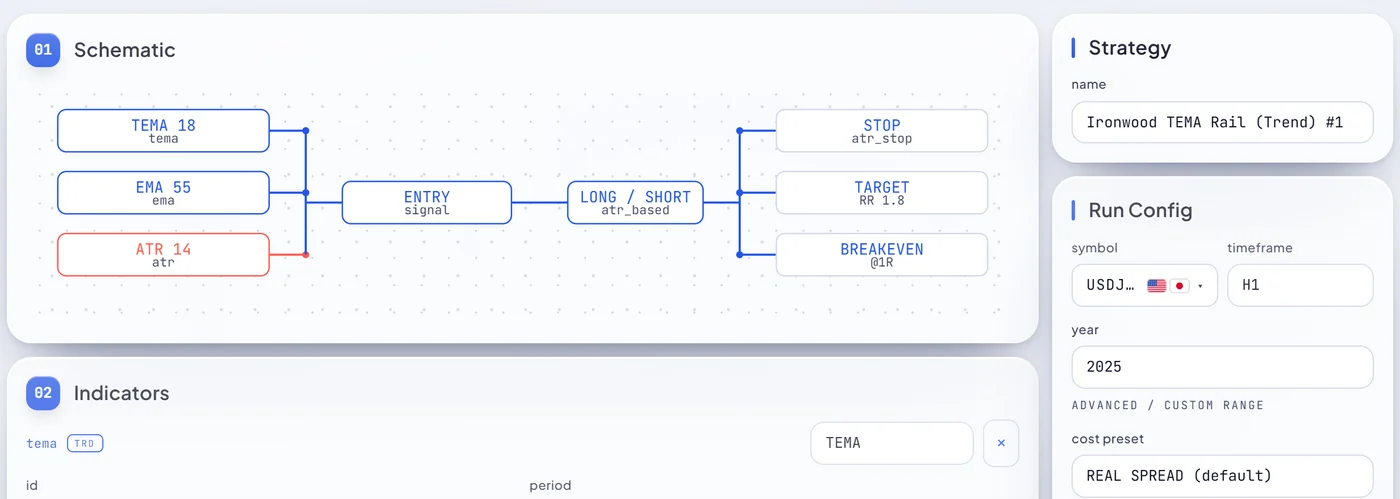
For people coming from fxDreema this is the familiar part. Every strategy is drawn as a schematic: indicators on the left, the entry signal and sizing in the middle, and stop, target and exit on the right. In the Builder you edit those blocks and their parameters, then set the symbol, timeframe, year, cost preset and risk per trade. The spec validates as you go. The difference from fxDreema is scope. You edit a strategy built from the engine’s components rather than wiring arbitrary MetaTrader logic, and editing is a paid feature.
3. Backtest on real spread, then validate every year
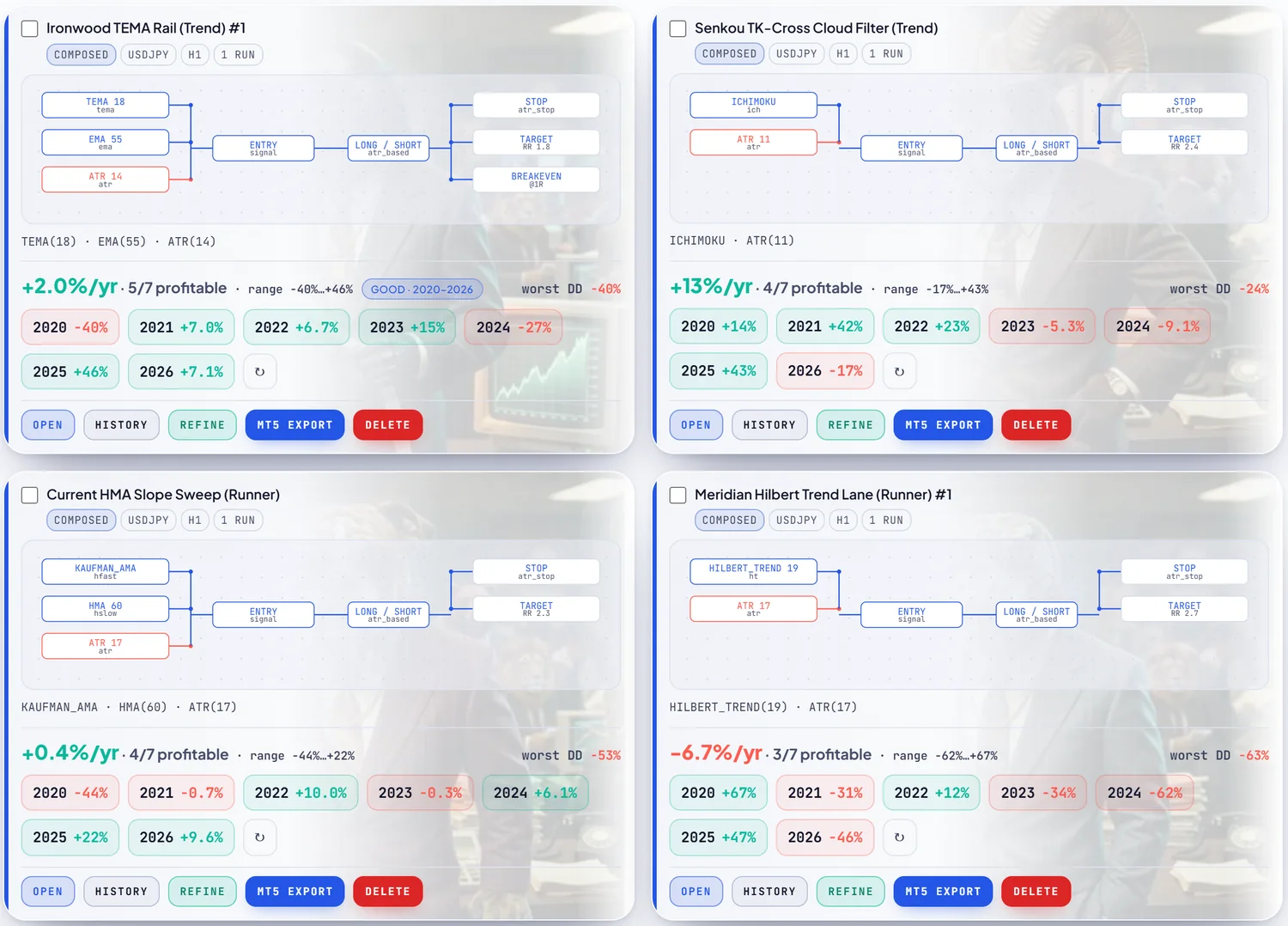
Backtests run on a purpose-built C++ engine over real market data, with spread, commission and overnight swap charged inside the simulation. The default cost preset is the recorded spread, not a flat assumption. Then validation re-runs the strategy on each year separately, back to 2018, as independent backtests, and the card keeps the losing years in red. Validating across 8 years costs 8 tokens, and validation is available on every plan including free.
4. Replay the trades before you trust them
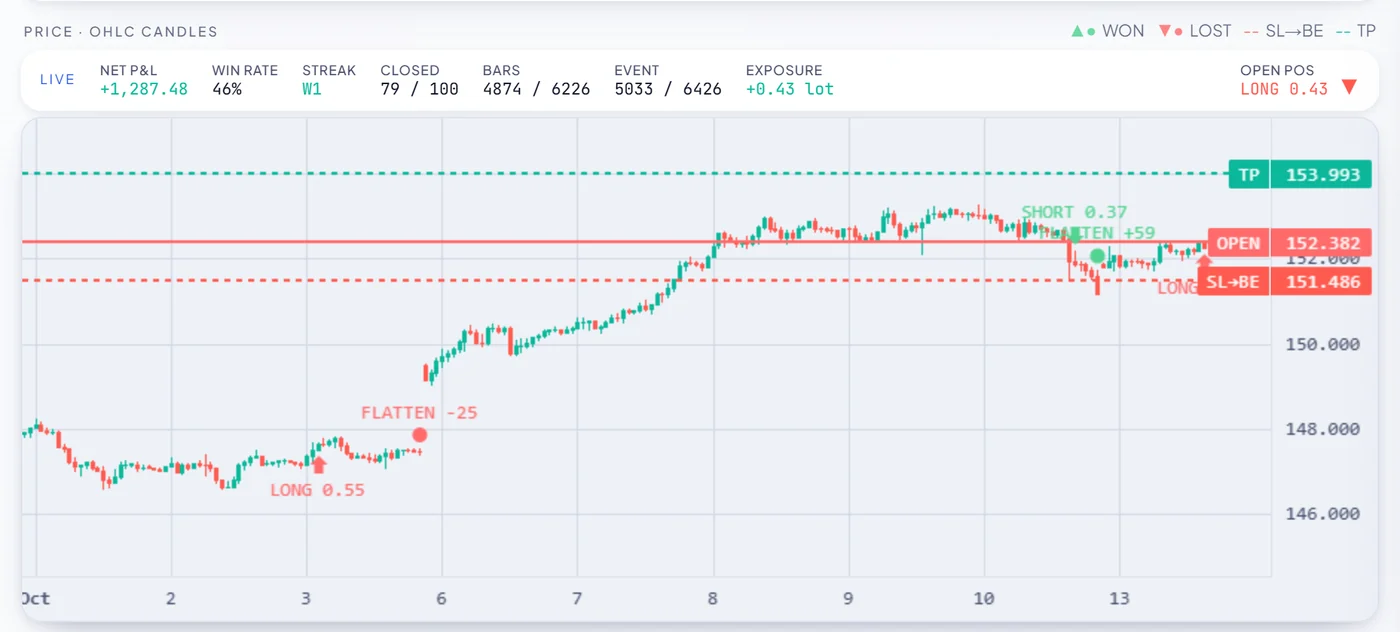
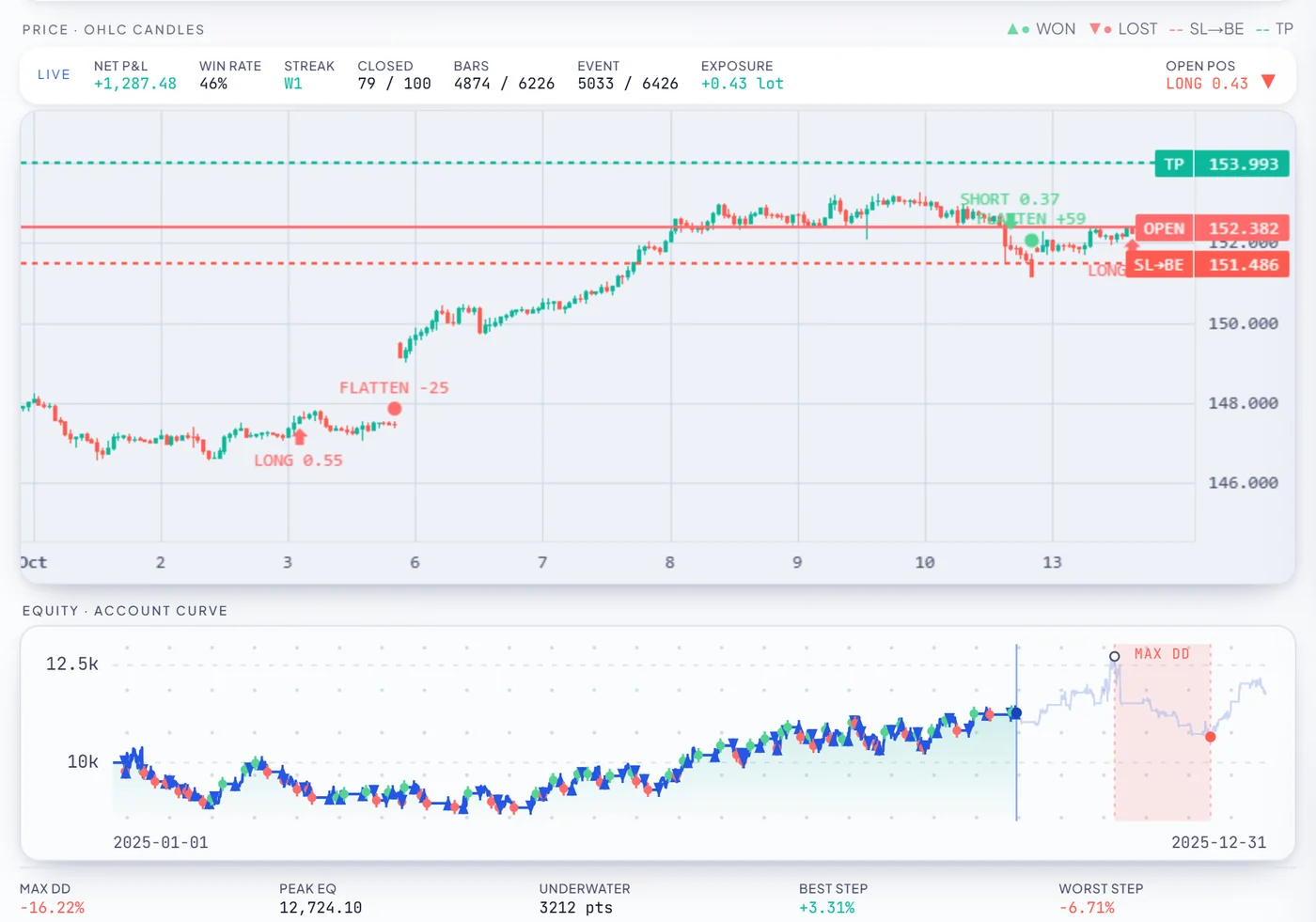
A row of yearly numbers still does not show how a strategy behaves. Trade replay plays the backtest back bar by bar on real candles, with entries, exits, stop and target lines, the equity curve and a drawdown strip underneath. You can jump straight to the worst drawdown. Replaying a run you already have costs nothing.
5. Export to MetaTrader 5
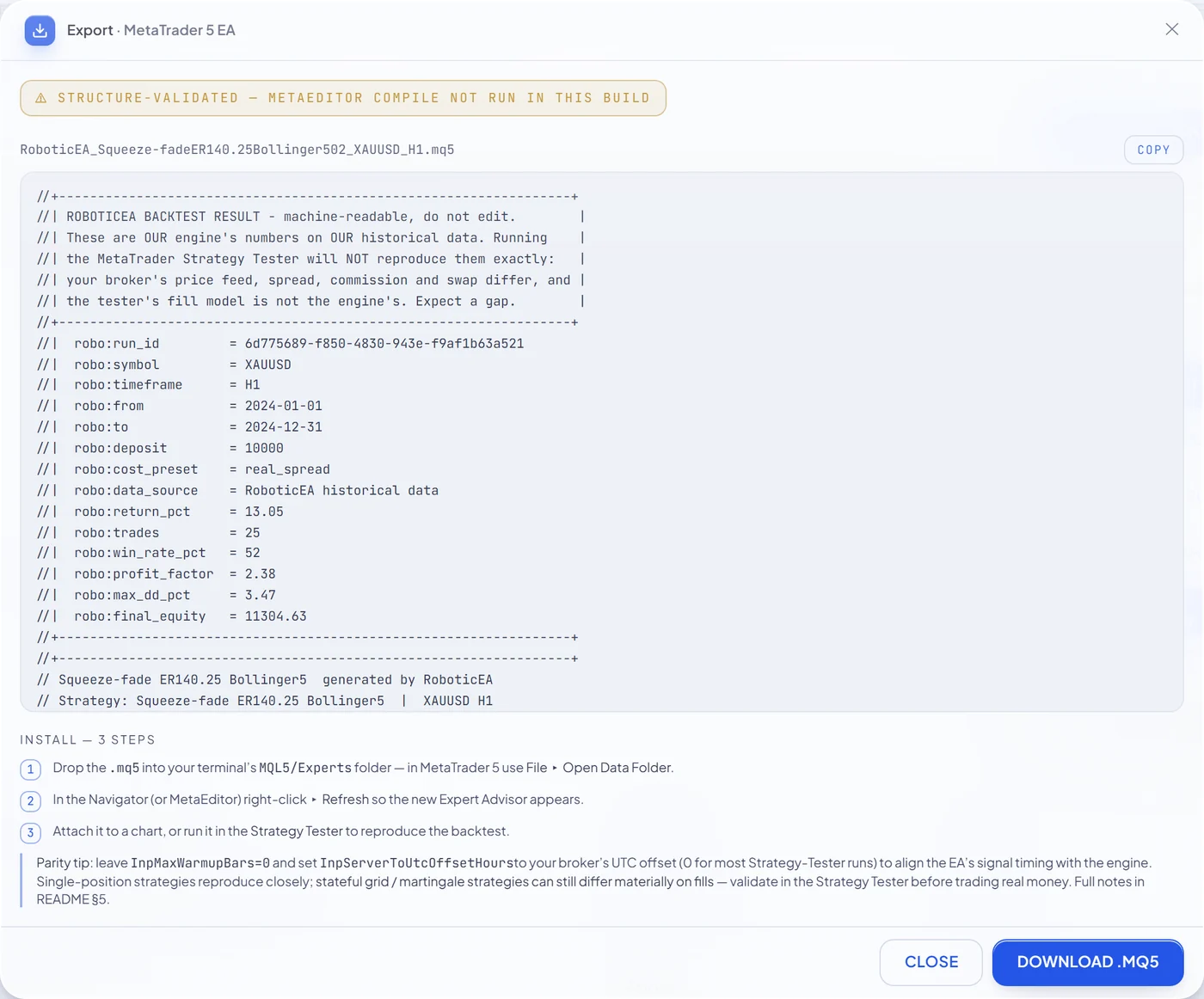
When a strategy has earned it, export produces a single .mq5 source file with named, labelled inputs. You can preview it in full before downloading, and it costs no tokens on any plan, including free. Every file passes a server-side validation gate first. The internal framework identifiers are deliberately renamed, while the header, inputs and labels stay readable. You compile it once in MetaEditor, which is one keypress, and run it on your own broker. Our engine and MetaTrader 5’s Strategy Tester were compared run for run on the same real ticks: across 97 strategies the median return gap was 6.07 percentage points (the parity study). That is close, not identical, so test the EA in MetaTrader 5 on your broker’s data too.
Where RoboticEA is the weaker choice
Being fair about it matters more than the comparison:
- MetaTrader 5 only. There is no MT4 export. If your broker or your existing EAs are on MT4, fxDreema covers you and RoboticEA does not.
- Less freedom over raw logic. fxDreema lets you wire whatever MetaTrader logic the blocks can express. RoboticEA edits strategies built from its own engine components, because everything it exports has to be something its engine has backtested.
- Free is for research, not editing. The 250-token grant is one-time. Editing in the Builder, AI compose and the remaining 30 archetypes need a paid plan. The entry plan is starter at $49 / mo with 20,000 tokens a month (pricing).
Comparison
fxDreema vs RoboticEA: side by side
| fxDreema | RoboticEA | |
|---|---|---|
| Approach | Build the logic you specify, block by block | Generate and test strategies, then refine |
| How you build | Graphical blocks wired together | Archetype generator, plain-English AI (paid), schematic Builder (paid) |
| Runs in | Browser, or a Windows program offline | Browser |
| Platforms | MetaTrader 4 and 5 | MetaTrader 5 |
| Output | .mq4 / .ex4 / .mq5 / .ex5 | Readable .mq5 source |
| Backtesting | In MetaTrader's own tester | Built-in engine, real recorded spread |
| Year-by-year validation | Not built in; its docs point to MetaTrader's Strategy Tester | Built in, on every plan |
| Trade replay | Not built in; its docs point to MetaTrader's Strategy Tester | Built in, free to replay |
| Free option | Projects up to 10 connections to export | 250 tokens once, no card, export included |
| Paid | Full plan, 1 to 12 months, one-time payments | From $49 / mo |
Read the table as two tools with different jobs, not a scorecard. fxDreema is a construction tool: it is best when the idea is already settled. RoboticEA is a research tool that ends in an EA: it is best when the open question is which idea survives costs across years. Plenty of traders will reasonably use both, researching in one and hand-building the final trade management in the other.
Test an idea across every year, free
250 tokens on signing up, no card. Generate, backtest on real spread, validate year by year, replay, and export the .mq5.
The wider field
Other fxDreema alternatives: EA Builder, EA Studio and StrategyQuant X
Three other expert advisor builders come up most often. Everything below is taken from each vendor’s own site as of November 2026. Prices change, so check before buying.
EA Builder: the closest like-for-like
EA Builder is a web-based, no-coding builder for MetaTrader 4, MetaTrader 5 and TradeStation. It says it produces commented, readable code in a single file, with money management, trading-hour filters and trade limits built in. The free version is fully working for indicators. Building expert advisors needs the paid Unlimited version, a one-time $97 for lifetime access. Good for: traders who like fxDreema’s build-it-yourself model, want readable code and prefer one payment to a renewable plan.
Expert Advisor Studio: a browser-based generator
Expert Advisor Studio, from Forex Software Ltd, is the closest in spirit to RoboticEA. It runs online, generates and tests strategies automatically against acceptance criteria, and adds robustness tools: Monte Carlo analysis, multi-market testing and an optimizer with out-of-sample testing. You can import data from your MetaTrader broker. It exports to MetaTrader 4 and 5 in native MQL. Free access lets you try the generator, but exporting needs an account; its purchase page lists a one-year account at €690 and a lifetime account at €1,490, both with a premium data feed. Good for: generator users who want MT4 as well as MT5 and a toolkit of robustness checks.
StrategyQuant X: the desktop research suite
StrategyQuant X is installed software for Windows, Mac and Linux. It uses machine learning and genetic programming to generate strategies, and can apply Monte Carlo simulations, walk-forward optimisation and walk-forward matrices automatically as part of building. It exports full source code for the target platform. There is a 14-day full-featured trial. Its pricing page lists three editions sold as a lifetime licence or 12 monthly instalments, with Starter at $1,290 one-time. Good for: systematic traders who want the deepest robustness toolkit and are happy to run it on their own machine.
| Tool | How you build | Platforms | Built-in testing | Free option |
|---|---|---|---|---|
| fxDreema | Visual blocks | MT4, MT5 | Via MetaTrader's tester | Small projects |
| EA Builder | Point-and-click, web | MT4, MT5, TradeStation | Not described on its site | Indicators only |
| EA Studio | Generator, web | MT4, MT5 | Yes, with Monte Carlo and multi-market | Try it; export needs an account |
| StrategyQuant X | Genetic programming, desktop | Full source for the target platform | Yes, with Monte Carlo and walk-forward | 14-day trial |
| RoboticEA | Generator, AI and Builder, web | MT5 | Yes, real spread, per-year validation, replay | 250 tokens, export included |
Decision
Which EA builder fits you
- You know exactly what you want built, and need MT4: stay with fxDreema, or try EA Builder.
- You want the tool to find and test ideas, in the browser, for MT5: RoboticEA or Expert Advisor Studio.
- You want the most robustness tests and do not mind desktop software: StrategyQuant X.
- Whichever you pick: ask any backtest for the spread it charged, every year shown separately, the drawdown next to the return, and a period that was not used to choose the strategy. A builder makes an EA; only that evidence tells you whether to run it.
If the last point is the one you care about, start with what 700,000 backtests say about forex robots, or see the whole RoboticEA workflow on how it works.
250
free tokens, no card
34
strategy archetypes
50
strategies per batch
0
tokens to export
FAQ
fxDreema alternative questions, answered
What is the best fxDreema alternative?
It depends on what you want next. If you want the same block-by-block control over MetaTrader 4 or 5 logic, fxDreema is hard to replace and EA Builder is the closest match. If you want the tool to test ideas for you, a generator with a built-in backtester fits better: RoboticEA (browser-based, real recorded spread, year-by-year validation, trade replay, MetaTrader 5 export), Expert Advisor Studio, or StrategyQuant X for a desktop research suite.
Is fxDreema free?
For small projects, yes. As of November 2026 its purchase page lists the free plan at up to 10 connections between blocks for a project to be exportable, 100 blocks per project and 30 projects, against 10,000 connections, 3,000 blocks and 10,000 projects on the Full plan. The Full plan is bought in 1, 3, 6, 9 or 12-month periods as one-time payments with no automatic renewal, and when it ends the account returns to free with its projects kept.
Does fxDreema work with MT4 and MT5?
Yes. fxDreema supports both MetaTrader 4 and MetaTrader 5 and outputs .mq4, .ex4, .mq5 or .ex5 files. Among the alternatives, EA Builder covers MT4, MT5 and TradeStation, Expert Advisor Studio exports to MT4 and MT5, and RoboticEA exports to MetaTrader 5 only. If you need MT4, RoboticEA is not the right fit.
fxDreema vs RoboticEA: what is the difference?
fxDreema is a construction tool: you wire graphical blocks into the exact logic you want, then test the EA in MetaTrader's own tester. RoboticEA is a research tool that ends in an EA: a generator invents strategies from archetypes, backtests each one on real recorded spread, validates it on every year separately and lets you replay the trades, and only then exports a readable .mq5 for MetaTrader 5. fxDreema gives more freedom over raw logic and supports MT4; RoboticEA puts the testing inside the tool.
Is there an EA builder with built-in backtesting?
Yes. RoboticEA, Expert Advisor Studio and StrategyQuant X all backtest inside the tool. RoboticEA charges real recorded spread by default and validates each year separately; Expert Advisor Studio adds Monte Carlo and multi-market tests; StrategyQuant X adds Monte Carlo and walk-forward analysis on the desktop. fxDreema's documentation covers testing in MetaTrader's own tester instead.
Do I need to know how to code to build an expert advisor?
No, with any of these tools. fxDreema says it needs no programming skills, only logic thinking. In RoboticEA you pick strategy archetypes and set ranges for the generator, or on paid plans describe the idea in plain English. You compile the exported .mq5 once in MetaEditor, which is one keypress.
Gold figures come from the same study artifact as our gold post (186,637 engine runs, build 0.2.0, $10,000 per run, 3% risk per trade). Parity figures come from the MT5 Strategy Tester study. Competitor details were checked on each vendor’s own site in November 2026 and may since have changed.
Keep reading
Free expert advisor for MetaTrader 5
The free tier in detail: what it includes, what it does not, and what is in the .mq5.
What 9 years of gold EA backtests show
Why real spread and year-by-year testing change which strategies look good.
MT5 Strategy Tester accuracy
Real ticks against synthetic, and how closely two backtesters agree.
Every RoboticEA feature
Compose, Builder, backtesting, validation, replay, refiner and MetaTrader 5 export.